> ## Documentation Index
> Fetch the complete documentation index at: https://help.maestra.io/llms.txt
> Use this file to discover all available pages before exploring further.
# Permission Groups: Managing User Access.
A **permission group** is a bundle of permissions that controls what someone can see and do in Maestra Platform — which pages they can open, and whether they can create, edit, or delete things on those pages.
Maestra ships with a set of **standard groups** that cover most teams out of the box. If none of them fit, you can build a [custom group](/administration/staff/how-to-create-a-security-group) with exactly the permissions you need.
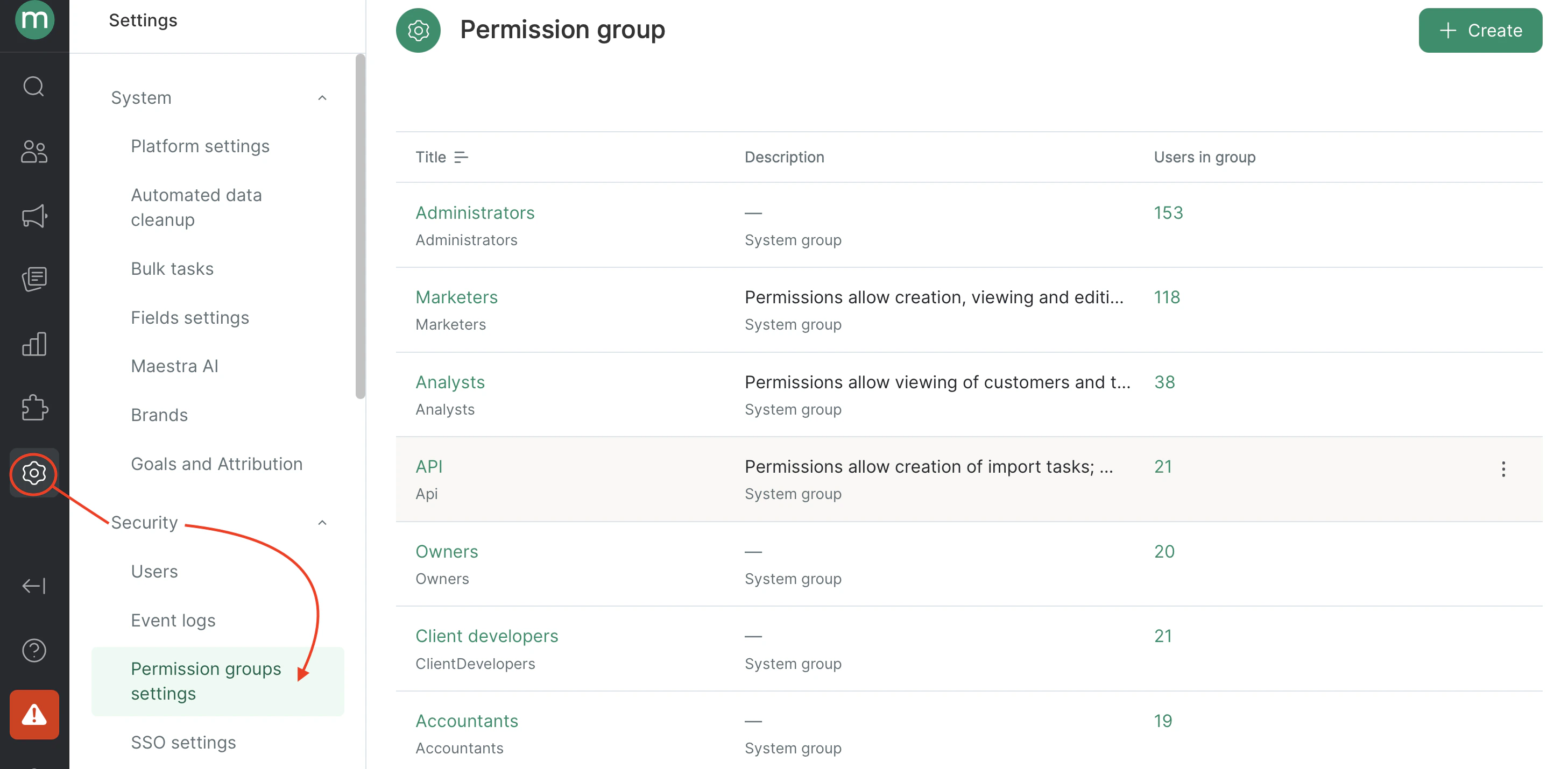
You'll find every group on your account under **Settings** → **Security** → **Permission groups Settings**.
 ## Picking the right group
Here's a quick side-by-side of the standard groups you can assign to your team. A few additional groups exist for Maestra staff only and aren't listed here.
| Group | Best for | Customers | Campaigns | Reports | Integrations | Settings | Billing |
| ----------------------------- | -------------------------- | ---------------------- | ------------------- | ------- | ------------ | -------- | ------------- |
| **Owners** | Project leads | Full | Full | Full | Full | Full | View & manage |
| **Marketers** | Campaign managers | View & edit | Full | Full | View | Partial | — |
| **Analysts** | Data analysts | View & export (no PII) | — | Full | — | — | — |
| **Client developers** | Engineers on your side | — | — | — | View | — | — |
| **Accountants** | Finance & bookkeeping | — | — | — | — | — | View |
| **Layout of email templates** | Designers & HTML coders | — | Email: build & test | — | — | — | — |
| **API** | Technical service accounts | Create & edit via API | Send via API | — | — | — | — |
Need the full permission list for a specific group? Open **Settings** → **Security** → **Permission groups Settings** and click the group name.
## Learn more about each group
### Owners
**Use it for:** Project leads on your team who need to run the whole account.
**What they can do:**
* **Customers and data** — full access to customer profiles (including PII), actions, segments, and exports.
* **Marketing tools** — campaigns (email, SMS, push, Viber), flows, personalization, promotions, promo codes, gift cards, A/B tests.
* **Products and recommendations** — manage the catalog, recommendation blocks, and algorithms.
* **Reports** — every report.
* **Settings** — manage users, permission groups, billing, and integrations.
* **Billing** — view invoice breakdowns and manage your plan.
**What they can't do:**
* Access system tasks like segment recalculations or campaign send jobs.
- Ability to manage billing
- Actions bulk import
- Add actions
- Add and edit brands
- Add bulk tasks
- Add customer
- Add orders
- Add orders for special postal address
- Add prize draw requests
- Campaign sending
- Cancel tasks
- Create, edit and delete blocks in the email constructor
- Customer token verification
- Delete SMS connections
- Delete Viber connections
- Delete customer actions
- Delete customers
- Delete issued prizes
- Delete issued prizes and return bonus points
- Discount card bulk tasks
- Edit "MMS and messengers" integrations
- Edit SMS settings
- Edit SSO settings
- Edit Viber settings
- Edit action template list
- Edit algorithm settings
- Edit auto-deletion settings
- Edit certificates list
- Edit custom fields
- Edit customer
- Edit customer actions
- Edit customer balances
- Edit customer segment
- Edit customer subscriptions
- Edit default UTM tags
- Edit email settings
- Edit email templates in new builder
- Edit email validity
- Edit external systems
- Edit flows
- Edit folders
- Edit integrations
- Edit order settings
- Edit permission groups
- Edit prize list
- Edit product categories
- Edit product list
- Edit product segment
- Edit product-based flows
- Edit products cost price
- Edit project settings
- Edit promo codes
- Edit security policy
- Edit segments
- Edit subscription topics
- Edit third-party system connectors
- Edit touchpoint list
- Edit users
- Editing global control group settings
- Export actions
- Export areas
- Export customer campaign engagement
- Export customers
- Export customers from scenario execution report
- Export dashboards
- Export event log
- Export flows
- Export integration logs
- Export messages
- Export personal data
- Export product list item history
- Export products
- Export promo codes
- Export promotions
- Force tasks
- Forwarding email attachments
- Issue prizes
- Limit campaigns to segments
- Limit staff campaign access
- MCP access
- Manage allowed IPs for API
- Manage consent for AI assistant
- Manage discount card types
- Manage personal user profile
- Manage secret keys
- Manage tasks
- Manage unsubscribe page
- Manual customer merging
- Modify model messages
- Order cancellation
- Project monitoring access
- Publish prizes
- Record user actions in activity log
- Roll back order status
- Run and edit A/B tests
- Run and edit In-apps
- Run and edit quizzes
- Send test messages
- Set order status to "received"
- Set order status to "returned"
- Unmask personal data
- View A/B tests
- View Dependencies
- View Email clicked link
- View SKU
- View Sms clicked link
- View action template list
- View actions
- View activity logs
- View all code generation requests
- View and edit "MMS and messengers" messages
- View and edit SMS messages
- View and edit Viber messages
- View and edit customer personal details
- View and edit email messages
- View and edit mobile push messages
- View and edit promotions
- View and edit web push notifications
- View and edit website personalization forms
- View and export the users list
- View and launch promotions
- View area list
- View billing details
- View brands
- View campaign manager
- View certificates
- View code pools
- View custom fields
- View customer
- View customer list
- View discount cards list
- View flows
- View generated email
- View gift cards
- View gift cards CVV
- View imports input files
- View in-apps
- View integration logs
- View integrations
- View lottery tickets
- View message template variables (tab)
- View non-system tasks
- View order details
- View permission groups
- View personal bulk tasks only
- View personal code generation requests
- View prize list
- View product recommendation algorithms
- View product-based flows
- View products
- View products cost price
- View promo codes
- View promotions
- View quizzes
- View reports
- View security policy
- View segment groups
- View touchpoint list
- View user settings
- View webhook builder
- View winners
- Webhook builder access
### Marketers
**Use it for:** Marketers, CRM managers, and email specialists running day-to-day campaigns.
**What they can do:**
* **Customers** — view and edit profiles (including PII), add new customers, export without PII, and manage segments.
* **Actions** — view, create, and assign actions to customers.
* **Campaigns** — full access to email, SMS, mobile push, web push, and Viber campaigns, plus flows and personalization.
* **Mechanics** — promotions, A/B tests, quizzes, in-apps, and product recommendations.
* **Promo codes and cards** — view and add codes (no export), manage gift cards.
* **Products** — full catalog management.
* **Reports** — every report.
* **Settings** — UTM templates, mailing topics, external systems, order settings, and custom fields.
* **Campaign and Data Monitoring** — Working with issues, warnings and the event log.
**What they can't do:**
* Delete or merge customers, or export PII.
* Delete or export actions.
* Export promo codes.
* Manage integrations, webhooks, staff, or billing.
* Manage discount cards (only discount card *types*).
- Actions bulk import
- Add actions
- Add bulk tasks
- Add customer
- Add orders
- Add orders for special postal address
- Campaign sending
- Create, edit and delete blocks in the email constructor
- Delete SMS connections
- Delete Viber connections
- Edit "MMS and messengers" integrations
- Edit action template list
- Edit algorithm settings
- Edit certificates list
- Edit custom fields
- Edit customer
- Edit customer actions
- Edit customer balances
- Edit customer segment
- Edit customer subscriptions
- Edit default UTM tags
- Edit email templates in new builder
- Edit external systems
- Edit flows
- Edit folders
- Edit order settings
- Edit prize list
- Edit product categories
- Edit product list
- Edit product segment
- Edit promo codes
- Edit segments
- Edit subscription topics
- Edit touchpoint list
- Export areas
- Export customers
- Export customers from scenario execution report
- Export dashboards
- Export flows
- Export messages
- Export products
- Export promotions
- Issue prizes
- Limit campaigns to segments
- Limit staff campaign access
- Manage discount card types
- Manage personal user profile
- Manage tasks
- Manage unsubscribe page
- Order cancellation
- Project monitoring access
- Publish prizes
- Record user actions in activity log
- Run and edit A/B tests
- Run and edit In-apps
- Run and edit quizzes
- Send test messages
- Set order status to "received"
- Set order status to "returned"
- View A/B tests
- View Dependencies
- View Email clicked link
- View SKU
- View Sms clicked link
- View action template list
- View actions
- View activity logs
- View all code generation requests
- View and edit "MMS and messengers" messages
- View and edit SMS messages
- View and edit Viber messages
- View and edit customer personal details
- View and edit email messages
- View and edit mobile push messages
- View and edit promotions
- View and edit web push notifications
- View and edit website personalization forms
- View and export the users list
- View and launch promotions
- View area list
- View brands
- View campaign manager
- View certificates
- View code pools
- View custom fields
- View customer
- View customer list
- View flows
- View generated email
- View gift cards
- View in-apps
- View integrations
- View message template variables (tab)
- View non-system tasks
- View order details
- View personal bulk tasks only
- View personal code generation requests
- View prize list
- View product recommendation algorithms
- View products
- View promo codes
- View promotions
- View quizzes
- View reports
- View segment groups
- View touchpoint list
- View user settings
- View winners
### Analysts
**Use it for:** Data analysts who need to dig into performance without touching live campaigns.
**What they can do:**
* **Customers** — view and export, no PII.
* **Actions** — view only.
* **Products** — view and export the catalog.
* **Campaigns** — view personalization mechanics, flows, in-apps, and quizzes.
* **Promotions and gift cards** — view promotions; view, edit, and export gift cards.
* **Reports** — full access.
* **Recommendations and tests** — view product recommendations and A/B tests.
**What they can't do:**
* Edit, add, or delete customers, or see PII.
* Add or export actions.
* Create or send campaigns.
* Create segments.
* Add, delete, or export promo codes.
* Access integrations, campaign settings, or staff management.
* Edit custom fields
- Export areas
- Export customers
- Export customers from scenario execution report
- Export dashboards
- Export flows
- Export messages
- Export products
- Export promotions
- Manage personal user profile
- Record user actions in activity log
- Run and edit A/B tests
- Run and edit In-apps
- Run and edit quizzes
- View A/B tests
- View Email clicked link
- View SKU
- View Sms clicked link
- View action template list
- View actions
- View and edit promotions
- View and edit website personalization forms
- View and launch promotions
- View area list
- View brands
- View campaign manager
- View custom fields
- View customer
- View customer list
- View flows
- View generated email
- View gift cards
- View in-apps
- View message template variables (tab)
- View order details
- View personal bulk tasks only
- View prize list
- View product recommendation algorithms
- View product-based flows
- View products
- View promo codes
- View promotions
- View quizzes
- View reports
- View touchpoint list
- View winners
### Client developers
**Use it for:** Engineers on your team setting up and troubleshooting integrations.
**What they can do:**
* **Integrations** — view operations and the integration list.
* **Personalization** — view and tune mechanics, including popup frequency caps.
* **Testing** — view in-apps, A/B tests, and quizzes.
* **Monitoring** — view the staff list.
**What they can't do:**
* Open customer data, campaigns, or billing.
* Edit integrations (view-only).
- Record user actions in activity log
- View A/B tests
- View Email clicked link
- View Sms clicked link
- View and edit website personalization forms
- View area list
- View campaign manager
- View generated email
- View in-apps
- View integrations
- View quizzes
- View user settings
### Accountants
**Use it for:** Finance and bookkeeping.
**What they can do:**
* View invoices and spend breakdowns.
**What they can't do:**
* Access marketing tools, customer data, or integrations.
* Change your plan or billing settings.
- View Email clicked link
- View Sms clicked link
- View billing details
- View generated email
### **Layout of email templates**
**Use it for:** Designers and HTML coders building email templates.
**What they can do:**
* **Email** — view, edit, and add email templates.
* **Testing** — send test emails.
**What they can't do:**
* Send real campaigns to customers.
- Create, edit and delete blocks in the email constructor
- Edit action template list
- Manage unsubscribe page
- Send test messages
- View Email clicked link
- View Sms clicked link
- View action template list
- View and edit email messages
- View brands
- View campaign manager
- View generated email
- View products
### API
**Use it for:** Service accounts for API interaction.
**What they can do:**
* **Customers** — create and edit customers via API.
* **Actions** — add and edit actions.
* **Orders** — create orders.
* **Campaigns** — send campaigns.
* **Segments and balances** — change customer segments, balances, and subscriptions.
* **Products** — edit the catalog.
* **Promo codes and prizes** — edit promo codes, publish and remove prizes.
* **Touchpoints** — edit.
**What they can't do:**
* Sign into the Maestra Platform UI — API requests only.
- Actions bulk import
- Add actions
- Add bulk tasks
- Add customer
- Add orders
- Add orders for special postal address
- Campaign sending
- Delete issued prizes
- Delete issued prizes and return bonus points
- Edit customer
- Edit customer actions
- Edit customer balances
- Edit customer segment
- Edit customer subscriptions
- Edit product list
- Edit product segment
- Edit promo codes
- Edit touchpoint list
- Publish prizes
- Record user actions in activity log
- View Email clicked link
- View Sms clicked link
- View area list
- View generated email
## What's next
If the standard groups don't quite fit, you have two options:
* [Extend a user's permissions](/administration/staff/how-to-extend-staff-permissions) by adding individual permissions on top of their group.
* [Create a custom permission group](/administration/staff/how-to-create-a-security-group) with the exact mix of permissions you need.
## Picking the right group
Here's a quick side-by-side of the standard groups you can assign to your team. A few additional groups exist for Maestra staff only and aren't listed here.
| Group | Best for | Customers | Campaigns | Reports | Integrations | Settings | Billing |
| ----------------------------- | -------------------------- | ---------------------- | ------------------- | ------- | ------------ | -------- | ------------- |
| **Owners** | Project leads | Full | Full | Full | Full | Full | View & manage |
| **Marketers** | Campaign managers | View & edit | Full | Full | View | Partial | — |
| **Analysts** | Data analysts | View & export (no PII) | — | Full | — | — | — |
| **Client developers** | Engineers on your side | — | — | — | View | — | — |
| **Accountants** | Finance & bookkeeping | — | — | — | — | — | View |
| **Layout of email templates** | Designers & HTML coders | — | Email: build & test | — | — | — | — |
| **API** | Technical service accounts | Create & edit via API | Send via API | — | — | — | — |
Need the full permission list for a specific group? Open **Settings** → **Security** → **Permission groups Settings** and click the group name.
## Learn more about each group
### Owners
**Use it for:** Project leads on your team who need to run the whole account.
**What they can do:**
* **Customers and data** — full access to customer profiles (including PII), actions, segments, and exports.
* **Marketing tools** — campaigns (email, SMS, push, Viber), flows, personalization, promotions, promo codes, gift cards, A/B tests.
* **Products and recommendations** — manage the catalog, recommendation blocks, and algorithms.
* **Reports** — every report.
* **Settings** — manage users, permission groups, billing, and integrations.
* **Billing** — view invoice breakdowns and manage your plan.
**What they can't do:**
* Access system tasks like segment recalculations or campaign send jobs.
- Ability to manage billing
- Actions bulk import
- Add actions
- Add and edit brands
- Add bulk tasks
- Add customer
- Add orders
- Add orders for special postal address
- Add prize draw requests
- Campaign sending
- Cancel tasks
- Create, edit and delete blocks in the email constructor
- Customer token verification
- Delete SMS connections
- Delete Viber connections
- Delete customer actions
- Delete customers
- Delete issued prizes
- Delete issued prizes and return bonus points
- Discount card bulk tasks
- Edit "MMS and messengers" integrations
- Edit SMS settings
- Edit SSO settings
- Edit Viber settings
- Edit action template list
- Edit algorithm settings
- Edit auto-deletion settings
- Edit certificates list
- Edit custom fields
- Edit customer
- Edit customer actions
- Edit customer balances
- Edit customer segment
- Edit customer subscriptions
- Edit default UTM tags
- Edit email settings
- Edit email templates in new builder
- Edit email validity
- Edit external systems
- Edit flows
- Edit folders
- Edit integrations
- Edit order settings
- Edit permission groups
- Edit prize list
- Edit product categories
- Edit product list
- Edit product segment
- Edit product-based flows
- Edit products cost price
- Edit project settings
- Edit promo codes
- Edit security policy
- Edit segments
- Edit subscription topics
- Edit third-party system connectors
- Edit touchpoint list
- Edit users
- Editing global control group settings
- Export actions
- Export areas
- Export customer campaign engagement
- Export customers
- Export customers from scenario execution report
- Export dashboards
- Export event log
- Export flows
- Export integration logs
- Export messages
- Export personal data
- Export product list item history
- Export products
- Export promo codes
- Export promotions
- Force tasks
- Forwarding email attachments
- Issue prizes
- Limit campaigns to segments
- Limit staff campaign access
- MCP access
- Manage allowed IPs for API
- Manage consent for AI assistant
- Manage discount card types
- Manage personal user profile
- Manage secret keys
- Manage tasks
- Manage unsubscribe page
- Manual customer merging
- Modify model messages
- Order cancellation
- Project monitoring access
- Publish prizes
- Record user actions in activity log
- Roll back order status
- Run and edit A/B tests
- Run and edit In-apps
- Run and edit quizzes
- Send test messages
- Set order status to "received"
- Set order status to "returned"
- Unmask personal data
- View A/B tests
- View Dependencies
- View Email clicked link
- View SKU
- View Sms clicked link
- View action template list
- View actions
- View activity logs
- View all code generation requests
- View and edit "MMS and messengers" messages
- View and edit SMS messages
- View and edit Viber messages
- View and edit customer personal details
- View and edit email messages
- View and edit mobile push messages
- View and edit promotions
- View and edit web push notifications
- View and edit website personalization forms
- View and export the users list
- View and launch promotions
- View area list
- View billing details
- View brands
- View campaign manager
- View certificates
- View code pools
- View custom fields
- View customer
- View customer list
- View discount cards list
- View flows
- View generated email
- View gift cards
- View gift cards CVV
- View imports input files
- View in-apps
- View integration logs
- View integrations
- View lottery tickets
- View message template variables (tab)
- View non-system tasks
- View order details
- View permission groups
- View personal bulk tasks only
- View personal code generation requests
- View prize list
- View product recommendation algorithms
- View product-based flows
- View products
- View products cost price
- View promo codes
- View promotions
- View quizzes
- View reports
- View security policy
- View segment groups
- View touchpoint list
- View user settings
- View webhook builder
- View winners
- Webhook builder access
### Marketers
**Use it for:** Marketers, CRM managers, and email specialists running day-to-day campaigns.
**What they can do:**
* **Customers** — view and edit profiles (including PII), add new customers, export without PII, and manage segments.
* **Actions** — view, create, and assign actions to customers.
* **Campaigns** — full access to email, SMS, mobile push, web push, and Viber campaigns, plus flows and personalization.
* **Mechanics** — promotions, A/B tests, quizzes, in-apps, and product recommendations.
* **Promo codes and cards** — view and add codes (no export), manage gift cards.
* **Products** — full catalog management.
* **Reports** — every report.
* **Settings** — UTM templates, mailing topics, external systems, order settings, and custom fields.
* **Campaign and Data Monitoring** — Working with issues, warnings and the event log.
**What they can't do:**
* Delete or merge customers, or export PII.
* Delete or export actions.
* Export promo codes.
* Manage integrations, webhooks, staff, or billing.
* Manage discount cards (only discount card *types*).
- Actions bulk import
- Add actions
- Add bulk tasks
- Add customer
- Add orders
- Add orders for special postal address
- Campaign sending
- Create, edit and delete blocks in the email constructor
- Delete SMS connections
- Delete Viber connections
- Edit "MMS and messengers" integrations
- Edit action template list
- Edit algorithm settings
- Edit certificates list
- Edit custom fields
- Edit customer
- Edit customer actions
- Edit customer balances
- Edit customer segment
- Edit customer subscriptions
- Edit default UTM tags
- Edit email templates in new builder
- Edit external systems
- Edit flows
- Edit folders
- Edit order settings
- Edit prize list
- Edit product categories
- Edit product list
- Edit product segment
- Edit promo codes
- Edit segments
- Edit subscription topics
- Edit touchpoint list
- Export areas
- Export customers
- Export customers from scenario execution report
- Export dashboards
- Export flows
- Export messages
- Export products
- Export promotions
- Issue prizes
- Limit campaigns to segments
- Limit staff campaign access
- Manage discount card types
- Manage personal user profile
- Manage tasks
- Manage unsubscribe page
- Order cancellation
- Project monitoring access
- Publish prizes
- Record user actions in activity log
- Run and edit A/B tests
- Run and edit In-apps
- Run and edit quizzes
- Send test messages
- Set order status to "received"
- Set order status to "returned"
- View A/B tests
- View Dependencies
- View Email clicked link
- View SKU
- View Sms clicked link
- View action template list
- View actions
- View activity logs
- View all code generation requests
- View and edit "MMS and messengers" messages
- View and edit SMS messages
- View and edit Viber messages
- View and edit customer personal details
- View and edit email messages
- View and edit mobile push messages
- View and edit promotions
- View and edit web push notifications
- View and edit website personalization forms
- View and export the users list
- View and launch promotions
- View area list
- View brands
- View campaign manager
- View certificates
- View code pools
- View custom fields
- View customer
- View customer list
- View flows
- View generated email
- View gift cards
- View in-apps
- View integrations
- View message template variables (tab)
- View non-system tasks
- View order details
- View personal bulk tasks only
- View personal code generation requests
- View prize list
- View product recommendation algorithms
- View products
- View promo codes
- View promotions
- View quizzes
- View reports
- View segment groups
- View touchpoint list
- View user settings
- View winners
### Analysts
**Use it for:** Data analysts who need to dig into performance without touching live campaigns.
**What they can do:**
* **Customers** — view and export, no PII.
* **Actions** — view only.
* **Products** — view and export the catalog.
* **Campaigns** — view personalization mechanics, flows, in-apps, and quizzes.
* **Promotions and gift cards** — view promotions; view, edit, and export gift cards.
* **Reports** — full access.
* **Recommendations and tests** — view product recommendations and A/B tests.
**What they can't do:**
* Edit, add, or delete customers, or see PII.
* Add or export actions.
* Create or send campaigns.
* Create segments.
* Add, delete, or export promo codes.
* Access integrations, campaign settings, or staff management.
* Edit custom fields
- Export areas
- Export customers
- Export customers from scenario execution report
- Export dashboards
- Export flows
- Export messages
- Export products
- Export promotions
- Manage personal user profile
- Record user actions in activity log
- Run and edit A/B tests
- Run and edit In-apps
- Run and edit quizzes
- View A/B tests
- View Email clicked link
- View SKU
- View Sms clicked link
- View action template list
- View actions
- View and edit promotions
- View and edit website personalization forms
- View and launch promotions
- View area list
- View brands
- View campaign manager
- View custom fields
- View customer
- View customer list
- View flows
- View generated email
- View gift cards
- View in-apps
- View message template variables (tab)
- View order details
- View personal bulk tasks only
- View prize list
- View product recommendation algorithms
- View product-based flows
- View products
- View promo codes
- View promotions
- View quizzes
- View reports
- View touchpoint list
- View winners
### Client developers
**Use it for:** Engineers on your team setting up and troubleshooting integrations.
**What they can do:**
* **Integrations** — view operations and the integration list.
* **Personalization** — view and tune mechanics, including popup frequency caps.
* **Testing** — view in-apps, A/B tests, and quizzes.
* **Monitoring** — view the staff list.
**What they can't do:**
* Open customer data, campaigns, or billing.
* Edit integrations (view-only).
- Record user actions in activity log
- View A/B tests
- View Email clicked link
- View Sms clicked link
- View and edit website personalization forms
- View area list
- View campaign manager
- View generated email
- View in-apps
- View integrations
- View quizzes
- View user settings
### Accountants
**Use it for:** Finance and bookkeeping.
**What they can do:**
* View invoices and spend breakdowns.
**What they can't do:**
* Access marketing tools, customer data, or integrations.
* Change your plan or billing settings.
- View Email clicked link
- View Sms clicked link
- View billing details
- View generated email
### **Layout of email templates**
**Use it for:** Designers and HTML coders building email templates.
**What they can do:**
* **Email** — view, edit, and add email templates.
* **Testing** — send test emails.
**What they can't do:**
* Send real campaigns to customers.
- Create, edit and delete blocks in the email constructor
- Edit action template list
- Manage unsubscribe page
- Send test messages
- View Email clicked link
- View Sms clicked link
- View action template list
- View and edit email messages
- View brands
- View campaign manager
- View generated email
- View products
### API
**Use it for:** Service accounts for API interaction.
**What they can do:**
* **Customers** — create and edit customers via API.
* **Actions** — add and edit actions.
* **Orders** — create orders.
* **Campaigns** — send campaigns.
* **Segments and balances** — change customer segments, balances, and subscriptions.
* **Products** — edit the catalog.
* **Promo codes and prizes** — edit promo codes, publish and remove prizes.
* **Touchpoints** — edit.
**What they can't do:**
* Sign into the Maestra Platform UI — API requests only.
- Actions bulk import
- Add actions
- Add bulk tasks
- Add customer
- Add orders
- Add orders for special postal address
- Campaign sending
- Delete issued prizes
- Delete issued prizes and return bonus points
- Edit customer
- Edit customer actions
- Edit customer balances
- Edit customer segment
- Edit customer subscriptions
- Edit product list
- Edit product segment
- Edit promo codes
- Edit touchpoint list
- Publish prizes
- Record user actions in activity log
- View Email clicked link
- View Sms clicked link
- View area list
- View generated email
## What's next
If the standard groups don't quite fit, you have two options:
* [Extend a user's permissions](/administration/staff/how-to-extend-staff-permissions) by adding individual permissions on top of their group.
* [Create a custom permission group](/administration/staff/how-to-create-a-security-group) with the exact mix of permissions you need.