> ## Documentation Index
> Fetch the complete documentation index at: https://help.maestra.io/llms.txt
> Use this file to discover all available pages before exploring further.
# How to Shorten Links in SMS, MMS, and Other Channels
# Why shorten links?
1. **Reduce SMS costs** Shorter URLs lower the total character count, which means fewer billable SMS segments and a cleaner, more readable message.
2. **Track clicks and performance**
# Maestra link shortener
## Benefits
* Links are shortened to **16 characters for SMS** and **up to 24 characters** for channels in the Notifications and Messengers module.
* You don’t need to integrate a tracking pixel on your website — all setup is handled directly in Maestra.
* You can shorten links to external websites, such as a survey built with Google Forms.
Once a link expires after five years, it can be reassigned to a different destination URL in any project.
## Where you can use it
* **SMS**
* **Any channel in the Notifications and Messengers module** Except for channels configured via **FastTrack** — analytics for those channels is provided by the messaging provider.
**Link shortening across different channels** ***Original link:*** \*[https://example.com/promo/12345/?utm\_source=maestra\&utm\_medium=sms\&utm\_campaign=promo08.03.2023](https://example.com/promo/12345/?utm_source=maestra\&utm_medium=sms\&utm_campaign=promo08.03.2023)\* ***SMS:*** *mst.io/=6jOi25ml* ***Notifications and Messengers channels:*** *[https://mst.io/=6jOi25ml](https://mst.io/=6jOi25ml)*
## How to enable it
* For new projects, the Maestra link shortener is enabled automatically.
* If your project uses the legacy link shortener, contact your project manager or reach out to support.
If your project includes multiple brands, enabling the new link shortener will apply it to **all brands** in the project.
## What happens when a user clicks the link
When a customer clicks a shortened link, the following variables are added:
* **Authentication ticket.** `UniversalAuthenticationCustomizableTimeTicket` is added to identify the customer. The ticket has a **maximum lifetime of three months**.
After three months, the ticket will no longer work for authentication, but the link will **continue to track clicks** until it reaches its own expiration date.
* A **m-message-click-id** variable is added to attribute the click to the customer.The link from the example above will look like this:
```
`https://example.com/promo/12345/?m-message-click-id=8caf42da-1526-468b-8f11-dba452fd1844&utm_source=maestra&utm_medium=sms&utm_campaign=promo08.03.2023&direct-crm-ticket=PGRpcmVjdENybVRpY2tldCB0eXBlPSJFbWFpbEF1dGhlbnRpY2F0aW9uVGlja2V0IiBjdXN0b21lcklkPSIyNzE2NDk1IiBwYXNzd29yZD0iIiB0ZW1wUGFzc3dvcmQ9IiIgZW1haWw9IkExOEMyODU1NjMyODc1NDQwNEY3QjBFNjkyMDhFNTM2RjAyQjlEOTgiIHNpZ25hdHVyZT0iM0E0RTQ3RjUzODNDMkMxNTgzQzk2OUQ5MTFEOURCREFBOTc2NjkxQTgzMzdDNzVFMDk1NUY0OTM3QTU1RkVBMTE5NzA0NUI3QkJFQjg5RDRGNTAxQzdDQ0E5RTM3NjYzQTdDREU4N0JBNzYwMkYxNEVEQTg3M0M5RjJBMjI4NDciIC8`
```
# How to Shorten a Link in a Campaign
1. Create a campaign in the desired channel (SMS or another channel of Notifications and messengers module).
2. Add the desired link to your SMS message. **Example:**
```
`https://example.com/promo/12345/?utm_source=maestra&utm_medium=sms&utm_campaign=promo08.03.2023`
```
Always include the `http://` or `https://` prefix. Without it, the link will not be shortened.
If the device OS doesn’t recognize the domain and the link appears non-clickable, you can prepend the protocol using a templating variable:
```
`@{set a="https://"} ${a}YourSiteDomainName.market/`
```
3. In the campaign settings, enable the **Shorten URL and track clicks** checkbox in the Link Shortening section.
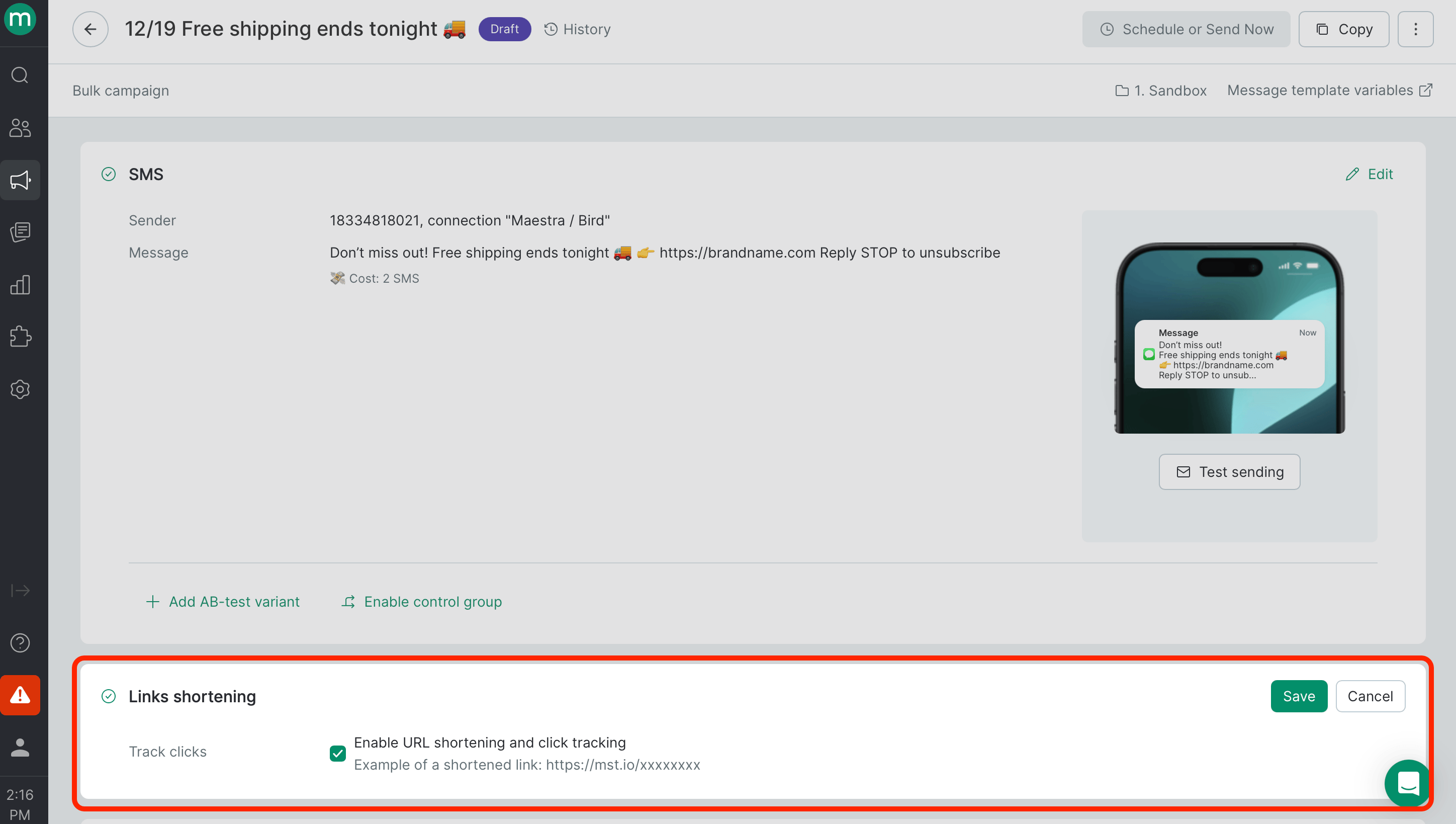 Links are shortened at send time, so the link in the template remains unchanged.
# How to Test
Use **Preview** to see how the message will appear to the recipient with the shortened link applied.
Links are shortened at send time, so the link in the template remains unchanged.
# How to Test
Use **Preview** to see how the message will appear to the recipient with the shortened link applied.
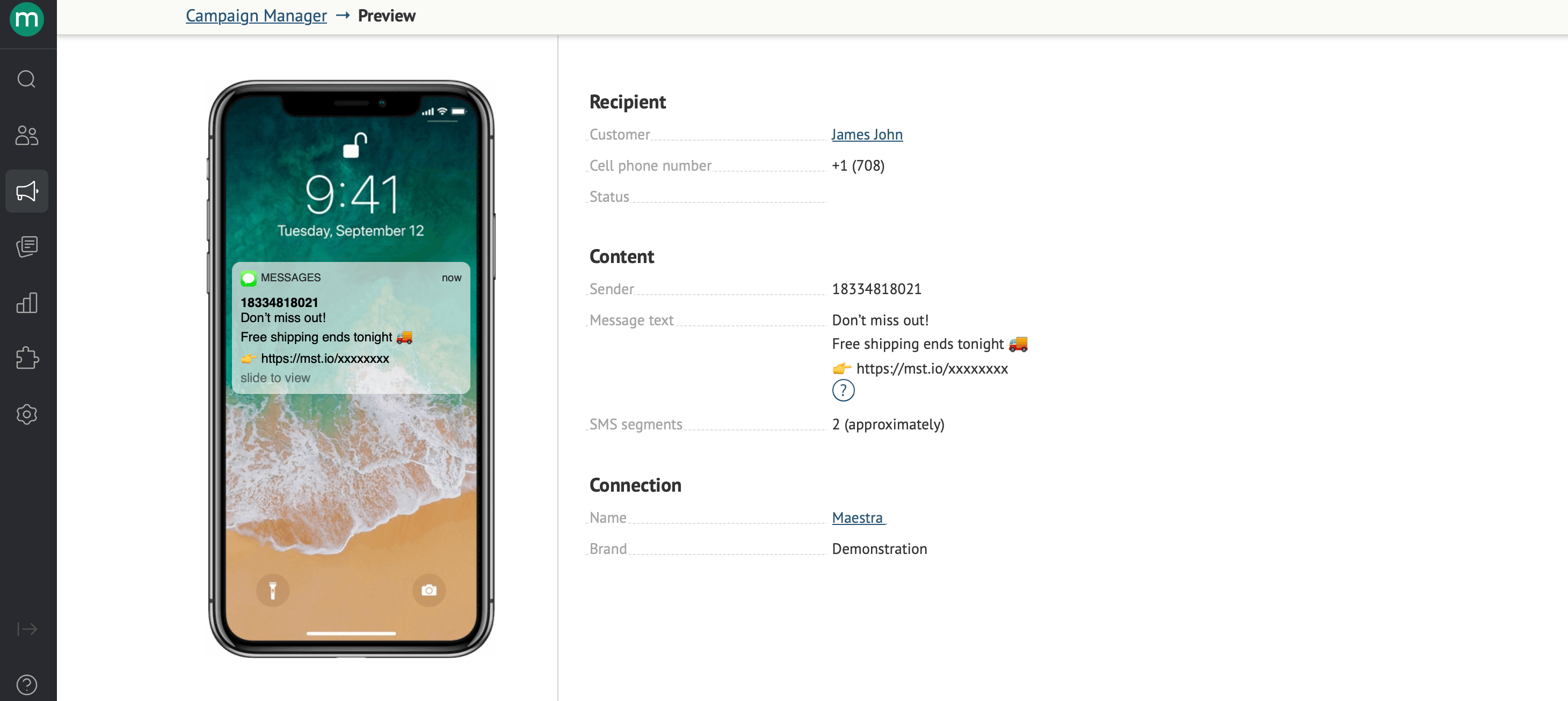 We display an estimated SMS segment count. To confirm the exact number, send a test message.
*IMPORTANT*
1. In **Preview** **mode** and when generating messages in **test mode**, link redirects and click tracking **are not active**. Instead, the link may lead to a blank page or return a 404 error.
2. To verify that redirect works correctly, send a **test message**.
3. Click tracking and click events in customer profile are recorded **only** when a live SMS campaign is sent to a real phone number.
# Personalized Links with Variables
You can personalize links using variables ([Message Template Engine](/campaigns/message-template-engine/what-is-the-message-template-engine)**)**. For example, you can insert a customer’s order tracking number into the link:
```
`https://yourdomain.com/${Order.CustomField.TrackingURL}`
```
### Authentication Tickets
An authentication ticket is automatically appended to every shortened link to identify the customer.
The Maestra link shortener uses **`UniversalAuthenticationCustomizableTimeTicket`**. The legacy link shortener uses **`PermanentAuthenticationTicket`**.
You can also use other authentication tickets listed on the **Dynamic Parameters** page: `https://projectname.maestra.io/mailing-parameters-help/Ticket` (replace `projectname` with your project name). If you manually specify a ticket, `UniversalAuthenticationCustomizableTimeTicket` and `PermanentAuthenticationTicket` \*\*\*\* will not be added automatically.
Example:
```
`https://yourdomain.com/?ticket=${Ticket.MobilePhoneAuthenticationHexTicket}`
```
Authentication via tickets may require additional implementation on your website.
We display an estimated SMS segment count. To confirm the exact number, send a test message.
*IMPORTANT*
1. In **Preview** **mode** and when generating messages in **test mode**, link redirects and click tracking **are not active**. Instead, the link may lead to a blank page or return a 404 error.
2. To verify that redirect works correctly, send a **test message**.
3. Click tracking and click events in customer profile are recorded **only** when a live SMS campaign is sent to a real phone number.
# Personalized Links with Variables
You can personalize links using variables ([Message Template Engine](/campaigns/message-template-engine/what-is-the-message-template-engine)**)**. For example, you can insert a customer’s order tracking number into the link:
```
`https://yourdomain.com/${Order.CustomField.TrackingURL}`
```
### Authentication Tickets
An authentication ticket is automatically appended to every shortened link to identify the customer.
The Maestra link shortener uses **`UniversalAuthenticationCustomizableTimeTicket`**. The legacy link shortener uses **`PermanentAuthenticationTicket`**.
You can also use other authentication tickets listed on the **Dynamic Parameters** page: `https://projectname.maestra.io/mailing-parameters-help/Ticket` (replace `projectname` with your project name). If you manually specify a ticket, `UniversalAuthenticationCustomizableTimeTicket` and `PermanentAuthenticationTicket` \*\*\*\* will not be added automatically.
Example:
```
`https://yourdomain.com/?ticket=${Ticket.MobilePhoneAuthenticationHexTicket}`
```
Authentication via tickets may require additional implementation on your website.