> ## Documentation Index
> Fetch the complete documentation index at: https://help.maestra.io/llms.txt
> Use this file to discover all available pages before exploring further.
# How to find clicks on specific links in campaigns
You can use filters **to find customers** who clicked on specific links within campaigns.
To do this, select the following filter: **Campaign clicked → Link click → Link**
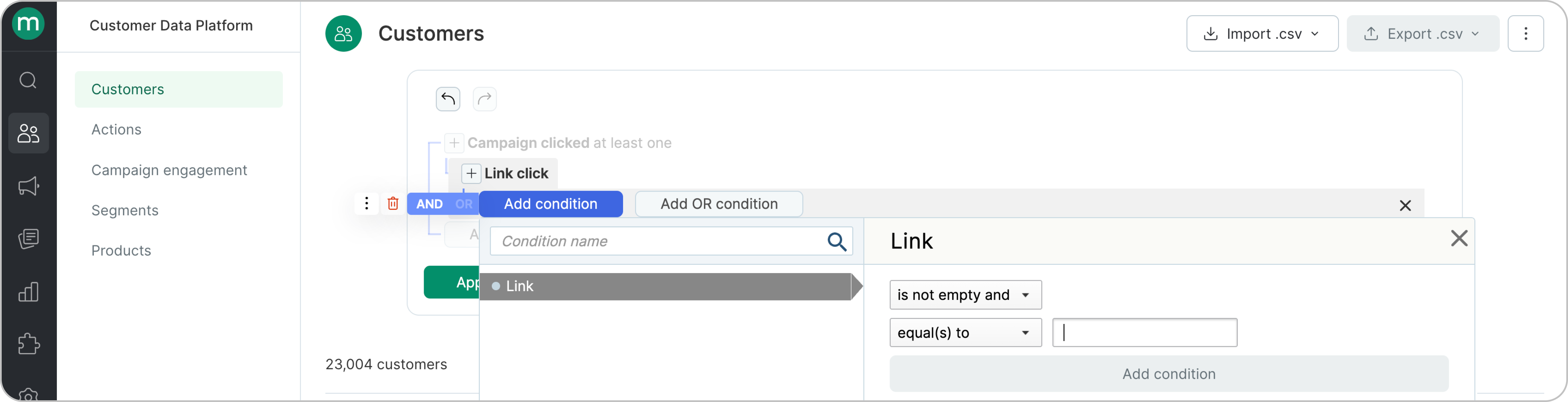 **Note:** The filter does not support links containing `?`, anchors (`#abc`), or variables.
For example, clicks on the link below cannot be found by entering the full URL in the search.
`https://demoshop.maestra.cloud/?utm_source=maestra&utm_medium=email&utm_campaign=Bulk`
**Note:** The filter does not support links containing `?`, anchors (`#abc`), or variables.
For example, clicks on the link below cannot be found by entering the full URL in the search.
`https://demoshop.maestra.cloud/?utm_source=maestra&utm_medium=email&utm_campaign=Bulk`
.png?fit=max&auto=format&n=PP-BodS5bFF14NYd&q=85&s=3dd424199d28d054e39c3fb8637ad659) In the filter, you should only enter the part of the URL **before the `?`**.
In the filter, you should only enter the part of the URL **before the `?`**.
.png?fit=max&auto=format&n=PP-BodS5bFF14NYd&q=85&s=b07f551ca8e55d92c408fb34d3b6b033) This type of filter will find clicks on the specified link **with any variables**, including `click id` and UTM tags.
It is not necessary to enter the full URL. **Partial URL search** is supported.
This type of filter will find clicks on the specified link **with any variables**, including `click id` and UTM tags.
It is not necessary to enter the full URL. **Partial URL search** is supported.
.png?fit=max&auto=format&n=PP-BodS5bFF14NYd&q=85&s=815a26d4d5c76be660790f760858720d) You can also specify **which campaigns’ clicks** you are interested in,
You can also specify **which campaigns’ clicks** you are interested in,
.png?fit=max&auto=format&n=PP-BodS5bFF14NYd&q=85&s=1eb2d0b079c65f23d892333d9a59fd59) and specify the **time period** for the clicks.
and specify the **time period** for the clicks.
.png?fit=max&auto=format&n=O0b_zyYQP7Y48mll&q=85&s=c6546bfa1933682c4f925a37717930ce) To see all **click actions** across all users, build the filter on the **Customer Data Platform → Campaign engagements** tab.
To see all **click actions** across all users, build the filter on the **Customer Data Platform → Campaign engagements** tab.
.png?fit=max&auto=format&n=O0b_zyYQP7Y48mll&q=85&s=1e637ccde4a20bb3b8a9572df81542a1)