> ## Documentation Index
> Fetch the complete documentation index at: https://help.maestra.io/llms.txt
> Use this file to discover all available pages before exploring further.
# How to Find Customers Who Interacted with a Specific Campaign
> Applies to Email, SMS, Mobile Push, and Other Channels
Let’s take a look at how customers interact with a campaign.
# How to find customers
Go to **Customer Data Platform→ Customers**.
.png?fit=max&auto=format&n=O0b_zyYQP7Y48mll&q=85&s=796bf5f5418af07d8618f208e7e303ad) We’ll use a "Welcome / Referral program" campaign as an example.
## Searching by campaign status
In the **Campaigns** filter group, select the status you need.
We’ll use a "Welcome / Referral program" campaign as an example.
## Searching by campaign status
In the **Campaigns** filter group, select the status you need.
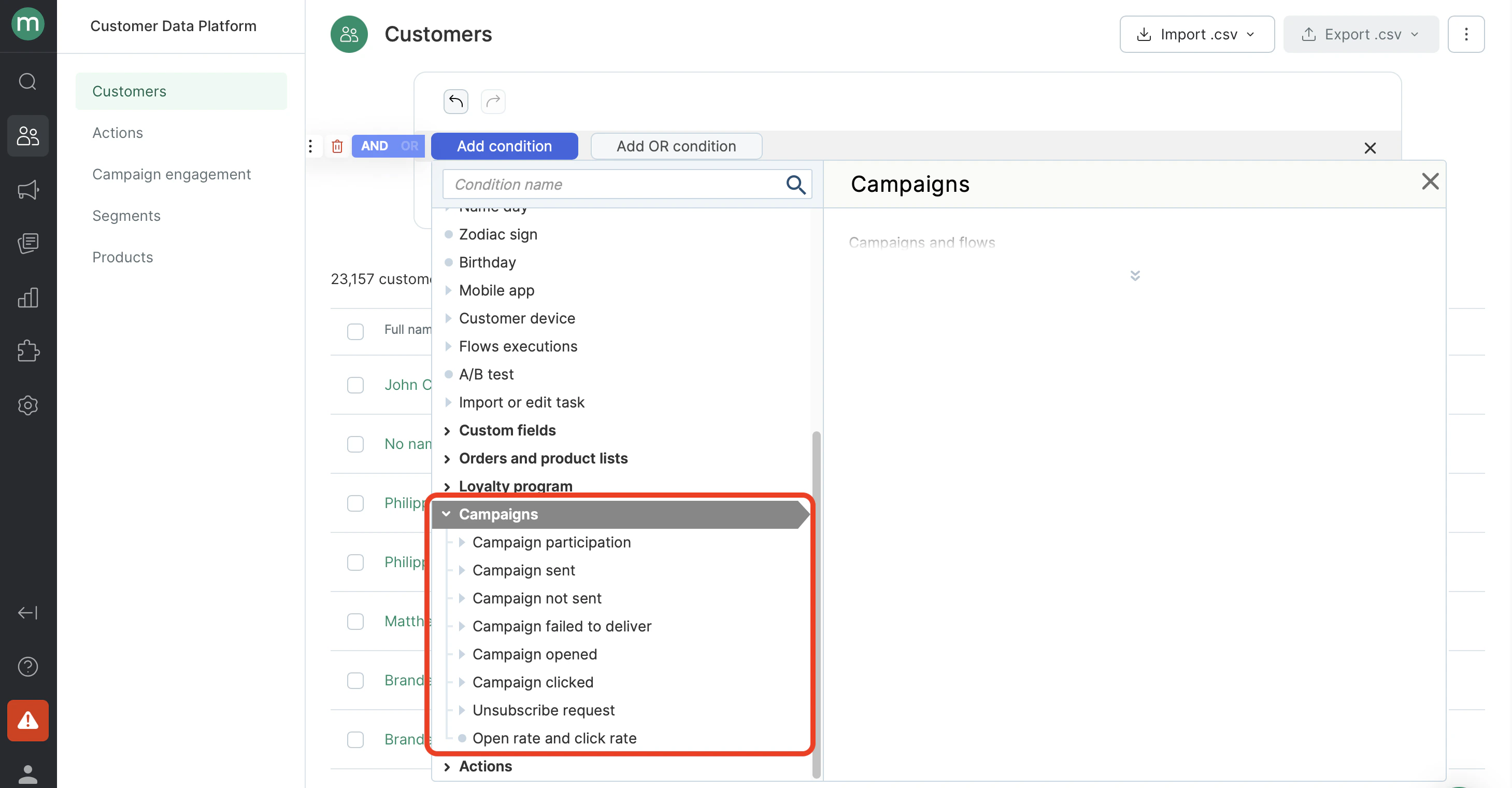 Each status has a nested filter — **Campaign** — pick the one you need.
.png?fit=max&auto=format&n=O0b_zyYQP7Y48mll&q=85&s=b4c17e53248878669be6635892540316) * Find customers who were sent the campaign.
* Find customers who were sent the campaign.
.png?fit=max&auto=format&n=O0b_zyYQP7Y48mll&q=85&s=f6c639b44924006ba10ca5b03b772b4e) * Find customers who were unable to send the campaign.
* Find customers who were unable to send the campaign.
.png?fit=max&auto=format&n=O0b_zyYQP7Y48mll&q=85&s=5bb862f1ee55d21c419319040a1235d2) * Find customers who were unable to deliver the campaign.
* Find customers who were unable to deliver the campaign.
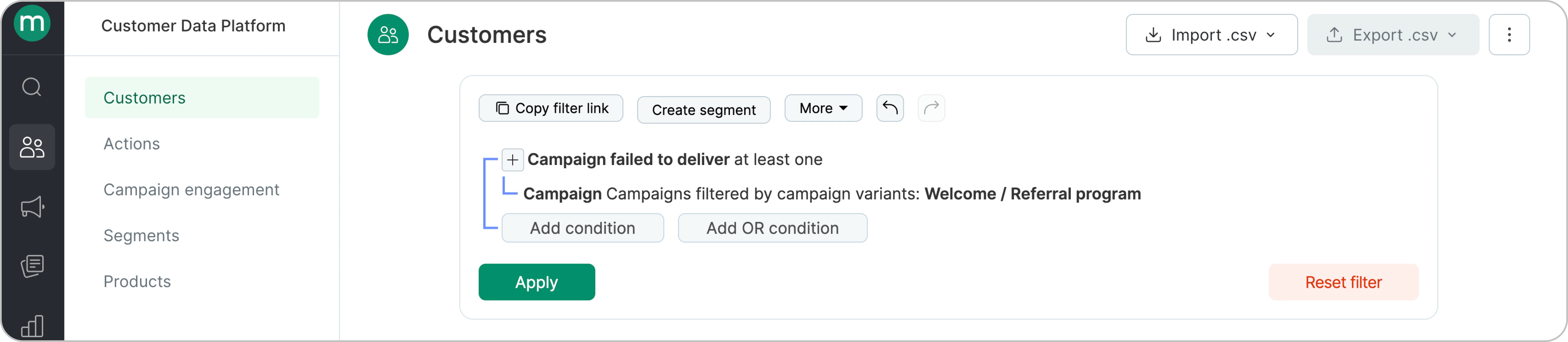 * Find customers who were in the campaign recipient list but could not receive it due to a send or delivery failure.
.png?fit=max&auto=format&n=O0b_zyYQP7Y48mll&q=85&s=6cdc5afe70f698334815d005f0ac9e5b) * Find customers who received the campaign.
There is no separate "Delivered" status. To find these customers, set the following two conditions: "The campaign was sent" and "There were no campaign delivery failures."
* Find customers who received the campaign.
There is no separate "Delivered" status. To find these customers, set the following two conditions: "The campaign was sent" and "There were no campaign delivery failures."
.png?fit=max&auto=format&n=O0b_zyYQP7Y48mll&q=85&s=ebe3eaffc77ed809b39d20b820038940) * Find customers who opened the campaign.
* Find customers who opened the campaign.
.png?fit=max&auto=format&n=O0b_zyYQP7Y48mll&q=85&s=2002ab1818809e8a7305964d44636dc1) * Find customers who didn’t open the campaign.
**Note:** Make sure to include **campaign sends** in the filter. Otherwise, customers who weren’t included in the recipient list may appear as well, since they have no opens for the selected campaign.
* Find customers who didn’t open the campaign.
**Note:** Make sure to include **campaign sends** in the filter. Otherwise, customers who weren’t included in the recipient list may appear as well, since they have no opens for the selected campaign.
.png?fit=max&auto=format&n=O0b_zyYQP7Y48mll&q=85&s=5d17810479cbc379668a64c5277a1009) * Find customers who clicked on a link in the campaign.
* Find customers who clicked on a link in the campaign.
.png?fit=max&auto=format&n=O0b_zyYQP7Y48mll&q=85&s=788b925b804e408c9645204533bd0a73) * Find customers who did not click in the campaign.
* Find customers who did not click in the campaign.
.png?fit=max&auto=format&n=O0b_zyYQP7Y48mll&q=85&s=bf215ee9624ffc0f95996c1a351e4951) * Find customers who clicked the unsubscribe link.
* Find customers who clicked the unsubscribe link.
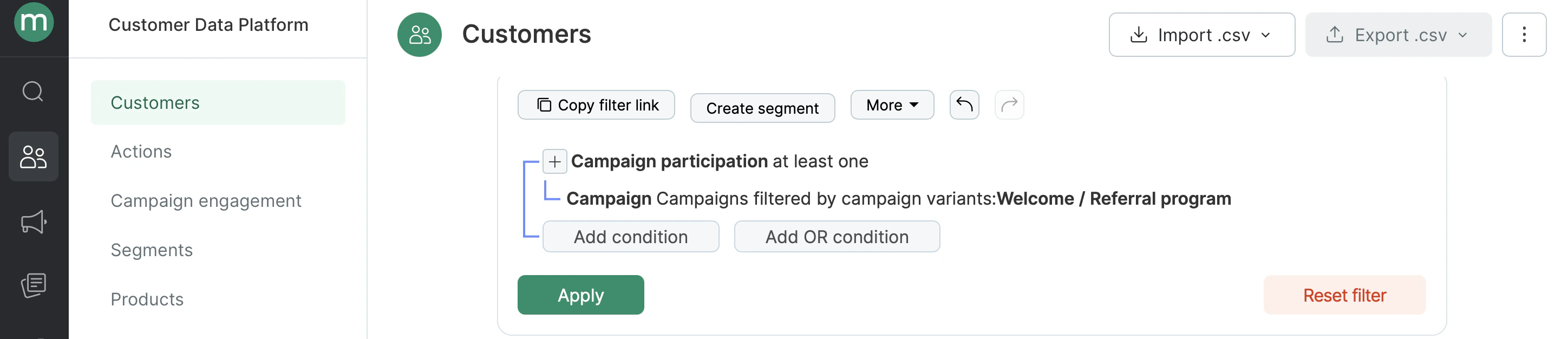
.png?fit=max&auto=format&n=O0b_zyYQP7Y48mll&q=85&s=e301212b3e20c3edf99b3adce6d90032) * Find all campaign participants — all customers who were included in the campaign’s recipient list.
* Find all campaign participants — all customers who were included in the campaign’s recipient list.
 ## Searching by interaction time
* Find customers who opened the campaign in June 2024.
## Searching by interaction time
* Find customers who opened the campaign in June 2024.
.png?fit=max&auto=format&n=O0b_zyYQP7Y48mll&q=85&s=06e406ce6db277bd77ebca07a0344ed0) * Find customers who opened the campaign within the last hour.
* Find customers who opened the campaign within the last hour.
.png?fit=max&auto=format&n=O0b_zyYQP7Y48mll&q=85&s=14fb501af969a6868a94869624a8c044) ## Searching by number of interactions
* Find customers who clicked in the campaign two or more times.
## Searching by number of interactions
* Find customers who clicked in the campaign two or more times.
.png?fit=max&auto=format&n=O0b_zyYQP7Y48mll&q=85&s=c4560332705e49b8efebf6f8596d8b56) * Find customers who were sent the campaign three times in the last six months.
* Find customers who were sent the campaign three times in the last six months.
.png?fit=max&auto=format&n=O0b_zyYQP7Y48mll&q=85&s=d6f6e8ea8a9327ce94fe7d1beeb8b288) # How to find specific Campaign engagements (e.g. clicked, sent, opened etc.)
Go to **Customer Data Platform → Campaign engagements**.
# How to find specific Campaign engagements (e.g. clicked, sent, opened etc.)
Go to **Customer Data Platform → Campaign engagements**.
.png?fit=max&auto=format&n=O0b_zyYQP7Y48mll&q=85&s=ced6954cd08aee53b195f51d53166eeb) * Find campaign sends.
* Find campaign sends.
.png?fit=max&auto=format&n=O0b_zyYQP7Y48mll&q=85&s=48edaa803b62e4be67355fdb81250c9d) * Find campaign opens.
* Find campaign opens.
.png?fit=max&auto=format&n=O0b_zyYQP7Y48mll&q=85&s=731ee4bab030c601463cd2ab4e83b4d1) * Find campaign clicks in the last 24 hours.
* Find campaign clicks in the last 24 hours.
.png?fit=max&auto=format&n=O0b_zyYQP7Y48mll&q=85&s=82a96cbafbb3919e688b974d9e8903ca)