> ## Documentation Index
> Fetch the complete documentation index at: https://help.maestra.io/llms.txt
> Use this file to discover all available pages before exploring further.
# How the order status filter works
[An order](/customers-orders-and-products/orders/what-is-an-order) consists of items.
Each item can have one of the following statuses: **placed, delivered, paid, canceled, or returned**.
A single order can contain items with **different** statuses.
For example, three items may be delivered while one is canceled.
## Which status is used for filtering
The item status is always checked based on its **latest state**.
**What this means:**
For example, an order was placed, then paid, and later delivered.
.png?fit=max&auto=format&n=wm8oEjg6bFaQwCHC&q=85&s=d568da4be54d6e4ee485427fff5fa461) To find this order, you need to build a filter for orders with the status **Delivered**, since that’s the most recent status.
“Placed” and “Paid” are historical states, and orders can’t be filtered by those statuses
To find this order, you need to build a filter for orders with the status **Delivered**, since that’s the most recent status.
“Placed” and “Paid” are historical states, and orders can’t be filtered by those statuses
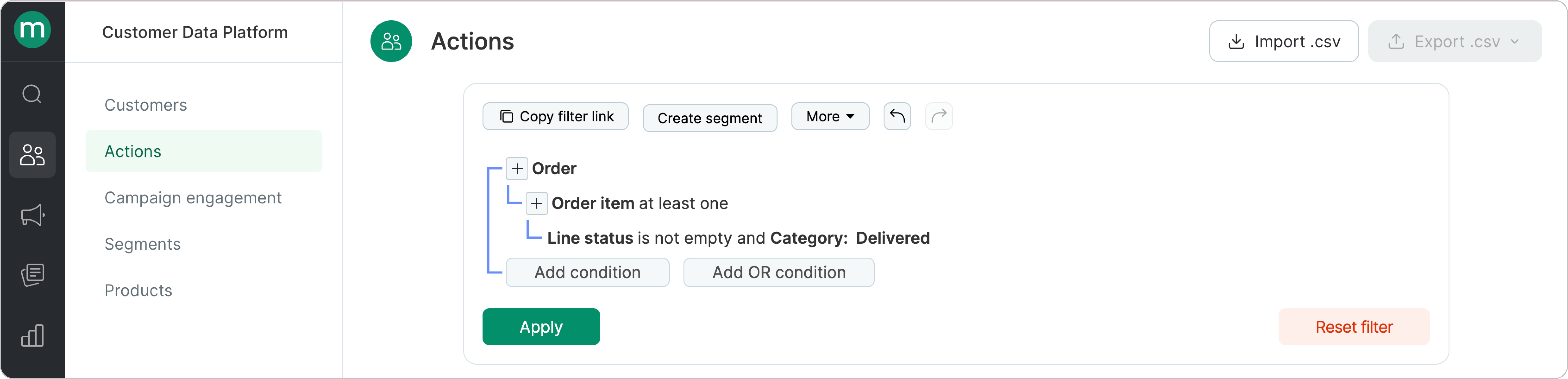 ## **Which statuses should you use in your filter?**
Start with the business goal.
In most cases, you’ll want to include “positive” order statuses — such as **Placed**, **Paid**, or **Delivered** (using the **[OR](/filters/how-to-create-filters)**[ condition](/filters/how-to-create-filters)):
## **Which statuses should you use in your filter?**
Start with the business goal.
In most cases, you’ll want to include “positive” order statuses — such as **Placed**, **Paid**, or **Delivered** (using the **[OR](/filters/how-to-create-filters)**[ condition](/filters/how-to-create-filters)):
.png?fit=max&auto=format&n=05-EV9YqA_RINTJ8&q=85&s=c32c03e6b0cd0dc0fdfae7ab29400b62) **Example 1:** how to find customers with paid orders (the most recent order status is Paid)
**Example 1:** how to find customers with paid orders (the most recent order status is Paid)
.png?fit=max&auto=format&n=05-EV9YqA_RINTJ8&q=85&s=b4249958d42f408559341d9fdf0fa5b9) **Example 2:** find customers whose orders have **all items paid** (the most recent order status is Paid)
**Example 2:** find customers whose orders have **all items paid** (the most recent order status is Paid)
.png?fit=max&auto=format&n=05-EV9YqA_RINTJ8&q=85&s=a16b311ebb1e2b3a3afc5086f05bd8f8) **Difference between the filters:**
* In the first case, orders with partially canceled or delivered items are included.
* In the second case, all the items are paid.
**Difference between the filters:**
* In the first case, orders with partially canceled or delivered items are included.
* In the second case, all the items are paid.