How to Add a Customer Manually via the User Interface
To add a customer using the Maestra interface, follow these steps:
Go to Customer Data Platform → Customers.
Click Create customer in the side menu.
Fill in the fields.
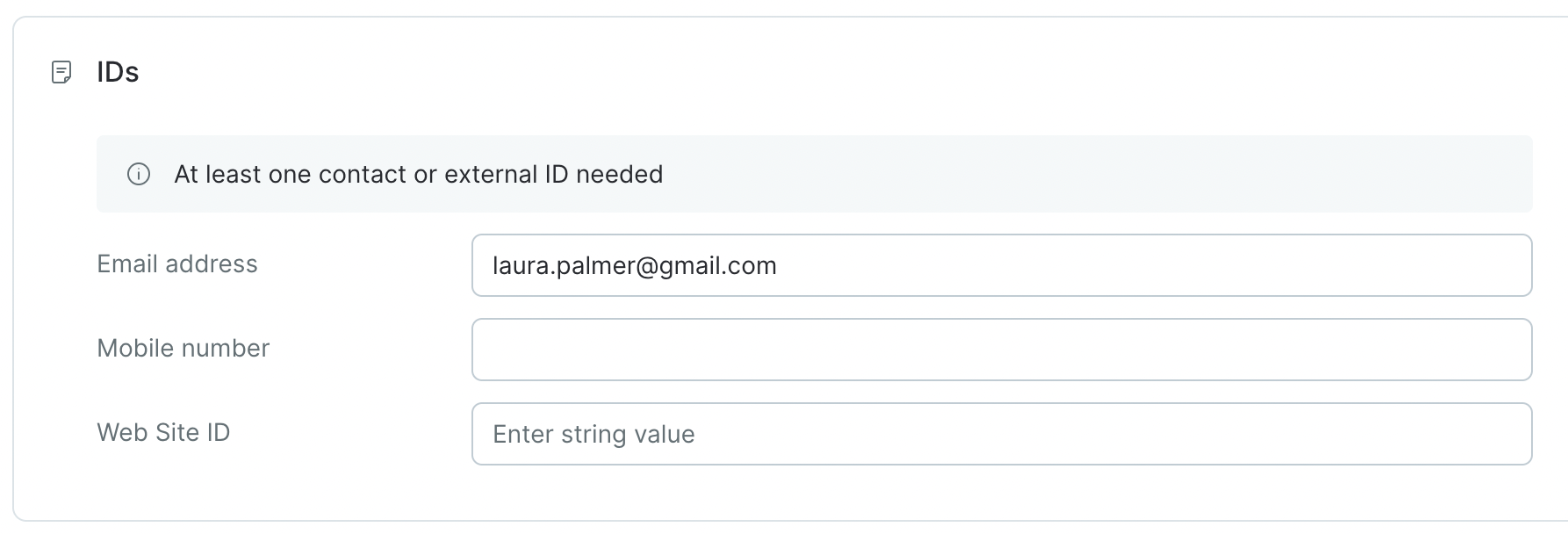
IDs: at least one contact field must be filled in:
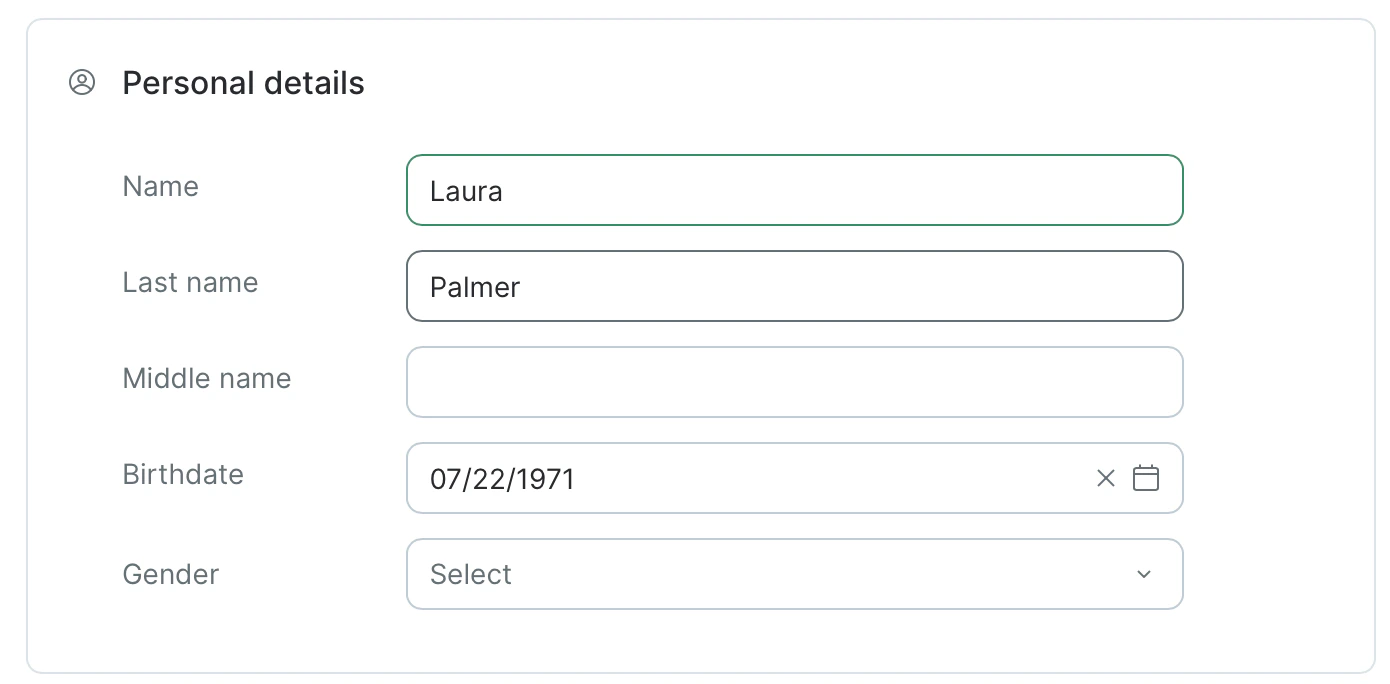
Personal details: this section is optional.
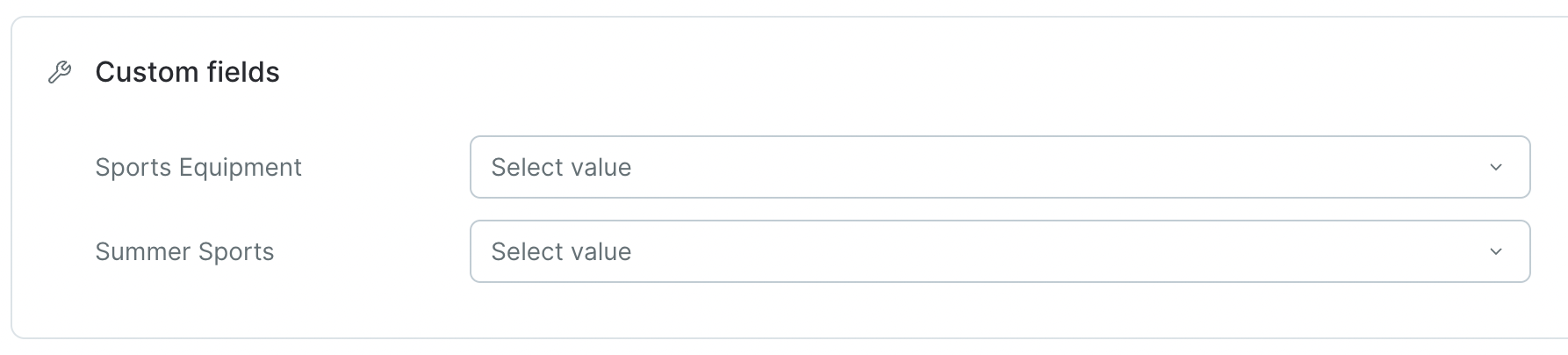
Specify your Subscription preferences. By default, the subscription fields are blank. You can select the required status from the list:Custom fields: this section is optional:
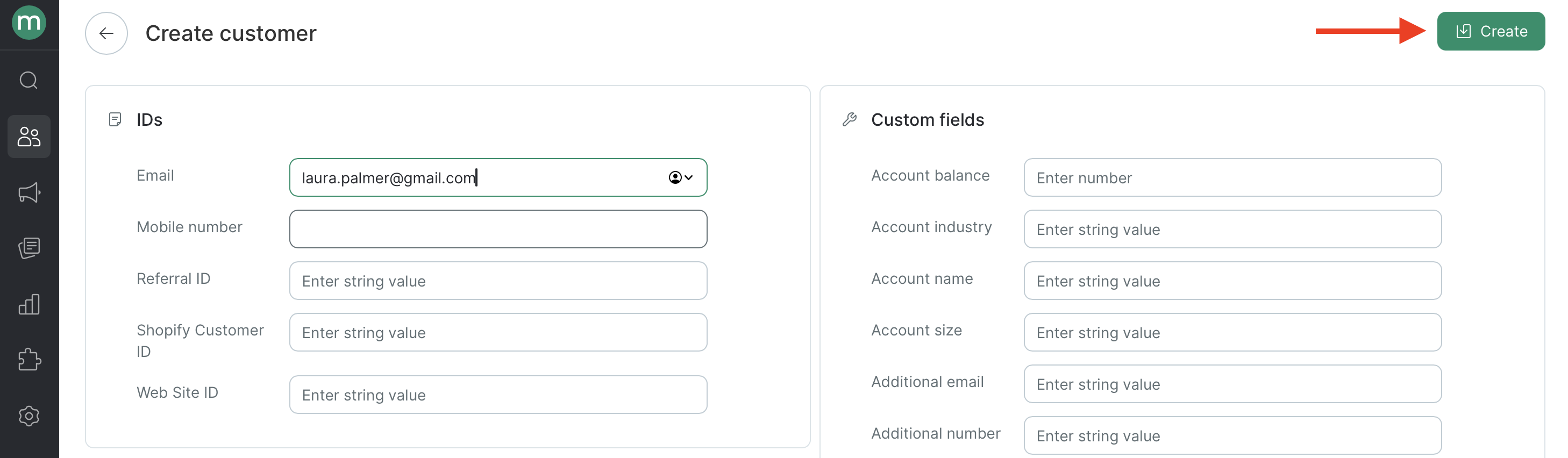
Click Create:
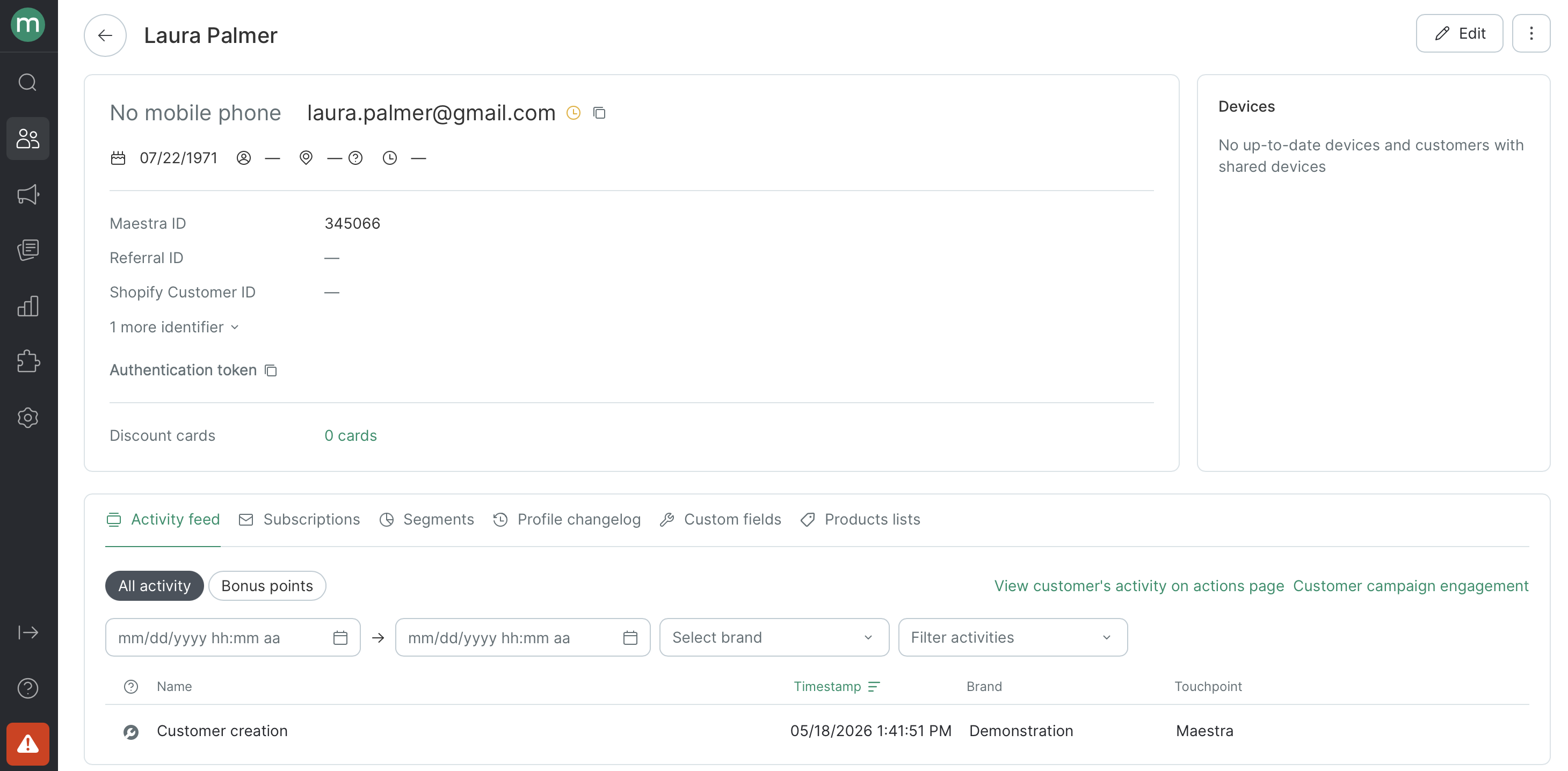
The customer account is now created:
{"docsConfig":{"theme":"mint","$schema":"https://mintlify.com/docs.json","name":"Maestra Help Center","colors":{"primary":"#5DA600","light":"#97EA2D","dark":"#7ECE17"},"logo":{"light":"https://mintcdn.com/maestraio/QFfUMd9lAUjtR59J/logo/light.svg?fit=max\u0026auto=format\u0026n=QFfUMd9lAUjtR59J\u0026q=85\u0026s=850a8fd5d63a0dc23daae21e31810aed","dark":"https://mintcdn.com/maestraio/QFfUMd9lAUjtR59J/logo/dark.svg?fit=max\u0026auto=format\u0026n=QFfUMd9lAUjtR59J\u0026q=85\u0026s=5ff6140ad7367a721f7ef4748d393b39"},"favicon":"https://mintcdn.com/maestraio/fpoGWXHzPf6Ub5Qi/favicon.png?fit=max\u0026auto=format\u0026n=fpoGWXHzPf6Ub5Qi\u0026q=85\u0026s=55f1e8d5d8d3f26ff774217a9a0ee5f7","navbar":{"links":[{"href":"https://maestra.io/blog/cases","label":"Success stories"},{"href":"https://developers.maestra.io","label":"Maestra API"}]},"footer":{"socials":{"linkedin":"https://www.linkedin.com/company/maestraplatform","facebook":"https://www.facebook.com/maestraplatform"},"links":[{"items":[{"label":"support@maestra.io","href":"mailto:support@maestra.io"}]}]},"integrations":{"intercom":{"appId":"imn5pkg4"}},"contextual":{"options":["copy","view","chatgpt","claude","perplexity","mcp","cursor","vscode"],"display":"header"},"styling":{"latex":true},"navigation":{"global":{},"pages":[]}},"deployment":{"deploymentMetadataValue":{"subdomain":"maestraio","hasAudioNarration":false,"actualSubdomain":"maestraio","customDomains":["help.maestra.io"],"gitSource":{"type":"github","owner":"maestra-io","repo":"help-maestra-docs","deployBranch":"main","contentDirectory":"","isPrivate":true,"mountPath":"","label":""},"chroma":{"liveDeploymentHistoryId":"6ad6280a4613fdc88741b16e","collectionId":"02a2a0cb-caa2-4aad-892f-c5694d915686","schemaVersion":"v3","latestBuiltDeploymentHistoryId":"6ad6280a4613fdc88741b16e"},"entitlements":{},"buildId":"6ad6280a4613fdc88741b16e","clientVersion":"0.0.3902","searchFilterCounts":[{"language":"default","tag":"Guides","count":305},{"language":"default","tag":"Customers, orders and products","count":83},{"language":"default","tag":"Campaigns","count":61},{"language":"default","tag":"Customers","count":54},{"language":"default","tag":"Flows","count":29},{"language":"default","tag":"Merging customers","count":26},{"language":"default","tag":"Personalization","count":26},{"language":"default","tag":"Loyalty","count":24},{"language":"default","tag":"Email campaigns","count":23},{"language":"default","tag":"Filters","count":23}]},"assistantConfig":{"enableAskAiButton":false,"enableStarterQuestions":false,"enableContextualStarterQuestions":false,"enableAskAiSearchBar":true},"hasChatPermissions":false,"hasWebMcpPermissions":false,"toggles":[{"name":"kill-isr","enabled":true,"variant":{"name":"disabled","enabled":false,"feature_enabled":true},"impressionData":false},{"name":"agent-mintlify-slack","enabled":true,"variant":{"name":"disabled","enabled":false,"feature_enabled":true},"impressionData":false},{"name":"editor-v7-file-tree","enabled":true,"variant":{"name":"disabled","enabled":false,"feature_enabled":true},"impressionData":false},{"name":"agent-integrations-settings","enabled":true,"variant":{"name":"disabled","enabled":false,"feature_enabled":true},"impressionData":false},{"name":"automations-pr-grouping","enabled":true,"variant":{"name":"disabled","enabled":false,"feature_enabled":true},"impressionData":false},{"name":"custom-prefix","enabled":true,"variant":{"name":"disabled","enabled":false,"feature_enabled":true},"impressionData":false},{"name":"analytics-v7","enabled":true,"variant":{"name":"disabled","enabled":false,"feature_enabled":true},"impressionData":false},{"name":"user-flows-analytics","enabled":true,"variant":{"name":"disabled","enabled":false,"feature_enabled":true},"impressionData":false},{"name":"no-publish-flow","enabled":true,"variant":{"name":"disabled","enabled":false,"feature_enabled":true},"impressionData":false},{"name":"workos-onboarding","enabled":true,"variant":{"name":"disabled","enabled":false,"feature_enabled":true},"impressionData":false},{"name":"llms-txt-v2","enabled":true,"variant":{"name":"disabled","enabled":false,"feature_enabled":true},"impressionData":false},{"name":"pause-universal-search-reconcile","enabled":true,"variant":{"name":"disabled","enabled":false,"feature_enabled":true},"impressionData":false},{"name":"snapshot-serving-live","enabled":true,"variant":{"name":"disabled","enabled":false,"feature_enabled":true},"impressionData":false},{"name":"stripTemperatureMiddleware","enabled":true,"variant":{"name":"disabled","enabled":false,"feature_enabled":true},"impressionData":false},{"name":"per-site-search-delta","enabled":true,"variant":{"name":"disabled","enabled":false,"feature_enabled":true},"impressionData":false},{"name":"support-platform-pylon-zendesk","enabled":true,"variant":{"name":"disabled","enabled":false,"feature_enabled":true},"impressionData":false},{"name":"editor-branches-v2-autocommit","enabled":true,"variant":{"name":"disabled","enabled":false,"feature_enabled":true},"impressionData":false},{"name":"editor-branches-v2","enabled":true,"variant":{"name":"disabled","enabled":false,"feature_enabled":true},"impressionData":false},{"name":"snapshot-serving","enabled":true,"variant":{"name":"disabled","enabled":false,"feature_enabled":true},"impressionData":false},{"name":"instant-rollback","enabled":true,"variant":{"name":"disabled","enabled":false,"feature_enabled":true},"impressionData":false},{"name":"granular-notifications-server","enabled":true,"variant":{"name":"disabled","enabled":false,"feature_enabled":true},"impressionData":false},{"name":"granular-notifications","enabled":true,"variant":{"name":"disabled","enabled":false,"feature_enabled":true},"impressionData":false},{"name":"editor-private-page-search","enabled":true,"variant":{"name":"disabled","enabled":false,"feature_enabled":true},"impressionData":false},{"name":"automations-fable","enabled":true,"variant":{"name":"disabled","enabled":false,"feature_enabled":true},"impressionData":false},{"name":"fixed-ai-action-pricing","enabled":true,"variant":{"name":"disabled","enabled":false,"feature_enabled":true},"impressionData":false},{"name":"automation-resolve-merge-conflict","enabled":true,"variant":{"name":"disabled","enabled":false,"feature_enabled":true},"impressionData":false},{"name":"scoped-publishing","enabled":true,"variant":{"name":"disabled","enabled":false,"feature_enabled":true},"impressionData":false},{"name":"mintql","enabled":true,"variant":{"name":"disabled","enabled":false,"feature_enabled":true},"impressionData":false},{"name":"page-level-analytics","enabled":true,"variant":{"name":"disabled","enabled":false,"feature_enabled":true},"impressionData":false},{"name":"teamspace","enabled":true,"variant":{"name":"disabled","enabled":false,"feature_enabled":true},"impressionData":false},{"name":"editor-version-history-v2","enabled":true,"variant":{"name":"disabled","enabled":false,"feature_enabled":true},"impressionData":false},{"name":"vite-origin","enabled":true,"variant":{"name":"disabled","enabled":false,"feature_enabled":true},"impressionData":false},{"name":"editor-nav-generations","enabled":true,"variant":{"name":"disabled","enabled":false,"feature_enabled":true},"impressionData":false},{"name":"workspace-projects","enabled":true,"variant":{"name":"disabled","enabled":false,"feature_enabled":true},"impressionData":false},{"name":"assistant-v5","enabled":true,"variant":{"name":"disabled","enabled":false,"feature_enabled":true},"impressionData":false},{"name":"byok-sep-25","enabled":true,"variant":{"name":"disabled","enabled":false,"feature_enabled":true},"impressionData":false},{"name":"revalidation-jwt","enabled":true,"variant":{"name":"disabled","enabled":false,"feature_enabled":true},"impressionData":false},{"name":"editor-agent-model-picker","enabled":true,"variant":{"name":"disabled","enabled":false,"feature_enabled":true},"impressionData":false},{"name":"client-snapshot-docs-config","enabled":true,"variant":{"name":"disabled","enabled":false,"feature_enabled":true},"impressionData":false},{"name":"hobby-abuse-scan","enabled":true,"variant":{"name":"disabled","enabled":false,"feature_enabled":true},"impressionData":false},{"name":"dashboard-inbox","enabled":true,"variant":{"name":"disabled","enabled":false,"feature_enabled":true},"impressionData":false}],"isAtlas":false,"googleFontsInlined":false},"customCss":[{"filePath":"custom.css","content":"details.accordion{margin-top:1.5rem;background-color:rgba(151,234,45,.08)}.dark details.accordion{background-color:rgba(255,255,255,.04)}.accordion-muted details.accordion{background-color:rgba(128,128,128,.08)}"}],"page":{"pagePath":"customers-orders-and-products/customers/add-edit-export-delete/how-to-add-a-customer-manually-via-the-user-interface","slug":"/customers-orders-and-products/customers/add-edit-export-delete/how-to-add-a-customer-manually-via-the-user-interface","pageMetadata":{"title":"How to Add a Customer Manually via the User Interface","description":null,"href":"/customers-orders-and-products/customers/add-edit-export-delete/how-to-add-a-customer-manually-via-the-user-interface"},"pageType":"default","mdx":{"mdxSource":{"compiledSource":"\"use strict\";const{Fragment:_Fragment,jsx:_jsx,jsxs:_jsxs}=arguments[0];const{useMDXComponents:_provideComponents}=arguments[0];function _createMdxContent(props){const _components={a:`a`,li:`li`,ol:`ol`,p:`p`,strong:`strong`,ul:`ul`,..._provideComponents(),...props.components},{Frame,OptimizedImage}=_components;if(!Frame)_missingMdxReference(`Frame`,true);if(!OptimizedImage)_missingMdxReference(`OptimizedImage`,true);return _jsxs(_Fragment,{children:[_jsx(_components.p,{children:`To add a customer using the Maestra interface, follow these steps:`}),`\n`,_jsxs(_components.ol,{children:[`\n`,_jsxs(_components.li,{children:[`Go to `,_jsx(_components.strong,{children:`Customer Data Platform`}),` → `,_jsx(_components.strong,{children:`Customers`}),`.`]}),`\n`]}),`\n`,_jsx(Frame,{children:_jsx(OptimizedImage,{src:`https://mintcdn.com/maestraio/FCQt5sXd0fOLTChm/images/2026-05-08-19.51.09.png?fit=max\u0026auto=format\u0026n=FCQt5sXd0fOLTChm\u0026q=85\u0026s=b1292d4df777200e4dfcfd9bdd460049`,alt:`2026 05 08 19 51 09`,\"data-og-width\":`2918`,width:`2918`,\"data-og-height\":`434`,height:`434`,\"data-path\":`images/2026-05-08-19.51.09.png`,\"data-optimize\":`true`,\"data-opv\":`3`,srcset:`https://mintcdn.com/maestraio/FCQt5sXd0fOLTChm/images/2026-05-08-19.51.09.png?w=280\u0026fit=max\u0026auto=format\u0026n=FCQt5sXd0fOLTChm\u0026q=85\u0026s=4c965d4f12bffca75ae326da3d068e32 280w, https://mintcdn.com/maestraio/FCQt5sXd0fOLTChm/images/2026-05-08-19.51.09.png?w=560\u0026fit=max\u0026auto=format\u0026n=FCQt5sXd0fOLTChm\u0026q=85\u0026s=67696c9324c3ecc57ad8f1be9b2b0c5c 560w, https://mintcdn.com/maestraio/FCQt5sXd0fOLTChm/images/2026-05-08-19.51.09.png?w=840\u0026fit=max\u0026auto=format\u0026n=FCQt5sXd0fOLTChm\u0026q=85\u0026s=9a5a4f2b17f4ef7fc981bad313d51be6 840w, https://mintcdn.com/maestraio/FCQt5sXd0fOLTChm/images/2026-05-08-19.51.09.png?w=1100\u0026fit=max\u0026auto=format\u0026n=FCQt5sXd0fOLTChm\u0026q=85\u0026s=1af2ee0227377a2b85ffd1c575175302 1100w, https://mintcdn.com/maestraio/FCQt5sXd0fOLTChm/images/2026-05-08-19.51.09.png?w=1650\u0026fit=max\u0026auto=format\u0026n=FCQt5sXd0fOLTChm\u0026q=85\u0026s=b57c0593d2d2ca676a7a09f6807ae75f 1650w, https://mintcdn.com/maestraio/FCQt5sXd0fOLTChm/images/2026-05-08-19.51.09.png?w=2500\u0026fit=max\u0026auto=format\u0026n=FCQt5sXd0fOLTChm\u0026q=85\u0026s=97508ad61ede3eb8ea80ed76f1bd670e 2500w`})}),`\n`,_jsxs(_components.ol,{start:`2`,children:[`\n`,_jsxs(_components.li,{children:[`Click `,_jsx(_components.strong,{children:`Create customer`}),` in the side menu.`]}),`\n`]}),`\n`,_jsx(Frame,{children:_jsx(OptimizedImage,{src:`https://mintcdn.com/maestraio/FCQt5sXd0fOLTChm/images/%D0%A1%D0%BD%D0%B8%D0%BC%D0%BE%D0%BA-%D1%8D%D0%BA%D1%80%D0%B0%D0%BD%D0%B0-%E2%80%94-2026-05-08-%D0%B2-19.55.55.png?fit=max\u0026auto=format\u0026n=FCQt5sXd0fOLTChm\u0026q=85\u0026s=0c46a29c0e837889dea3afb0f376b8ce`,alt:`Снимок Экрана — 2026 05 08 В 19 55 55`,\"data-og-width\":`2920`,width:`2920`,\"data-og-height\":`516`,height:`516`,\"data-path\":`images/Снимок-экрана-—-2026-05-08-в-19.55.55.png`,\"data-optimize\":`true`,\"data-opv\":`3`,srcset:`https://mintcdn.com/maestraio/FCQt5sXd0fOLTChm/images/%D0%A1%D0%BD%D0%B8%D0%BC%D0%BE%D0%BA-%D1%8D%D0%BA%D1%80%D0%B0%D0%BD%D0%B0-%E2%80%94-2026-05-08-%D0%B2-19.55.55.png?w=280\u0026fit=max\u0026auto=format\u0026n=FCQt5sXd0fOLTChm\u0026q=85\u0026s=9fa26506dee83401d8306a4c3e50b65e 280w, https://mintcdn.com/maestraio/FCQt5sXd0fOLTChm/images/%D0%A1%D0%BD%D0%B8%D0%BC%D0%BE%D0%BA-%D1%8D%D0%BA%D1%80%D0%B0%D0%BD%D0%B0-%E2%80%94-2026-05-08-%D0%B2-19.55.55.png?w=560\u0026fit=max\u0026auto=format\u0026n=FCQt5sXd0fOLTChm\u0026q=85\u0026s=ffcd781cf2d1beacfaa34a5305b551b3 560w, https://mintcdn.com/maestraio/FCQt5sXd0fOLTChm/images/%D0%A1%D0%BD%D0%B8%D0%BC%D0%BE%D0%BA-%D1%8D%D0%BA%D1%80%D0%B0%D0%BD%D0%B0-%E2%80%94-2026-05-08-%D0%B2-19.55.55.png?w=840\u0026fit=max\u0026auto=format\u0026n=FCQt5sXd0fOLTChm\u0026q=85\u0026s=7c507baf39a4a032b4fe6c0bb8ccf4fc 840w, https://mintcdn.com/maestraio/FCQt5sXd0fOLTChm/images/%D0%A1%D0%BD%D0%B8%D0%BC%D0%BE%D0%BA-%D1%8D%D0%BA%D1%80%D0%B0%D0%BD%D0%B0-%E2%80%94-2026-05-08-%D0%B2-19.55.55.png?w=1100\u0026fit=max\u0026auto=format\u0026n=FCQt5sXd0fOLTChm\u0026q=85\u0026s=e0c943efec9312028ec89b89279af11b 1100w, https://mintcdn.com/maestraio/FCQt5sXd0fOLTChm/images/%D0%A1%D0%BD%D0%B8%D0%BC%D0%BE%D0%BA-%D1%8D%D0%BA%D1%80%D0%B0%D0%BD%D0%B0-%E2%80%94-2026-05-08-%D0%B2-19.55.55.png?w=1650\u0026fit=max\u0026auto=format\u0026n=FCQt5sXd0fOLTChm\u0026q=85\u0026s=447bcc57d0830653ae8490ed197201a5 1650w, https://mintcdn.com/maestraio/FCQt5sXd0fOLTChm/images/%D0%A1%D0%BD%D0%B8%D0%BC%D0%BE%D0%BA-%D1%8D%D0%BA%D1%80%D0%B0%D0%BD%D0%B0-%E2%80%94-2026-05-08-%D0%B2-19.55.55.png?w=2500\u0026fit=max\u0026auto=format\u0026n=FCQt5sXd0fOLTChm\u0026q=85\u0026s=aa26c74b1ac35776159554c122694fed 2500w`})}),`\n`,_jsxs(_components.ol,{start:`3`,children:[`\n`,_jsx(_components.li,{children:`Fill in the fields.`}),`\n`]}),`\n`,_jsxs(_components.ul,{children:[`\n`,_jsxs(_components.li,{children:[_jsx(_components.strong,{children:`IDs`}),`: at least one contact field must be filled in:`]}),`\n`]}),`\n`,_jsx(OptimizedImage,{src:`https://mintcdn.com/maestraio/m5TAkUWmgaRT4x96/images/imported/1_custcreate.png?fit=max\u0026auto=format\u0026n=m5TAkUWmgaRT4x96\u0026q=85\u0026s=3d5852c350b443008c594ce9bcbbe285`,alt:`1_custcreate`,\"data-og-width\":`1786`,width:`1786`,\"data-og-height\":`608`,height:`608`,\"data-path\":`images/imported/1_custcreate.png`,\"data-optimize\":`true`,\"data-opv\":`3`,srcset:`https://mintcdn.com/maestraio/m5TAkUWmgaRT4x96/images/imported/1_custcreate.png?w=280\u0026fit=max\u0026auto=format\u0026n=m5TAkUWmgaRT4x96\u0026q=85\u0026s=0317aa1d106132d4154662be664a9bb0 280w, https://mintcdn.com/maestraio/m5TAkUWmgaRT4x96/images/imported/1_custcreate.png?w=560\u0026fit=max\u0026auto=format\u0026n=m5TAkUWmgaRT4x96\u0026q=85\u0026s=4ce71786309d6e142fa17a08a5c77cc4 560w, https://mintcdn.com/maestraio/m5TAkUWmgaRT4x96/images/imported/1_custcreate.png?w=840\u0026fit=max\u0026auto=format\u0026n=m5TAkUWmgaRT4x96\u0026q=85\u0026s=3d7868c83a6c11213c0af6adc217ce21 840w, https://mintcdn.com/maestraio/m5TAkUWmgaRT4x96/images/imported/1_custcreate.png?w=1100\u0026fit=max\u0026auto=format\u0026n=m5TAkUWmgaRT4x96\u0026q=85\u0026s=d9d18d668abe734da7b39b00cbc2648b 1100w, https://mintcdn.com/maestraio/m5TAkUWmgaRT4x96/images/imported/1_custcreate.png?w=1650\u0026fit=max\u0026auto=format\u0026n=m5TAkUWmgaRT4x96\u0026q=85\u0026s=6c8beb261ab7f38469fd330ed942bc06 1650w, https://mintcdn.com/maestraio/m5TAkUWmgaRT4x96/images/imported/1_custcreate.png?w=2500\u0026fit=max\u0026auto=format\u0026n=m5TAkUWmgaRT4x96\u0026q=85\u0026s=2bdd09d7dc8639c4df71d315d7bb1680 2500w`}),`\n`,_jsxs(_components.ul,{children:[`\n`,_jsxs(_components.li,{children:[_jsx(_components.strong,{children:`Personal details`}),`: this section is optional.`]}),`\n`]}),`\n`,_jsx(Frame,{children:_jsx(OptimizedImage,{src:`https://mintcdn.com/maestraio/FCQt5sXd0fOLTChm/images/2026-05-08-20.02.45.png?fit=max\u0026auto=format\u0026n=FCQt5sXd0fOLTChm\u0026q=85\u0026s=00b856214a82e4ff225c44010554ed88`,alt:`2026 05 08 20 02 45`,\"data-og-width\":`1390`,width:`1390`,\"data-og-height\":`684`,height:`684`,\"data-path\":`images/2026-05-08-20.02.45.png`,\"data-optimize\":`true`,\"data-opv\":`3`,srcset:`https://mintcdn.com/maestraio/FCQt5sXd0fOLTChm/images/2026-05-08-20.02.45.png?w=280\u0026fit=max\u0026auto=format\u0026n=FCQt5sXd0fOLTChm\u0026q=85\u0026s=dbb9279df2c2b827fbe05fa844a67ef9 280w, https://mintcdn.com/maestraio/FCQt5sXd0fOLTChm/images/2026-05-08-20.02.45.png?w=560\u0026fit=max\u0026auto=format\u0026n=FCQt5sXd0fOLTChm\u0026q=85\u0026s=9ff385c5e5572cb75e20204f4004a93d 560w, https://mintcdn.com/maestraio/FCQt5sXd0fOLTChm/images/2026-05-08-20.02.45.png?w=840\u0026fit=max\u0026auto=format\u0026n=FCQt5sXd0fOLTChm\u0026q=85\u0026s=4aa026d14ad33ed6afc375dfb38d5401 840w, https://mintcdn.com/maestraio/FCQt5sXd0fOLTChm/images/2026-05-08-20.02.45.png?w=1100\u0026fit=max\u0026auto=format\u0026n=FCQt5sXd0fOLTChm\u0026q=85\u0026s=3f2ff8b857e832239e7566d4880cbba3 1100w, https://mintcdn.com/maestraio/FCQt5sXd0fOLTChm/images/2026-05-08-20.02.45.png?w=1650\u0026fit=max\u0026auto=format\u0026n=FCQt5sXd0fOLTChm\u0026q=85\u0026s=aa320dd12020d94fe5322daa6a655022 1650w, https://mintcdn.com/maestraio/FCQt5sXd0fOLTChm/images/2026-05-08-20.02.45.png?w=2500\u0026fit=max\u0026auto=format\u0026n=FCQt5sXd0fOLTChm\u0026q=85\u0026s=49c1673a0c3931fd7b724c36e1314758 2500w`})}),`\n`,_jsxs(_components.p,{children:[`Specify your `,_jsx(_components.strong,{children:`Subscription preferences`}),`. By default, the subscription fields are blank. You can select the required status from the list:`]}),`\n`,_jsx(OptimizedImage,{src:`https://mintcdn.com/maestraio/8VE_QojSxRA8jQ0B/images/imported/3_custcreate.png?fit=max\u0026auto=format\u0026n=8VE_QojSxRA8jQ0B\u0026q=85\u0026s=969a1d8e088219944bfce4ea0e5ae1fd`,alt:`3_custcreate`,\"data-og-width\":`1784`,width:`1784`,\"data-og-height\":`498`,height:`498`,\"data-path\":`images/imported/3_custcreate.png`,\"data-optimize\":`true`,\"data-opv\":`3`,srcset:`https://mintcdn.com/maestraio/8VE_QojSxRA8jQ0B/images/imported/3_custcreate.png?w=280\u0026fit=max\u0026auto=format\u0026n=8VE_QojSxRA8jQ0B\u0026q=85\u0026s=42dff554b5571c04101052701a6a070d 280w, https://mintcdn.com/maestraio/8VE_QojSxRA8jQ0B/images/imported/3_custcreate.png?w=560\u0026fit=max\u0026auto=format\u0026n=8VE_QojSxRA8jQ0B\u0026q=85\u0026s=ee02cdd0251e9e34f766b76e5141c9f3 560w, https://mintcdn.com/maestraio/8VE_QojSxRA8jQ0B/images/imported/3_custcreate.png?w=840\u0026fit=max\u0026auto=format\u0026n=8VE_QojSxRA8jQ0B\u0026q=85\u0026s=65837a1a9b1cd39edba984f25ed9a41c 840w, https://mintcdn.com/maestraio/8VE_QojSxRA8jQ0B/images/imported/3_custcreate.png?w=1100\u0026fit=max\u0026auto=format\u0026n=8VE_QojSxRA8jQ0B\u0026q=85\u0026s=8ccc6e5d0f517436ee0a6f461b4acbdb 1100w, https://mintcdn.com/maestraio/8VE_QojSxRA8jQ0B/images/imported/3_custcreate.png?w=1650\u0026fit=max\u0026auto=format\u0026n=8VE_QojSxRA8jQ0B\u0026q=85\u0026s=d81863d50db91f251672bbeab53d6287 1650w, https://mintcdn.com/maestraio/8VE_QojSxRA8jQ0B/images/imported/3_custcreate.png?w=2500\u0026fit=max\u0026auto=format\u0026n=8VE_QojSxRA8jQ0B\u0026q=85\u0026s=ef22eeb8a7fefa177aa2a65d4b853c61 2500w`}),`\n`,_jsxs(_components.p,{children:[_jsx(_components.a,{href:`/api-integrations/how-to-create-a-custom-field`,children:`Custom fields:`}),` this section is optional:`]}),`\n`,_jsx(OptimizedImage,{src:`https://mintcdn.com/maestraio/8VE_QojSxRA8jQ0B/images/imported/4_custcreate.png?fit=max\u0026auto=format\u0026n=8VE_QojSxRA8jQ0B\u0026q=85\u0026s=c8bd1af133ef0d06ba2dfd42ec72eff9`,alt:`4_custcreate`,\"data-og-width\":`1786`,width:`1786`,\"data-og-height\":`404`,height:`404`,\"data-path\":`images/imported/4_custcreate.png`,\"data-optimize\":`true`,\"data-opv\":`3`,srcset:`https://mintcdn.com/maestraio/8VE_QojSxRA8jQ0B/images/imported/4_custcreate.png?w=280\u0026fit=max\u0026auto=format\u0026n=8VE_QojSxRA8jQ0B\u0026q=85\u0026s=99f3996d158a16692a594ca6dae18302 280w, https://mintcdn.com/maestraio/8VE_QojSxRA8jQ0B/images/imported/4_custcreate.png?w=560\u0026fit=max\u0026auto=format\u0026n=8VE_QojSxRA8jQ0B\u0026q=85\u0026s=d5dea3b4faf58b21395f86673dc79a86 560w, https://mintcdn.com/maestraio/8VE_QojSxRA8jQ0B/images/imported/4_custcreate.png?w=840\u0026fit=max\u0026auto=format\u0026n=8VE_QojSxRA8jQ0B\u0026q=85\u0026s=ec3e02ef6516a1f2f248c0ee055a7feb 840w, https://mintcdn.com/maestraio/8VE_QojSxRA8jQ0B/images/imported/4_custcreate.png?w=1100\u0026fit=max\u0026auto=format\u0026n=8VE_QojSxRA8jQ0B\u0026q=85\u0026s=4f13c2ff3dfe7badf7e0ce649415104b 1100w, https://mintcdn.com/maestraio/8VE_QojSxRA8jQ0B/images/imported/4_custcreate.png?w=1650\u0026fit=max\u0026auto=format\u0026n=8VE_QojSxRA8jQ0B\u0026q=85\u0026s=9f406dc09159e2502746defc34fb2f71 1650w, https://mintcdn.com/maestraio/8VE_QojSxRA8jQ0B/images/imported/4_custcreate.png?w=2500\u0026fit=max\u0026auto=format\u0026n=8VE_QojSxRA8jQ0B\u0026q=85\u0026s=5a48b8fadf05d54d54b13d0ab59b60b4 2500w`}),`\n`,_jsxs(_components.ol,{start:`3`,children:[`\n`,_jsxs(_components.li,{children:[`Click `,_jsx(_components.strong,{children:`Create`}),`:`]}),`\n`]}),`\n`,_jsx(Frame,{children:_jsx(OptimizedImage,{src:`https://mintcdn.com/maestraio/FCQt5sXd0fOLTChm/images/-%E2%80%94-2026-05-08--20.05.53.png?fit=max\u0026auto=format\u0026n=FCQt5sXd0fOLTChm\u0026q=85\u0026s=46b7cbe51c5672e7621c5ccdae1c8a21`,alt:`— 2026 05 08 20 05 53`,\"data-og-width\":`2916`,width:`2916`,\"data-og-height\":`852`,height:`852`,\"data-path\":`images/-—-2026-05-08--20.05.53.png`,\"data-optimize\":`true`,\"data-opv\":`3`,srcset:`https://mintcdn.com/maestraio/FCQt5sXd0fOLTChm/images/-%E2%80%94-2026-05-08--20.05.53.png?w=280\u0026fit=max\u0026auto=format\u0026n=FCQt5sXd0fOLTChm\u0026q=85\u0026s=b4b2e4c886fc06a05a38893e6553d304 280w, https://mintcdn.com/maestraio/FCQt5sXd0fOLTChm/images/-%E2%80%94-2026-05-08--20.05.53.png?w=560\u0026fit=max\u0026auto=format\u0026n=FCQt5sXd0fOLTChm\u0026q=85\u0026s=f99a012ab2357ced11413426c2d2cce0 560w, https://mintcdn.com/maestraio/FCQt5sXd0fOLTChm/images/-%E2%80%94-2026-05-08--20.05.53.png?w=840\u0026fit=max\u0026auto=format\u0026n=FCQt5sXd0fOLTChm\u0026q=85\u0026s=96047eb7c0eb51fd4aa109e69fe74b6c 840w, https://mintcdn.com/maestraio/FCQt5sXd0fOLTChm/images/-%E2%80%94-2026-05-08--20.05.53.png?w=1100\u0026fit=max\u0026auto=format\u0026n=FCQt5sXd0fOLTChm\u0026q=85\u0026s=a636136cc32ccc57b776ee2055e8ccf7 1100w, https://mintcdn.com/maestraio/FCQt5sXd0fOLTChm/images/-%E2%80%94-2026-05-08--20.05.53.png?w=1650\u0026fit=max\u0026auto=format\u0026n=FCQt5sXd0fOLTChm\u0026q=85\u0026s=6eb92500cc23d53b902f04d86310f035 1650w, https://mintcdn.com/maestraio/FCQt5sXd0fOLTChm/images/-%E2%80%94-2026-05-08--20.05.53.png?w=2500\u0026fit=max\u0026auto=format\u0026n=FCQt5sXd0fOLTChm\u0026q=85\u0026s=82cbe0b4c382ed17da59a9a6abd82477 2500w`})}),`\n`,_jsx(_components.p,{children:`The customer account is now created:`}),`\n`,_jsx(Frame,{children:_jsx(OptimizedImage,{src:`https://mintcdn.com/maestraio/lKPNgBeiIiY8g7bJ/images/2026-05-18-13.42.58.png?fit=max\u0026auto=format\u0026n=lKPNgBeiIiY8g7bJ\u0026q=85\u0026s=5c7d741c7238f4b79514274f730381f0`,alt:`2026 05 18 13 42 58`,\"data-og-width\":`2920`,width:`2920`,\"data-og-height\":`1436`,height:`1436`,\"data-path\":`images/2026-05-18-13.42.58.png`,\"data-optimize\":`true`,\"data-opv\":`3`,srcset:`https://mintcdn.com/maestraio/lKPNgBeiIiY8g7bJ/images/2026-05-18-13.42.58.png?w=280\u0026fit=max\u0026auto=format\u0026n=lKPNgBeiIiY8g7bJ\u0026q=85\u0026s=f52456c44a2601a4eed7fdc662c5363f 280w, https://mintcdn.com/maestraio/lKPNgBeiIiY8g7bJ/images/2026-05-18-13.42.58.png?w=560\u0026fit=max\u0026auto=format\u0026n=lKPNgBeiIiY8g7bJ\u0026q=85\u0026s=0e11bc369c63f56428e5dc87230a18eb 560w, https://mintcdn.com/maestraio/lKPNgBeiIiY8g7bJ/images/2026-05-18-13.42.58.png?w=840\u0026fit=max\u0026auto=format\u0026n=lKPNgBeiIiY8g7bJ\u0026q=85\u0026s=cc8953fd389027b9e91e7a7c281ea6c1 840w, https://mintcdn.com/maestraio/lKPNgBeiIiY8g7bJ/images/2026-05-18-13.42.58.png?w=1100\u0026fit=max\u0026auto=format\u0026n=lKPNgBeiIiY8g7bJ\u0026q=85\u0026s=cb78639217fd66bd8f6adb56e683018d 1100w, https://mintcdn.com/maestraio/lKPNgBeiIiY8g7bJ/images/2026-05-18-13.42.58.png?w=1650\u0026fit=max\u0026auto=format\u0026n=lKPNgBeiIiY8g7bJ\u0026q=85\u0026s=08a7aa56e0afa4854c072b1adb847e68 1650w, https://mintcdn.com/maestraio/lKPNgBeiIiY8g7bJ/images/2026-05-18-13.42.58.png?w=2500\u0026fit=max\u0026auto=format\u0026n=lKPNgBeiIiY8g7bJ\u0026q=85\u0026s=fe042813c74c14e8a1b8f3cec72b0621 2500w`})})]})}function MDXContent(props={}){const{wrapper:MDXLayout}={..._provideComponents(),...props.components};return MDXLayout?_jsx(MDXLayout,{...props,children:_jsx(_createMdxContent,{...props})}):_createMdxContent(props)}return{default:MDXContent};function _missingMdxReference(id,component){throw new Error(`Expected `+(component?`component`:`object`)+\" `\"+id+\"` to be defined: you likely forgot to import, pass, or provide it.\")}","frontmatter":{},"scope":{"config":{},"pageMetadata":{"title":"How to Add a Customer Manually via the User Interface","description":null,"href":"/customers-orders-and-products/customers/add-edit-export-delete/how-to-add-a-customer-manually-via-the-user-interface"}}},"mdxSourceWithNoJs":null},"mdxExtracts":{"tableOfContents":[],"codeExamples":{}},"jsLinks":[],"subdomain":"maestraio","siteName":"Maestra Help Center","title":"How to Add a Customer Manually via the User Interface - Maestra Help Center","navMaps":{"firstHrefInVersion":{},"firstHrefInLanguage":{}},"lastModified":"2026-10-14T16:48:14.878Z","originalFileLocation":"customers-orders-and-products/customers/add-edit-export-delete/how-to-add-a-customer-manually-via-the-user-interface.mdx"},"headHtml":"\u003cscript data-mint-head>(function(){var d=document.documentElement,p=null;if(!p){try{p=localStorage.getItem(\"isDarkMode\")}catch(e){}if(p==='true')p='dark';else if(p==='false')p='light';if(p!=='light'\u0026\u0026p!=='dark'\u0026\u0026p!=='system')p=\"system\"}var r=p==='system'?(matchMedia(\"(prefers-color-scheme: dark)\").matches?'dark':'light'):p;d.classList.remove(r==='dark'?'light':'dark');d.classList.add(r);d.setAttribute(\"data-theme-preference\",p)})();\u003c/script>\u003cmeta data-mint-head name=\"application-name\" content=\"Maestra Help Center\">\u003cmeta data-mint-head name=\"generator\" content=\"Mintlify\">\u003clink data-mint-head rel=\"icon\" type=\"image/png\" sizes=\"192x192\" href=\"/mintlify-assets/_mintlify/favicons/maestraio/pnAUqzhcyAMFIg1E/_generated/favicon/android-chrome-192x192.png\" media=\"(prefers-color-scheme: light)\">\u003clink data-mint-head rel=\"apple-touch-icon\" type=\"image/png\" sizes=\"180x180\" href=\"/mintlify-assets/_mintlify/favicons/maestraio/pnAUqzhcyAMFIg1E/_generated/favicon/apple-touch-icon.png\">\u003clink data-mint-head rel=\"icon\" type=\"image/png\" sizes=\"16x16\" href=\"/mintlify-assets/_mintlify/favicons/maestraio/pnAUqzhcyAMFIg1E/_generated/favicon/favicon-16x16.png\" media=\"(prefers-color-scheme: light)\">\u003clink data-mint-head rel=\"icon\" type=\"image/png\" sizes=\"32x32\" href=\"/mintlify-assets/_mintlify/favicons/maestraio/pnAUqzhcyAMFIg1E/_generated/favicon/favicon-32x32.png\" media=\"(prefers-color-scheme: light)\">\u003clink data-mint-head rel=\"shortcut icon\" type=\"image/x-icon\" href=\"/mintlify-assets/_mintlify/favicons/maestraio/pnAUqzhcyAMFIg1E/_generated/favicon/favicon.ico\" media=\"(prefers-color-scheme: light)\">\u003clink data-mint-head rel=\"icon\" type=\"image/png\" sizes=\"192x192\" href=\"/mintlify-assets/_mintlify/favicons/maestraio/pnAUqzhcyAMFIg1E/_generated/favicon-dark/android-chrome-192x192.png\" media=\"(prefers-color-scheme: dark)\">\u003clink data-mint-head rel=\"icon\" type=\"image/png\" sizes=\"16x16\" href=\"/mintlify-assets/_mintlify/favicons/maestraio/pnAUqzhcyAMFIg1E/_generated/favicon-dark/favicon-16x16.png\" media=\"(prefers-color-scheme: dark)\">\u003clink data-mint-head rel=\"icon\" type=\"image/png\" sizes=\"32x32\" href=\"/mintlify-assets/_mintlify/favicons/maestraio/pnAUqzhcyAMFIg1E/_generated/favicon-dark/favicon-32x32.png\" media=\"(prefers-color-scheme: dark)\">\u003clink data-mint-head rel=\"shortcut icon\" type=\"image/x-icon\" href=\"/mintlify-assets/_mintlify/favicons/maestraio/pnAUqzhcyAMFIg1E/_generated/favicon-dark/favicon.ico\" media=\"(prefers-color-scheme: dark)\">\u003cmeta data-mint-head property=\"og:title\" content=\"How to Add a Customer Manually via the User Interface - Maestra Help Center\">\u003cmeta data-mint-head property=\"og:site_name\" content=\"Maestra Help Center\">\u003cmeta data-mint-head property=\"og:url\" content=\"https://help.maestra.io/customers-orders-and-products/customers/add-edit-export-delete/how-to-add-a-customer-manually-via-the-user-interface\">\u003cmeta data-mint-head property=\"og:type\" content=\"website\">\u003cmeta data-mint-head name=\"twitter:card\" content=\"summary_large_image\">\u003cmeta data-mint-head name=\"twitter:title\" content=\"How to Add a Customer Manually via the User Interface - Maestra Help Center\">\u003cmeta data-mint-head name=\"msapplication-config\" content=\"/mintlify-assets/_mintlify/favicons/maestraio/pnAUqzhcyAMFIg1E/_generated/favicon/browserconfig.xml\">\u003cmeta data-mint-head name=\"apple-mobile-web-app-title\" content=\"Maestra Help Center\">\u003cmeta data-mint-head name=\"msapplication-TileColor\" content=\"#5DA600\">\u003clink data-mint-head rel=\"canonical\" href=\"https://help.maestra.io/customers-orders-and-products/customers/add-edit-export-delete/how-to-add-a-customer-manually-via-the-user-interface\">\u003clink data-mint-head rel=\"alternate\" type=\"application/xml\" href=\"/sitemap.xml\">\u003clink data-mint-head rel=\"alternate\" type=\"text/markdown\" href=\"/customers-orders-and-products/customers/add-edit-export-delete/how-to-add-a-customer-manually-via-the-user-interface.md\">\u003cscript data-mint-head type=\"application/ld+json\">{\"@context\":\"https://schema.org\",\"@graph\":[{\"@type\":\"Organization\",\"@id\":\"https://help.maestra.io/#organization\",\"name\":\"Maestra Help Center\",\"url\":\"https://help.maestra.io\",\"logo\":{\"@type\":\"ImageObject\",\"url\":\"https://mintcdn.com/maestraio/QFfUMd9lAUjtR59J/logo/light.svg?fit=max\u0026auto=format\u0026n=QFfUMd9lAUjtR59J\u0026q=85\u0026s=850a8fd5d63a0dc23daae21e31810aed\"}},{\"@type\":\"WebSite\",\"@id\":\"https://help.maestra.io#website\",\"name\":\"Maestra Help Center\",\"url\":\"https://help.maestra.io\",\"publisher\":{\"@id\":\"https://help.maestra.io/#organization\"}},{\"@type\":\"WebPage\",\"@id\":\"https://help.maestra.io/customers-orders-and-products/customers/add-edit-export-delete/how-to-add-a-customer-manually-via-the-user-interface#webpage\",\"url\":\"https://help.maestra.io/customers-orders-and-products/customers/add-edit-export-delete/how-to-add-a-customer-manually-via-the-user-interface\",\"name\":\"How to Add a Customer Manually via the User Interface\",\"dateModified\":\"2026-10-14T16:48:14.878Z\",\"isPartOf\":{\"@id\":\"https://help.maestra.io#website\"},\"breadcrumb\":{\"@id\":\"https://help.maestra.io/customers-orders-and-products/customers/add-edit-export-delete/how-to-add-a-customer-manually-via-the-user-interface#breadcrumb\"}},{\"@type\":\"BreadcrumbList\",\"@id\":\"https://help.maestra.io/customers-orders-and-products/customers/add-edit-export-delete/how-to-add-a-customer-manually-via-the-user-interface#breadcrumb\",\"itemListElement\":[{\"@type\":\"ListItem\",\"position\":1,\"name\":\"Customers, orders and products\",\"item\":\"https://help.maestra.io/customers-orders-and-products/customers/who-is-a-customer\"},{\"@type\":\"ListItem\",\"position\":2,\"name\":\"Customers\",\"item\":\"https://help.maestra.io/customers-orders-and-products/customers/who-is-a-customer\"},{\"@type\":\"ListItem\",\"position\":3,\"name\":\"How to Add a Customer Manually via the User Interface\",\"item\":\"https://help.maestra.io/customers-orders-and-products/customers/add-edit-export-delete/how-to-add-a-customer-manually-via-the-user-interface\"}]},{\"@type\":[\"Article\",\"TechArticle\"],\"@id\":\"https://help.maestra.io/customers-orders-and-products/customers/add-edit-export-delete/how-to-add-a-customer-manually-via-the-user-interface#article\",\"headline\":\"How to Add a Customer Manually via the User Interface\",\"name\":\"How to Add a Customer Manually via the User Interface\",\"url\":\"https://help.maestra.io/customers-orders-and-products/customers/add-edit-export-delete/how-to-add-a-customer-manually-via-the-user-interface\",\"mainEntityOfPage\":{\"@id\":\"https://help.maestra.io/customers-orders-and-products/customers/add-edit-export-delete/how-to-add-a-customer-manually-via-the-user-interface#webpage\"},\"dateModified\":\"2026-10-14T16:48:14.878Z\",\"publisher\":{\"@id\":\"https://help.maestra.io/#organization\"},\"isPartOf\":{\"@id\":\"https://help.maestra.io#website\"}}]}\u003c/script>\u003cscript data-mint-head type=\"application/ld+json\">{\"@context\":\"https://schema.org\",\"@type\":\"WebSite\",\"name\":\"Maestra Help Center\",\"creator\":{\"@type\":\"Organization\",\"name\":\"Mintlify\",\"url\":\"https://mintlify.com\"}}\u003c/script>","siteName":"Maestra Help Center","nav":{"global":{},"tabs":[{"tab":"Guides","groups":[{"group":"Customers, orders and products","pages":[{"group":"Customers","pages":[{"title":"Who is a Customer?","href":"/customers-orders-and-products/customers/who-is-a-customer"},{"title":"How Customer De-anonymization Works","href":"/customers-orders-and-products/customers/how-customer-de-anonymization-works"},{"group":"Personal data","pages":[{"title":"How Customer Names Are Validated","href":"/customers-orders-and-products/customers/personal-data/how-customer-names-are-cleaned-up"},{"title":"Field Validation Rules for Customer Data","href":"/customers-orders-and-products/customers/personal-data/field-validation-rules"},{"title":"How a Customer's Time Zone Is Determined","href":"/customers-orders-and-products/customers/personal-data/how-customer-timezone-is-determined"},{"title":"How a Customer's Gender Is Determined From Their Name","href":"/customers-orders-and-products/customers/personal-data/how-customer-gender-is-determined-from-name"}]},{"group":"Contacts and identifiers","pages":[{"group":"Email validity","pages":[{"title":"How Email Validity Is Determined","href":"/customers-orders-and-products/customers/contacts-and-identifiers/email-validity/how-email-validity-is-determined"},{"title":"How to Manage Invalid Mobile Phone Numbers and Email Addresses","href":"/customers-orders-and-products/customers/contacts-and-identifiers/email-validity/how-to-manage-invalid-mobile-phone-numbers-and-email-addresses"}]},{"group":"Blocklist","pages":[{"title":"What Is the Blocklist","href":"/customers-orders-and-products/customers/contacts-and-identifiers/blocklist/what-is-the-blocklist"},{"title":"How to add contacts to the blocklist","href":"/customers-orders-and-products/customers/contacts-and-identifiers/blocklist/how-to-add-contacts-to-the-blocklist"},{"title":"How to remove contacts from the blocklist","href":"/customers-orders-and-products/customers/contacts-and-identifiers/blocklist/how-to-remove-contacts-from-the-blocklist"},{"title":"How to Export the Blocklist","href":"/customers-orders-and-products/customers/contacts-and-identifiers/blocklist/how-to-export-the-blocklist"}]},{"group":"Contact confirmation","pages":[{"title":"Contact Confirmation Status: How It Works","href":"/customers-orders-and-products/customers/contacts-and-identifiers/contact-confirmation/contact-confirmation-status"}]},{"group":"Account access","pages":[{"title":"How to Mark a Contact as \"Gives Account Access\" or Set It as Awaiting Confirmation","href":"/customers-orders-and-products/customers/contacts-and-identifiers/account-access/how-to-mark-a-contact-as-giving-account-access"},{"title":"How Contacts With the \"Gives Account Access\" Flag Behave","description":null,"href":"/customers-orders-and-products/customers/contacts-and-identifiers/account-access/account-access-contact-behavior"}]}]},{"group":"Add, edit, export, delete","pages":[{"title":"How to Add a Customer Manually via the User Interface","href":"/customers-orders-and-products/customers/add-edit-export-delete/how-to-add-a-customer-manually-via-the-user-interface"},{"title":"How to Edit Customer Data in Their Profile","description":null,"href":"/customers-orders-and-products/customers/add-edit-export-delete/how-to-edit-customer-data-in-the-profile"},{"group":"Bulk import and edit","pages":[{"title":"How to Bulk Import Customers from a File?","href":"/customers-orders-and-products/customers/add-edit-export-delete/bulk-import-and-edit/how-to-bulk-import-customers-from-a-file"},{"title":"How to edit existing customers via import","href":"/customers-orders-and-products/customers/add-edit-export-delete/bulk-import-and-edit/how-to-edit-existing-customers-via-import"},{"title":"Customer Import Best Practices","href":"/customers-orders-and-products/customers/add-edit-export-delete/bulk-import-and-edit/customer-import-recommendations"}]},{"group":"Bulk delete","pages":[{"title":"How to bulk delete customers by filter","href":"/customers-orders-and-products/customers/add-edit-export-delete/bulk-delete/how-to-bulk-delete-customers-by-filter"},{"title":"How to Bulk Delete Customers by ID List","href":"/customers-orders-and-products/customers/add-edit-export-delete/bulk-delete/how-to-bulk-delete-customers-by-id-list"},{"title":"How to bulk delete customers by email list","href":"/customers-orders-and-products/customers/add-edit-export-delete/bulk-delete/how-to-bulk-delete-customers-by-email-list"}]}]},{"group":"Subscriptions","pages":[{"title":"How Customer Subscriptions Work","href":"/customers-orders-and-products/customers/subscriptions/how-customer-subscriptions-work"},{"title":"How to Subscribe or Unsubscribe a Customer in Their Profile","href":"/customers-orders-and-products/customers/subscriptions/how-to-subscribe-or-unsubscribe-a-customer-in-their-profile"},{"title":"How to Bulk Subscribe or Unsubscribe Customers","href":"/customers-orders-and-products/customers/subscriptions/how-to-bulk-subscribe-or-unsubscribe-customers"},{"title":"How Topic Subscriptions Change When a Customer's Channel Data Is Updated","href":"/customers-orders-and-products/customers/subscriptions/how-topic-subscriptions-change-when-channel-data-is-updated"},{"title":"Double Opt-In: How Two-Step Subscription Works","href":"/customers-orders-and-products/customers/subscriptions/double-opt-in-how-two-step-subscription-works"}]},{"group":"Merging customers","pages":[{"title":"How Maestra Builds a Unified Customer Profile","href":"/customers-orders-and-products/customers/merging-customers/how-maestra-creates-a-unified-customer-profile"},{"title":"Why Were Two Customers Merged","href":"/customers-orders-and-products/customers/merging-customers/why-were-customers-merged"},{"title":"Customer Priority and Data Overwrites When Merging","href":"/customers-orders-and-products/customers/merging-customers/customer-priority-and-data-overwrites-on-merge"},{"title":"How to Manually Merge Customer Profiles","href":"/customers-orders-and-products/customers/merging-customers/how-to-merge-customer-profiles-manually"},{"title":"How to merge customers via import","href":"/customers-orders-and-products/customers/merging-customers/how-to-merge-customer-profiles-via-file-import"},{"group":"Merge settings","pages":[{"title":"What Deduplication Settings Are Available","href":"/customers-orders-and-products/customers/merging-customers/merge-settings/deduplication-settings"},{"title":"Can You Block Customer Profile Merging","href":"/customers-orders-and-products/customers/merging-customers/merge-settings/can-merging-be-disabled"},{"title":"Can You Turn Off Deduplication","href":"/customers-orders-and-products/customers/merging-customers/merge-settings/can-deduplication-be-disabled"}]},{"group":"Personal info and identifiers","pages":[{"title":"What Counts as Customer Personal Data and How to Edit It","href":"/customers-orders-and-products/customers/merging-customers/personal-info-and-identifiers/what-counts-as-personal-data-and-how-to-edit-it"},{"title":"Customer Identifiers in Maestra","href":"/customers-orders-and-products/customers/merging-customers/personal-info-and-identifiers/customer-identifiers-in-maestra"},{"title":"How to Wipe a Customer's Name, Phone, Email, or Identifier","href":"/customers-orders-and-products/customers/merging-customers/personal-info-and-identifiers/how-to-wipe-customer-name-phone-email-or-id"},{"title":"What Is Identifier History Search","href":"/customers-orders-and-products/customers/merging-customers/personal-info-and-identifiers/what-is-identifier-history-search"}]},{"group":"Customer change history","pages":[{"title":"How to Read Customer Change History After a Merge","href":"/customers-orders-and-products/customers/merging-customers/customer-change-history/how-to-read-customer-history-after-a-merge"},{"title":"How to Read Customer Change History to Find Out What Changed and Why","href":"/customers-orders-and-products/customers/merging-customers/customer-change-history/how-to-read-customer-history-why-customer-changed"},{"title":"How to Read Customer History — Where Did the Email Go","href":"/customers-orders-and-products/customers/merging-customers/customer-change-history/how-to-read-customer-history-where-did-the-email-go"}]},{"group":"Merge errors","pages":[{"title":"Error: \"Technical IDs Must Be Unique\"","href":"/customers-orders-and-products/customers/merging-customers/merge-errors/error-technical-ids-must-be-unique"},{"title":"Error: \"User With This Mobile Phone Is Already Registered\"","href":"/customers-orders-and-products/customers/merging-customers/merge-errors/error-user-with-mobile-phone-already-registered"},{"title":"Error: \"Cannot Uniquely Identify the Customer\"","href":"/customers-orders-and-products/customers/merging-customers/merge-errors/error-cannot-uniquely-identify-customer"}]},{"group":"Deduplication FAQ","pages":[{"group":"Contact merging","pages":[{"title":"Why Did a Customer Lose Their Phone or Email","href":"/customers-orders-and-products/customers/merging-customers/deduplication-faq/contact-merging/why-did-customer-lose-phone-or-email"},{"title":"Customers Share the Same Phone or Email — Why Weren't They Merged","href":"/customers-orders-and-products/customers/merging-customers/deduplication-faq/contact-merging/customers-share-phone-or-email-why-not-merged"}]},{"group":"Profile merging","pages":[{"title":"What Happens to a Customer's Name and Other Data After a Merge","href":"/customers-orders-and-products/customers/merging-customers/deduplication-faq/profile-merging/what-happens-to-name-and-other-data-after-merge"},{"title":"Which Segment Does a Customer Land In After a Merge","href":"/customers-orders-and-products/customers/merging-customers/deduplication-faq/profile-merging/which-segment-customer-lands-in-after-merge"},{"title":"Why Did a Customer's Custom Field Value Disappear","href":"/customers-orders-and-products/customers/merging-customers/deduplication-faq/profile-merging/why-customer-custom-field-value-disappeared"},{"title":"About Sessions: Why a Customer Has Actions That Happened Before They Appeared in the Database","href":"/customers-orders-and-products/customers/merging-customers/deduplication-faq/profile-merging/about-sessions-actions-before-database-appearance"},{"title":"What Happens to Subscriptions When Customers Are Merged","href":"/customers-orders-and-products/customers/merging-customers/deduplication-faq/profile-merging/what-happens-to-subscriptions-on-merge"},{"title":"What Happens to Customer Identifiers After a Merge","href":"/customers-orders-and-products/customers/merging-customers/deduplication-faq/profile-merging/what-happens-to-customer-identifiers-after-merge"}]}]}]}]},{"group":"Actions","pages":[{"title":"What is an Action?","href":"/customers-orders-and-products/actions/what-is-an-action"},{"title":"What is a Folder, and How to Create One","href":"/customers-orders-and-products/actions/what-is-a-folder-and-how-to-create-one"},{"group":"Issuing and deleting actions","pages":[{"title":"How to Issue an Action in a Customer Profile","href":"/customers-orders-and-products/actions/issuing-and-deleting-actions/how-to-issue-an-action-in-a-customer-profile"},{"title":"How to Issue Actions to Customers Selected by a Filter","href":"/customers-orders-and-products/actions/issuing-and-deleting-actions/how-to-issue-actions-to-customers-selected-by-a-filter"},{"title":"How to Import Actions","href":"/import-data/actions/how-to-bulk-import-actions-from-a-file"},{"title":"How to Delete Actions","href":"/customers-orders-and-products/actions/issuing-and-deleting-actions/how-to-delete-actions"}]},{"group":"Action template","pages":[{"title":"How to Create an Action Template","href":"/customers-orders-and-products/actions/action-template/how-to-create-an-action-template"},{"title":"How to Copy an Action Template","href":"/customers-orders-and-products/actions/action-template/how-to-copy-an-action-template"},{"group":"Template examples","pages":[{"title":"Action Template for Issuing an Action in an Operation or Flow","href":"/customers-orders-and-products/actions/action-template/examples/action-template-for-issuing-an-action-in-an-operation-or-flow"},{"title":"Action Template for Product and Category Views","href":"/customers-orders-and-products/actions/action-template/examples/action-template-for-product-or-category-views"},{"title":"Action Templates for Adding and Removing Products From a Product List","href":"/customers-orders-and-products/actions/action-template/examples/action-templates-for-adding-and-removing-products-from-a-product-list"}]}]},{"group":"Channels and touchpoints","pages":[{"title":"How the Website Traffic Source Is Determined","href":"/customers-orders-and-products/actions/channels-and-touchpoints/how-the-website-traffic-source-is-determined"},{"group":"Channels","pages":[{"title":"How to Create a Channel","href":"/customers-orders-and-products/actions/channels-and-touchpoints/channels/how-to-create-a-channel"},{"title":"How to Import Channels","href":"/import-data/references/how-to-import-channels"},{"title":"How Channels and Touchpoints Are Created From UTM Tags","href":"/customers-orders-and-products/actions/channels-and-touchpoints/channels/how-channels-and-touchpoints-are-created-from-utm-tags"}]},{"group":"Touchpoints","pages":[{"title":"How to Create a Touchpoint","href":"/customers-orders-and-products/actions/channels-and-touchpoints/touchpoints/how-to-create-a-touchpoint"},{"title":"How to Import Touchpoints","href":"/import-data/references/how-to-import-touchpoints"}]}]},{"group":"Tags","pages":[{"title":"How to Create an Action Tag","href":"/customers-orders-and-products/actions/tags/how-to-create-an-action-tag"},{"title":"How to Assign and Remove a Tag","href":"/customers-orders-and-products/actions/tags/how-to-assign-and-remove-a-tag"}]}]},{"group":"Orders","pages":[{"title":"What is an Order?","href":"/customers-orders-and-products/orders/what-is-an-order"},{"title":"How to Import Orders from a File","href":"/import-data/orders/how-to-bulk-import-orders-from-a-file"},{"title":"How Sending to the Contact from an Order Works","href":"/customers-orders-and-products/orders/how-sending-to-the-contact-from-an-order-works"},{"group":"Order settings","pages":[{"title":"How to Add an Order Line Status","href":"/customers-orders-and-products/orders/order-settings/how-to-add-an-order-line-status"},{"title":"How to Add a Payment Method","href":"/customers-orders-and-products/orders/order-settings/how-to-add-a-payment-method"}]}]},{"group":"Products","pages":[{"title":"What is a Product?","href":"/customers-orders-and-products/products/what-is-a-product"},{"title":"How to Set Up a Product Feed Import","href":"/customers-orders-and-products/products/how-to-set-up-a-product-feed-import"},{"title":"How to Set Up a Regional Product Feed Import","href":"/customers-orders-and-products/products/how-to-set-up-a-regional-product-feed-import"},{"title":"How to upload multiple product feeds in a single file","href":"/customers-orders-and-products/products/how-to-upload-multiple-product-feeds-in-a-single-file"}]},{"group":"Data Export","pages":[{"title":"How to Set Up Data Export for Analytics","href":"/customers-orders-and-products/data-export/how-to-set-up-data-export-for-analytics"}]}]},{"group":"Import data","pages":[{"title":"What is Data Import?","href":"/import-data/what-is-data-import"},{"title":"Preparing a file for import","href":"/import-data/preparing-a-file-for-import"}]},{"group":"Filters","pages":[{"title":"How to Create Filters","href":"/filters/how-to-create-filters"},{"title":"How to Simplify a Filter","href":"/filters/how-to-simplify-a-filter"},{"group":"Filtering by Customer Activity","pages":[{"title":"How to Find Customers Added to the Database in a Given Period","href":"/filters/how-to-find-customers-added-to-database-in-a-period"},{"title":"How to Find Customers Whose First Action Was in a Given Period","href":"/filters/how-to-find-customers-by-first-action-period"},{"title":"How to Find Customers Who Viewed Specific Products or Categories","href":"/filters/how-to-find-customers-who-viewed-products-or-categories"},{"title":"How to Find Customers Who Interacted With Product Lists","href":"/filters/how-to-find-customers-who-interacted-with-product-lists"},{"title":"How to Find Customers With Products in a List (Cart, Favorites)","href":"/filters/how-to-find-customers-with-products-in-a-list"},{"title":"How to Build a Filter With Multiple Action Templates","href":"/filters/how-to-build-a-filter-with-multiple-action-templates"}]},{"group":"Filtering by Campaign Engagement","pages":[{"title":"How to Find Customers Who Interacted with a Specific Campaign","href":"/filters/filtering-by-campaign-engagement/how-to-find-customers-who-interacted-with-a-specific-campaign"},{"title":"How to Find Customers Who Interacted with More Than One Campaign","href":"/filters/filtering-by-campaign-engagement/how-to-find-customers-who-interacted-with-more-than-one-campaign"},{"title":"How to find customers with send failures or undeliveries","href":"/filters/filtering-by-campaign-engagement/how-to-find-customers-with-send-failures-or-undeliveries"},{"title":"How to find clicks on specific links in campaigns","href":"/filters/filtering-by-campaign-engagement/how-to-find-clicks-on-specific-links-in-campaigns"}]},{"group":"Filtering by Orders","pages":[{"title":"How the order status filter works","href":"/filters/filtering-by-orders/how-the-order-status-filter-works"},{"title":"How the order first action filter works","href":"/filters/filtering-by-orders/how-the-order-first-action-filter-works"},{"title":"How to find customers with orders","href":"/filters/filtering-by-orders/how-to-find-customers-with-orders"},{"title":"How to find customers without orders","href":"/filters/filtering-by-orders/how-to-find-customers-without-orders"},{"title":"How to find orders for a specific period","href":"/filters/filtering-by-orders/how-to-find-orders-for-a-specific-period"},{"title":"How to find orders with a specific order price","href":"/filters/filtering-by-orders/how-to-find-orders-with-a-specific-order-price"},{"title":"How to find customers by Average Order Value","href":"/filters/filtering-by-orders/how-to-find-customers-by-average-order-value"},{"title":"How to filter customers by total revenue","href":"/filters/filtering-by-orders/how-to-filter-customers-by-total-revenue"},{"title":"How to find orders with applied promotions","href":"/filters/filtering-by-orders/how-to-find-orders-with-applied-promotions"},{"title":"How to find orders with earned points","href":"/filters/filtering-by-orders/how-to-find-orders-with-earned-points"},{"title":"How to Find Campaigns Sent for a Specific Order","href":"/filters/filtering-by-orders/how-to-find-campaigns-sent-for-a-specific-order"}]}]},{"group":"Segments","pages":[{"title":"Types of Customer Segments","href":"/segments/types-of-customer-segments"},{"title":"How to Filter Customers into Segments","href":"/segments/how-to-filter-customers-into-segments"},{"title":"How to Create a Static Customer Segment","href":"/segments/how-to-create-a-static-customer-segment"},{"title":"How to Add Customers into a Static Segment using UI","href":"/segments/how-to-add-customers-into-a-static-segment-using-ui"},{"title":"How Does RFM Segmentation Work?","href":"/segments/how-does-rfm-segmentation-work"},{"title":"What to Do If You Cannot Update a Segment","href":"/segments/what-to-do-if-you-cannot-update-a-segment"},{"title":"Types of Product Segments","href":"/segments/types-of-product-segments"},{"title":"How to Create a Product Segment From a Filter","href":"/segments/how-to-create-a-product-segment-from-a-filter"},{"title":"How to Create a Scheduled Product Segment","href":"/segments/how-to-create-a-scheduled-product-segment"},{"title":"How to Create a Static Product Segment","href":"/segments/how-to-create-a-static-product-segment"}]},{"group":"Flows","pages":[{"title":"What are flows and How Do You Use Them?","href":"/flows/what-are-flows-and-how-do-you-use-them"},{"title":"How to Test a Flow","href":"/flows/how-to-test-a-flow"},{"title":"How to Track a Customer's Progress Through a Flow","href":"/flows/how-to-track-a-customers-progress-through-a-flow"},{"title":"What is a transactional flow?","href":"/flows/what-is-a-transactional-flow"},{"title":"What Events Can Trigger a Flow","href":"/flows/what-events-can-trigger-a-flow"},{"title":"How to Schedule a Flow to Run Periodically","href":"/flows/how-to-schedule-a-flow-to-run-periodically"},{"title":"How Contextual Filters Work in the Condition Block of a Flow","href":"/flows/how-contextual-filters-work-in-the-condition-block-of-a-flow"},{"title":"How the \"MultiBranches\" Mode Work in the \"Condition\" Block of the flow","href":"/flows/how-the-multibranches-mode-work-in-the-condition-block-of-the-flow"},{"title":"How the Wait Block Works in a Flow","href":"/flows/how-the-wait-block-works-in-a-flow"},{"title":"How to Limit How Often a Flow Runs","href":"/flows/how-to-limit-how-often-a-flow-runs"},{"title":"Flow Run Statistics","href":"/flows/flow-run-statistics"},{"group":"Examples","pages":[{"title":"Welcome Flow: How to Greet a New Customer","href":"/flows/examples/welcome-flow"},{"title":"Double Opt-In Welcome Flow","href":"/flows/examples/double-opt-in-welcome-flow"},{"title":"Abandoned Session Flow","href":"/flows/examples/abandoned-session-flow"},{"title":"Multiple Abandoned Sessions Flow","href":"/flows/examples/multiple-abandoned-sessions-flow"},{"title":"Price Dropped on a Product in Customer's List Flow","href":"/flows/examples/price-dropped-on-product-in-list-flow"},{"title":"Price Dropped on a Viewed Product Flow","href":"/flows/examples/price-dropped-on-viewed-product-flow"},{"title":"Product From Customer's List Is Back in Stock Flow","href":"/flows/examples/product-in-list-back-in-stock-flow"},{"title":"Viewed Product Is Back in Stock Flow","href":"/flows/examples/viewed-product-back-in-stock-flow"},{"title":"The price of the most viewed or purchased product has dropped flow","href":"/flows/examples/the-price-of-the-most-viewed-or-purchased-product-has-dropped-flow"},{"title":"Order Confirmation Flow: 'Your Order Is Placed'","href":"/flows/examples/order-confirmation-flow"},{"title":"Reminder Before an Event Flow","href":"/flows/examples/reminder-before-event-flow"},{"title":"Post-Purchase Feedback and Review Flow","href":"/flows/examples/post-purchase-feedback-flow"},{"title":"Post-Trip Survey Flow","href":"/flows/examples/post-trip-survey-flow"},{"title":"Repeat Purchase Motivation Flow","href":"/flows/examples/repeat-purchase-motivation-flow"},{"title":"Product Replenishment Reminder Flow","href":"/flows/examples/product-replenishment-reminder-flow"},{"title":"Customer Reactivation by Order Activity Flow","href":"/flows/examples/reactivation-by-orders-flow"},{"title":"Customer Reactivation by Email Opens Flow","href":"/flows/examples/reactivation-by-email-opens-flow"},{"title":"How to Create a Next Best Action flow","href":"/flows/examples/how-to-create-a-next-best-action-flow"}]}]},{"group":"Campaigns","pages":[{"title":"Types of Campaigns Available in Maestra","href":"/campaigns/types-of-campaigns-available-in-maestra"},{"title":"Filtering Out Fake Clicks: Keeping Your Click Rate Clean","href":"/campaigns/filtering-out-fake-clicks-keeping-your-click-rate-clean"},{"title":"How to Test Your Campaign","href":"/campaigns/how-to-test-your-campaign"},{"title":"How to Test an Automated Campaign","href":"/campaigns/how-to-test-an-automated-campaign"},{"title":"How to Send a Campaign Using a File","href":"/campaigns/how-to-send-a-campaign-using-a-file"},{"title":"Smart Send","href":"/campaigns/smart-send"},{"group":"Email campaigns","pages":[{"title":"How to Create a Bulk Email Campaign","href":"/campaigns/email-campaigns/how-to-create-a-bulk-email-campaign"},{"title":"How to Create Automated Email Campaign","href":"/campaigns/email-campaigns/how-to-create-automated-email-campaign"},{"title":"How to Send a Campaign with an Attachment","href":"/campaigns/email-campaigns/how-to-send-a-campaign-with-an-attachment"},{"group":"Get started","pages":[{"title":"Maestra’s Basic Template Variables (Web Version, Unsubscribe, Mailing Name)","href":"/campaigns/email-campaigns/get-started/maestras-basic-template-variables-web-version-unsubscribe-mailing-name"},{"title":"How to Add Sender's email address","href":"/campaigns/email-campaigns/get-started/how-to-add-senders-email-address"},{"title":"Maestra IP List","href":"/campaigns/email-campaigns/get-started/maestra-ip-list"}]},{"group":"Email authentication methods","pages":[{"title":"Setting up DKIM and DMARC","href":"/campaigns/email-campaigns/email-authentication-methods/setting-up-dkim-and-dmarc"},{"title":"How to Set Up Branded Click Tracking","href":"/campaigns/email-campaigns/email-authentication-methods/how-to-set-up-branded-click-tracking"}]},{"group":"Email deliverability","pages":[{"title":"What Is Email Deliverability?","href":"/campaigns/email-campaigns/email-deliverability/what-is-email-deliverability"},{"title":"Which Email Metrics Impact Deliverability","href":"/campaigns/email-campaigns/email-deliverability/which-email-metrics-impact-deliverability"},{"title":"Email Health Report","href":"/campaigns/email-campaigns/email-deliverability/email-health-report"},{"title":"What IPs Does Maestra Use to Send Emails?","href":"/campaigns/email-campaigns/email-deliverability/what-ips-does-maestra-use-to-send-emails"},{"title":"Email List Hygiene","href":"/campaigns/email-campaigns/email-deliverability/email-list-hygiene"},{"title":"How to Segment Your Subscribers Based on Activity","href":"/campaigns/email-campaigns/email-deliverability/how-to-segment-your-subscribers-based-on-activity"},{"title":"Active subscribers","href":"/campaigns/email-campaigns/email-deliverability/active-subscribers"},{"title":"Inactive Subscribers","href":"/campaigns/email-campaigns/email-deliverability/inactive-subscribers"},{"title":"What to Do If You Have a Low Email Open Rate","href":"/campaigns/email-campaigns/email-deliverability/what-to-do-if-you-have-a-low-email-open-rate"},{"title":"What to Do if You Have a Low Email Click-Through Rate","href":"/campaigns/email-campaigns/email-deliverability/what-to-do-if-you-have-a-low-email-click-through-rate"},{"title":"What to Do if You Have a High Bounce Rate","href":"/campaigns/email-campaigns/email-deliverability/what-to-do-if-you-have-a-high-bounce-rate"},{"title":"What to Do if You Have a High Email Spam Complaint Rate","href":"/campaigns/email-campaigns/email-deliverability/what-to-do-if-you-have-a-high-email-spam-complaint-rate"},{"title":"What to Do if You Have a High Email Unsubscribe Rate","href":"/campaigns/email-campaigns/email-deliverability/what-to-do-if-you-have-a-high-email-unsubscribe-rate"},{"title":"Why Gmail Clips Emails","href":"/campaigns/email-campaigns/email-deliverability/why-gmail-clips-emails"}]},{"group":"Maestra Email Editor","pages":[{"title":"How to use custom fonts in the Maestra Editor","href":"/campaigns/email-campaigns/maestra-email-editor/how-to-use-custom-fonts-in-the-maestra-editor"}]}]},{"group":"SMS campaigns","pages":[{"title":"How to Create a Bulk SMS Campaign","href":"/campaigns/sms-campaigns/how-to-create-a-bulk-sms-campaign"},{"title":"How to Shorten Links in SMS, MMS, and Other Channels","href":"/campaigns/sms-campaigns/how-to-shorten-links-in-sms-mms-and-other-channels"}]},{"group":"Mobile Push Campaigns","pages":[{"title":"How to Create a Bulk Mobile Push Campaign","href":"/campaigns/mobile-push-campaigns/how-to-create-a-bulk-mobile-push-campaign"},{"title":"Technical Limitations for Push notifications","href":"/campaigns/mobile-push-campaigns/technical-limitations-for-push-notifications"}]},{"group":"Web Push Campaigns","pages":[{"title":"How to Create a Bulk Web Push Campaign","href":"/campaigns/web-push-campaigns/how-to-create-a-bulk-web-push-campaign"},{"title":"How to Create an Automated Web Push Campaign","href":"/campaigns/web-push-campaigns/how-to-create-an-automated-web-push-campaign"},{"title":"How to Find Recipients of a Web Push Campaign","href":"/campaigns/web-push-campaigns/how-to-find-web-push-recipients"},{"title":"How to Change the Web Push Service","href":"/campaigns/web-push-campaigns/how-to-change-the-web-push-service"}]},{"group":"Messengers","pages":[{"title":"How to Send a Telegram Campaign via Fasttrack","href":"/campaigns/messengers/how-to-send-a-telegram-campaign"},{"title":"How to Send a WhatsApp Campaign via Fasttrack","href":"/campaigns/messengers/how-to-send-a-whatsapp-campaign-via-fasttrack"},{"title":"How to Send a WhatsApp Campaign via Wazzup24","href":"/campaigns/messengers/how-to-send-a-whatsapp-campaign-via-wazzup"},{"title":"How to Send a WhatsApp Campaign via Edna Pulse","href":"/campaigns/messengers/how-to-send-a-whatsapp-campaign-via-edna-pulse"}]},{"group":"Common Settings","pages":[{"title":"How to Use Manual Import in Emails","href":"/campaigns/common-settings/how-to-use-manual-import-in-emails"},{"title":"Action Templates for Campaigns","href":"/campaigns/common-settings/action-templates-for-campaigns"},{"title":"How Does the Test Mode Work in Automated Campaigns?","href":"/campaigns/common-settings/how-does-the-test-mode-work-in-automated-campaigns"}]},{"group":"A/B Tests","pages":[{"title":"How A/B Tests Work in Maestra","href":"/campaigns/ab-tests/how-ab-tests-work"},{"title":"How to Set up Control Groups and A/B Tests for Campaigns","href":"/campaigns/ab-tests/how-to-set-up-control-groups-and-ab-tests-for-campaigns"},{"title":"A/B Tests by Customer Segments","href":"/campaigns/ab-tests/ab-tests-by-segments"},{"title":"A/B Tests in Flows","href":"/campaigns/ab-tests/ab-tests-in-flows"},{"title":"A/B Tests in Site Personalization","href":"/campaigns/ab-tests/ab-tests-in-site-personalization"},{"title":"Website A/B Tests","href":"/campaigns/ab-tests/website-ab-tests"},{"title":"Mobile App A/B Tests","href":"/campaigns/ab-tests/mobile-app-ab-tests"}]},{"group":"Message template engine","pages":[{"title":"What is the Message Template Engine?","href":"/campaigns/message-template-engine/what-is-the-message-template-engine"},{"title":"Adding a Condition: if...else if...end if","href":"/campaigns/message-template-engine/adding-a-condition-ifelse-ifend-if"},{"title":"How to Use Elements of a Collection with the \"for...end for\" Loop and the \"set\" Keyword","href":"/campaigns/message-template-engine/how-to-use-elements-of-a-collection-with-the-forend-for-loop-and-the-set-keyword"},{"title":"How Use Variables to Create a Product Grid Layout for HTML","href":"/campaigns/message-template-engine/how-use-variables-to-create-a-product-grid-layout-for-html"},{"title":"Data Processing and Formatting Methods","href":"/campaigns/message-template-engine/data-processing-and-formatting-methods"},{"title":"How to Greet Contacts by Name in your campaigns.","href":"/campaigns/message-template-engine/how-to-greet-contacts-by-name-in-your-campaigns"}]},{"group":"Webhooks","pages":[{"title":"What is a webhook and how to create one","href":"/campaigns/webhooks/what-is-a-webhook-and-how-to-create-one"},{"title":"Webhook Logs","href":"/campaigns/webhooks/webhook-logs"},{"title":"How to Use Webhook Responses in Flows","href":"/campaigns/webhooks/how-to-use-webhook-responses-in-flows"},{"title":"Adding Webhook-Powered Content to Campaigns","icon":"webhook","href":"/campaigns/webhooks/adding-webhook-powered-content-to-campaigns"}]}]},{"group":"Personalization","pages":[{"group":"Recommendations","pages":[{"title":"What Are Product Recommendations","href":"/personalization/product-recommendation/what-are-product-recommendations"},{"title":"Types of recommendation presets","href":"/personalization/product-recommendation/types-of-product-recommendation-presets"},{"group":"Recommendation presets","pages":[{"title":"How to Create a Bestsellers Preset","href":"/personalization/product-recommendation/recommendation-presets/how-to-create-a-popular-products-algorithm"},{"title":"How to Create a Similar Products Preset","href":"/personalization/product-recommendation/recommendation-presets/how-to-create-a-similar-products-algorithm"},{"title":"How to Create a Related Products Recommendation Preset","href":"/personalization/product-recommendation/recommendation-presets/how-to-create-a-related-products-algorithm"},{"title":"How to Create a Custom Recommendation Preset","href":"/personalization/product-recommendation/recommendation-presets/how-to-create-a-manual-mapping-algorithm"},{"title":"How to Create a Personal Recommendation Preset","href":"/personalization/product-recommendation/recommendation-presets/how-to-create-a-personal-recommendations-algorithm"}]},{"title":"Tips for Using Recommendation Algorithms","href":"/personalization/product-recommendation/tips-for-using-recommendation-algorithms"},{"title":"Why Recommendations Aren't Showing or Are Wrong","href":"/personalization/product-recommendation/why-recommendations-are-not-showing"},{"title":"How to Insert Recommendations Into an Email","href":"/personalization/product-recommendation/how-to-insert-recommendations-into-an-email"},{"title":"How to Create an Operation to Send Recommendations to a Site","href":"/personalization/product-recommendation/how-to-create-an-operation-to-send-recommendations-to-a-site"}]},{"group":"Site personalization","pages":[{"group":"Pop-up forms and embedded blocks","pages":[{"title":"How to Create Pop-ups","href":"/personalization/pop-up-forms-and-embedded-blocks/how-to-create-pop-ups"},{"title":"How to Create Embedded Form","href":"/personalization/pop-up-forms-and-embedded-blocks/how-to-create-embedded-form"},{"title":"Custom Colors and Fonts in Pop-ups and Embedded Blocks","href":"/personalization/pop-up-forms-and-embedded-blocks/custom-colors-and-fonts"},{"title":"How to Configure Form Targeting","href":"/personalization/pop-up-forms-and-embedded-blocks/how-to-configure-form-targeting"},{"title":"How to Set Up a Pop-up Trigger Button","href":"/personalization/pop-up-forms-and-embedded-blocks/how-to-set-up-a-pop-up-trigger-button"},{"title":"Actions After a Form Is Submitted","href":"/personalization/pop-up-forms-and-embedded-blocks/post-submission-actions"},{"title":"How to Pass Form Data to Your Project","href":"/personalization/pop-up-forms-and-embedded-blocks/how-to-pass-form-data-to-your-project"},{"title":"Guidelines for Coding Pop-ups and Embedded Forms","href":"/personalization/pop-up-forms-and-embedded-blocks/guidelines-for-coding-pop-ups-and-embedded-forms"}]},{"group":"Recommendation widgets","pages":[{"title":"How to Create a Recommendation Widget","href":"/personalization/recommendation-widgets/how-to-create-a-recommendation-widget"},{"title":"How to Style a Recommendation Widget","href":"/personalization/recommendation-widgets/how-to-style-a-recommendation-widget"},{"title":"Required Integrations for Recommendation Widgets","href":"/personalization/recommendation-widgets/required-integrations-for-recommendation-widgets"},{"title":"Product Grouping in a Recommendation Widget","href":"/personalization/recommendation-widgets/product-grouping-in-a-widget"}]}]},{"group":"Site integration","pages":[{"title":"How Maestra affects website loading speed?","href":"/personalization/site-integration/how-maestra-affects-website-loading-speed"},{"title":"Maestra and SEO","href":"/personalization/site-integration/maestra-and-seo"},{"title":"Site Integration Modes: Injector, Manual Div, and API","href":"/personalization/site-integration/site-integration-modes"}]}]},{"group":"Mobile app personalization","pages":[{"title":"Creating an In-app Message","href":"/mobile-app-personalization/creating-an-in-app-message"},{"title":"Free In-App to Collect Subscriptions to Push Notifications","href":"/mobile-app-personalization/free-in-app-to-collect-subscriptions-to-push-notifications"},{"title":"How to Display an In-App Message Anywhere in Your App","href":"/mobile-app-personalization/how-to-display-an-in-app-anywhere-in-the-app"},{"title":"How to Target In-Apps by Product or Category","href":"/mobile-app-personalization/how-to-target-in-apps-by-product-or-category"},{"title":"How to Limit How Often In-Apps Show to Customers","href":"/mobile-app-personalization/how-to-limit-in-app-frequency"},{"title":"Why an In-App Is Not Showing","href":"/mobile-app-personalization/why-an-in-app-is-not-showing"}]},{"group":"Ad Optimization","pages":[{"title":"How to Set Up the Ad Optimization Module","href":"/ad-optimization/how-to-set-up-the-ad-optimization-module"}]},{"group":"Loyalty","pages":[{"title":"What Is a Loyalty Program in Maestra","href":"/loyalty/what-is-a-loyalty-program"},{"group":"Promotions","pages":[{"title":"How to Create a Discount Promotion","href":"/loyalty/how-to-create-a-discount-promotion"},{"title":"How to Create a Bonus Points Promotion","href":"/loyalty/how-to-create-a-bonus-points-promotion"},{"title":"What Are External Promotions","href":"/loyalty/what-are-external-promotions"},{"title":"How Promotion Arbitration Works","href":"/loyalty/how-promotion-arbitration-works"},{"title":"How to Set Limits on a Promotion","href":"/loyalty/how-to-set-promotion-limits"},{"title":"Maximum Benefit in Promotions","href":"/loyalty/maximum-benefit-in-promotions"},{"title":"How Discounts Are Distributed Across Order Line Items","href":"/loyalty/how-discounts-are-distributed-across-order-line-items"}]},{"group":"Promo codes","pages":[{"title":"How to Import Promo Codes into a Project","href":"/loyalty/how-to-import-promo-codes-into-a-project"},{"title":"How to Create a Promo Code Format for Generation","href":"/loyalty/how-to-create-a-promo-code-format"},{"title":"How to Generate Promo Codes for a Pool","href":"/loyalty/how-to-generate-promo-codes-for-a-pool"},{"title":"How to Add a Multi-Use Promo Code Pool to a Promotion","href":"/loyalty/how-to-add-multi-use-promo-codes-to-a-promotion"},{"title":"How to Manually Issue Promo Codes from the Pool Using Filters","href":"/loyalty/how-to-manually-issue-promo-codes-from-the-pool-using-filters"},{"title":"How to add a Promo Code into a Campaign","href":"/loyalty/how-to-add-a-promo-code-into-a-campaign"}]},{"group":"Discount cards","pages":[{"title":"How to Create, Edit, and Delete Discount Card Types","href":"/loyalty/discount-cards/how-to-manage-discount-card-types"},{"title":"How to Bulk Import Discount Cards","href":"/loyalty/discount-cards/how-to-bulk-import-discount-cards"},{"title":"How to Change a Discount Card's Status","href":"/loyalty/discount-cards/how-to-change-a-discount-card-status"},{"title":"How to Bulk Unlink Discount Cards via the UI","href":"/loyalty/discount-cards/how-to-bulk-unlink-discount-cards-via-ui"}]},{"group":"Gift cards","pages":[{"title":"What Are Gift Cards in Maestra","href":"/loyalty/gift-cards/what-are-gift-cards"},{"title":"How to Import Gift Card Pools","href":"/loyalty/gift-cards/how-to-import-gift-card-pools"},{"title":"How to Import Gift Cards","href":"/loyalty/gift-cards/how-to-import-gift-cards"},{"title":"How to Delete Gift Card Pools","href":"/loyalty/gift-cards/how-to-delete-gift-card-pools"},{"title":"How to Delete Gift Cards","href":"/loyalty/gift-cards/how-to-delete-gift-cards"},{"title":"How to Extend Gift Card Validity","href":"/loyalty/gift-cards/how-to-extend-gift-card-validity"}]}]},{"group":"Reports","pages":[{"title":"Goals","href":"/reports/goals"},{"title":"Business Metrics Report","href":"/reports/business-metrics-report"},{"title":"How to Find Business Growth Opportunities","href":"/reports/how-to-find-business-growth-opportunities"},{"title":"Campaigns Report","href":"/reports/campaigns-report"},{"title":"Revenue \u0026 Drivers Report","href":"/reports/revenue-drivers-report"},{"title":"Customer Lifecycle Segmentation \u0026 Smart Engagement Strategies","href":"/reports/customer-lifecycle-segmentation-smart-engagement-strategies"},{"title":"Customer Segments Comparison Report","href":"/reports/customer-segments-comparison-report"},{"title":"Segments Dashboard","href":"/reports/segments-dashboard"},{"title":"Subscribers Report","href":"/reports/subscribers-report"},{"title":"Site Personalization Report","href":"/reports/site-personalization-report"},{"title":"In-App Messages Report","href":"/reports/in-app-report"},{"title":"Loyalty Program Report","href":"/reports/loyalty-program-report"},{"title":"Attribution model","href":"/reports/attribution-model"},{"title":"Promotions Report","href":"/reports/promotions-report"}]},{"group":"API integrations","pages":[{"title":"API v3 Methods: Basics","href":"/api-integrations/api-v3-methods-basics"},{"title":"What is a DeviceUUID?","href":"/api-integrations/what-is-a-deviceuuid"},{"title":"Cookies and Browser Storage","href":"/api-integrations/cookies-and-browser-storage"},{"title":"Computed fields","href":"/api-integrations/computed-fields"},{"title":"How to Create a Custom Field","href":"/api-integrations/how-to-create-a-custom-field"},{"title":"How to create and configure an integration point","href":"/api-integrations/how-to-create-and-configure-an-integration-point"},{"title":"Connect an AI Assistant to Maestra via MCP","href":"/api-integrations/connect-an-ai-assistant-to-maestra-via-mcp"}]},{"group":"Administration","pages":[{"title":"How the Billing page works","href":"/administration/billing"},{"title":"Invoices and Payment","href":"/administration/invoices-and-payment"},{"title":"Common billing questions","href":"/administration/billing-faq"},{"title":"Multibrand","href":"/administration/multibrand"},{"title":"How to create an external system","href":"/administration/how-to-create-an-external-system"},{"group":"Users","pages":[{"title":"How to add a User","href":"/administration/staff/how-to-add-a-staff-member"},{"title":"How to bulk import User from a file","href":"/administration/staff/how-to-bulk-import-staff-from-a-file"},{"title":"Permission Groups: Managing User Access.","href":"/administration/staff/what-security-groups-are-available"},{"title":"How to create a permission group","href":"/administration/staff/how-to-create-a-security-group"},{"title":"What permissions are needed for different tasks","href":"/administration/staff/what-permissions-are-needed-for-different-tasks-v2"},{"title":"How to check your own permissions","href":"/administration/staff/how-to-check-your-own-permissions"},{"title":"How to extend a user's permissions","href":"/administration/staff/how-to-extend-staff-permissions"}]}]},{"group":"Security","pages":[{"title":"Single Sign-On (SSO)","href":"/security/single-sign-on-sso"},{"title":"How Two-Factor Authentication Works","href":"/security/how-two-factor-authentication-works"},{"title":"Advanced security","href":"/security/advanced-security"},{"title":"Staff session duration","href":"/security/staff-session-duration"},{"group":"Passkeys","pages":[{"title":"What are passkeys?","href":"/security/passkeys/what-are-passkeys"},{"title":"Passkey login administration and setup","href":"/security/passkeys/passkey-login-administration-and-setup"},{"title":"Passkey FAQ","href":"/security/passkeys/passkey-faq"}]}]}]}]},"title":"How to Add a Customer Manually via the User Interface - Maestra Help Center","buildId":"dpl_C3fsfi1EcrBns9Vx91gUSN1X3Hi4","deploymentId":"dpl_C3fsfi1EcrBns9Vx91gUSN1X3Hi4","dynamics":["07c022d89b","a74be98ba7"],"chunks":["Frame-D4lgL6Y4.js","DynamicMarkdown-B-Kaxar8.js","zoom-image-lightbox-Evwtz42K.js","PlusIcon-DYlJbUaT.js","lightbox-handle-r17bVUz3.js"]}