

Spread — Proportional Discount Distribution
Discounts and loyalty points are split proportionally between purchased items according to their value.
Example
A store is running a promotion that allows customers to pay up to 50% of the order value with loyalty points. A customer purchases:- 2 pairs of sneakers priced at $200 each
- 1 sweater priced at $100
- 200 / 500 = 0.4 — the share of one pair of sneakers
- 100 / 500 = 0.2 — the share of the sweater
- Each pair of sneakers receives a 40-point discount
- The sweater receives a 20-point discount


Example
A promotion is active: Buy two items, get the third one free. A customer purchases:- Socks — $10
- T-shirt — $60
- Sunglasses — $30
- T-shirt — (60 / 100) × 10 = $6 discount
- Socks — (10 / 100) × 10 = $1 discount
- Sunglasses — (30 / 100) × 10 = $3 discount
- T-shirt: (60 / 90) × 1 = $0.67
- Sunglasses: (30 / 90) × 1 = $0.33

Split — dividing a single order line into multiple line items
Sometimes, a promotion applies only to part of the items within an order line or applies different discounts to identical items. In this case, the final price and applied discounts for otherwise identical items will differ. To correctly distribute discounts across items within the same line and avoid issues during returns, these items must be sent as separate order line items. Otherwise, the attempt to create the order will fail with the following error:Splitting of lines means that current order must be recalculated
When order lines are split
- Different discounts are applied to items within the same order line. In this case, the order line is split into two, and products participate or do not participate in the promotion as separate line items.
Example A store is running a promotion: 10% off a bundle that includes 1 pair of sneakers and 2 T-shirts. A customer purchases:
- 3 identical T-shirts priced at $25 each
- 1 pair of sneakers priced at $200Only two of the three T-shirts qualify for the promotion and receive a discounted price. The third T-shirt is sold at the regular price. Because these products end up with different prices, they cannot be sent as a single order line item. The POS or website can send identical items in one order line for calculation. Maestra automatically splits lines when required and returns the correct structure to be used when creating the order. The final order consists of three line items:
- 2 discounted T-shirts at $22.50 each
- 1 T-shirt at the full price of $25
- 1 discounted pair of sneakers at $180

- The same promotion is applied to items within a single order line, but the discount amount cannot be evenly divided across the discounted items. In this case, the system splits the order line into two line items, and one of the items receives a slightly higher discount as part of the reward
Example A store is running a promotion: : Buy any three T-shirts and get a 25. The total order value is 65.The discount amount ($10) cannot be evenly distributed across the three discounted items.As a result, the system splits the order line into two:
- 2 T-shirts with a discount of $3.33 each
- 1 T-shirt with a discount of $3.34This ensures the full discount amount is applied correctly and the final order total is accurate.
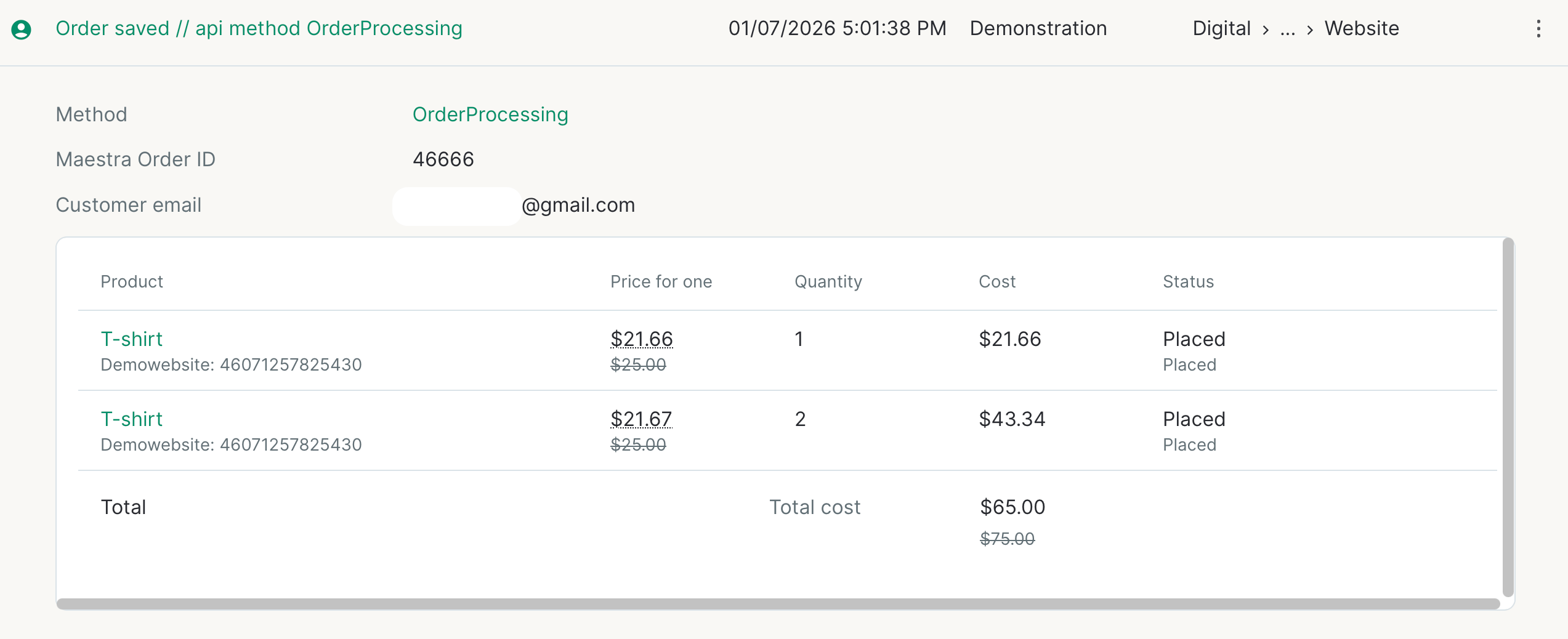
See the next section for details.
Multiplicity Rule for Loyalty Point Discounts
In promotions that use loyalty points, a customer may not always be able to redeem all available points for an order.This happens when a discount cannot be proportionally distributed across an order line . In this case, the system does not split the order line. Instead, it allows the customer to redeem only the maximum number of points that can be evenly applied across the items in the line.Example
A promotion allows customer to pay 100% of the order value using loyalty points.A customer purchases three identical pairs of socks, each priced at $10, and wants to redeem 13 loyalty points for the order.The system distributes the discount evenly across all items in the order. Since all items have the same price, each item should receive one third of the total points.Because 13 points cannot be evenly divided by 3, the system applies the largest amount that can be divided evenly across all items.As a result, 12 points are applied to the order — 4 points per item. Redeeming all 13 points is not possible in this case. 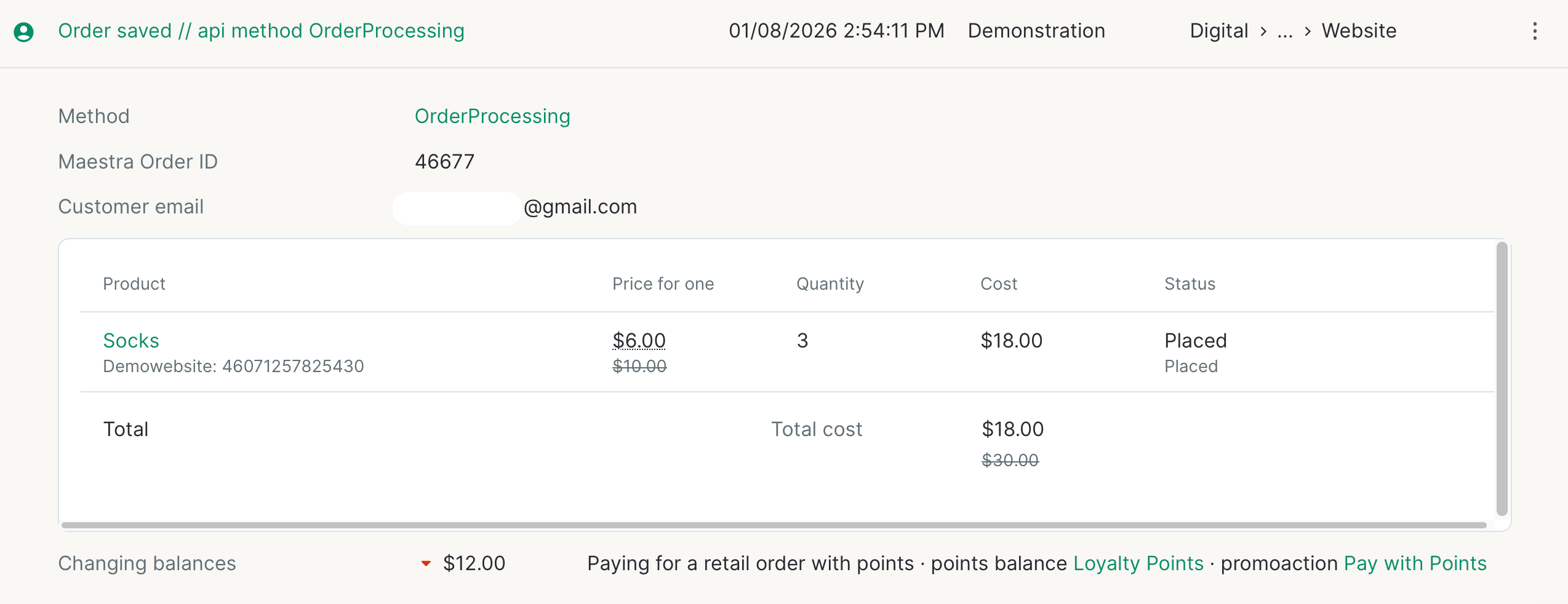
In all other cases, order line splitting works the same way as in other types of promotions:
- If items within the same order line participate in different promotions, the line is split into multiple line items.
- In orders with multiple order lines (even if they contain the same items), when a discount cannot be evenly distributed, one of the items receives a slightly higher discount.