An order consists of items.Each item can have one of the following statuses: placed, delivered, paid, canceled, or returned.
A single order can contain items with different statuses.
For example, three items may be delivered while one is canceled.
The item status is always checked based on its latest state.
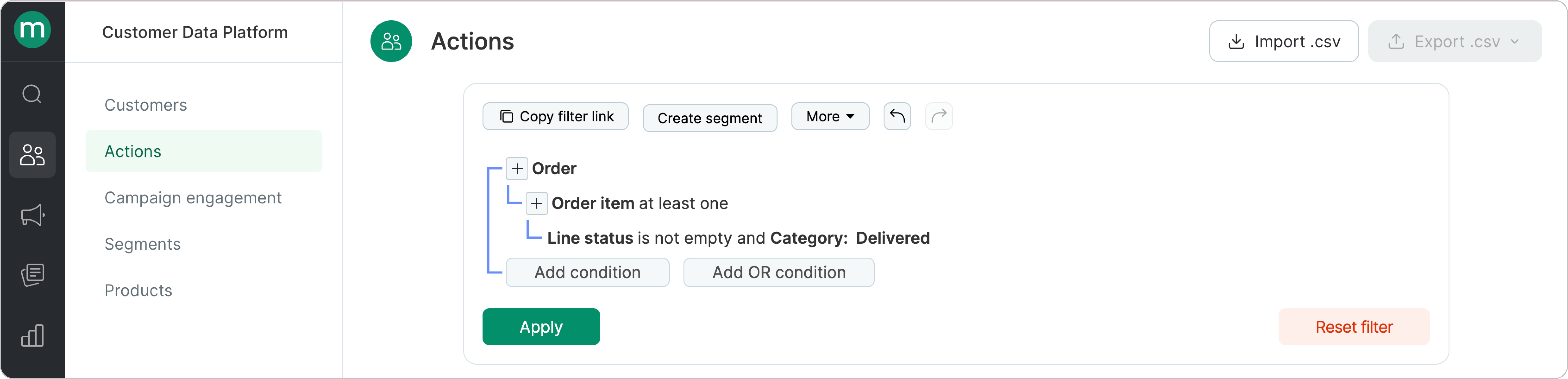
What this means:For example, an order was placed, then paid, and later delivered.To find this order, you need to build a filter for orders with the status Delivered, since that’s the most recent status.“Placed” and “Paid” are historical states, and orders can’t be filtered by those statuses
Start with the business goal.
In most cases, you’ll want to include “positive” order statuses — such as Placed, Paid, or Delivered (using the OR condition):
Example 1: how to find customers with paid orders (the most recent order status is Paid)
Example 2: find customers whose orders have all items paid (the most recent order status is Paid)
Difference between the filters:
In the first case, orders with partially canceled or delivered items are included.
In the second case, all the items are paid.
{"docsConfig":{"theme":"mint","$schema":"https://mintlify.com/docs.json","name":"Maestra Help Center","colors":{"primary":"#5DA600","light":"#97EA2D","dark":"#7ECE17"},"logo":{"light":"https://mintcdn.com/maestraio/QFfUMd9lAUjtR59J/logo/light.svg?fit=max\u0026auto=format\u0026n=QFfUMd9lAUjtR59J\u0026q=85\u0026s=850a8fd5d63a0dc23daae21e31810aed","dark":"https://mintcdn.com/maestraio/QFfUMd9lAUjtR59J/logo/dark.svg?fit=max\u0026auto=format\u0026n=QFfUMd9lAUjtR59J\u0026q=85\u0026s=5ff6140ad7367a721f7ef4748d393b39"},"favicon":"https://mintcdn.com/maestraio/fpoGWXHzPf6Ub5Qi/favicon.png?fit=max\u0026auto=format\u0026n=fpoGWXHzPf6Ub5Qi\u0026q=85\u0026s=55f1e8d5d8d3f26ff774217a9a0ee5f7","navbar":{"links":[{"href":"https://maestra.io/blog/cases","label":"Success stories"},{"href":"https://developers.maestra.io","label":"Maestra API"}]},"footer":{"socials":{"linkedin":"https://www.linkedin.com/company/maestraplatform","facebook":"https://www.facebook.com/maestraplatform"},"links":[{"items":[{"label":"support@maestra.io","href":"mailto:support@maestra.io"}]}]},"integrations":{"intercom":{"appId":"imn5pkg4"}},"contextual":{"options":["copy","view","chatgpt","claude","perplexity","mcp","cursor","vscode"],"display":"header"},"styling":{"latex":true},"navigation":{"global":{},"pages":[]}},"deployment":{"deploymentMetadataValue":{"subdomain":"maestraio","hasAudioNarration":false,"actualSubdomain":"maestraio","customDomains":["help.maestra.io"],"gitSource":{"type":"github","owner":"maestra-io","repo":"help-maestra-docs","deployBranch":"main","contentDirectory":"","isPrivate":true,"mountPath":"","label":""},"chroma":{"liveDeploymentHistoryId":"6ad6280a4613fdc88741b16e","collectionId":"02a2a0cb-caa2-4aad-892f-c5694d915686","schemaVersion":"v3","latestBuiltDeploymentHistoryId":"6ad6280a4613fdc88741b16e"},"entitlements":{},"buildId":"6ad6280a4613fdc88741b16e","clientVersion":"0.0.3894","searchFilterCounts":[{"language":"default","tag":"Guides","count":305},{"language":"default","tag":"Customers, orders and products","count":83},{"language":"default","tag":"Campaigns","count":61},{"language":"default","tag":"Customers","count":54},{"language":"default","tag":"Flows","count":29},{"language":"default","tag":"Merging customers","count":26},{"language":"default","tag":"Personalization","count":26},{"language":"default","tag":"Loyalty","count":24},{"language":"default","tag":"Email campaigns","count":23},{"language":"default","tag":"Filters","count":23}]},"assistantConfig":{"enableAskAiButton":false,"enableStarterQuestions":false,"enableContextualStarterQuestions":false,"enableAskAiSearchBar":true},"hasChatPermissions":false,"hasWebMcpPermissions":false,"toggles":[{"name":"kill-isr","enabled":true,"variant":{"name":"disabled","enabled":false,"feature_enabled":true},"impressionData":false},{"name":"agent-mintlify-slack","enabled":true,"variant":{"name":"disabled","enabled":false,"feature_enabled":true},"impressionData":false},{"name":"editor-v7-file-tree","enabled":true,"variant":{"name":"disabled","enabled":false,"feature_enabled":true},"impressionData":false},{"name":"agent-integrations-settings","enabled":true,"variant":{"name":"disabled","enabled":false,"feature_enabled":true},"impressionData":false},{"name":"automations-pr-grouping","enabled":true,"variant":{"name":"disabled","enabled":false,"feature_enabled":true},"impressionData":false},{"name":"custom-prefix","enabled":true,"variant":{"name":"disabled","enabled":false,"feature_enabled":true},"impressionData":false},{"name":"analytics-v7","enabled":true,"variant":{"name":"disabled","enabled":false,"feature_enabled":true},"impressionData":false},{"name":"user-flows-analytics","enabled":true,"variant":{"name":"disabled","enabled":false,"feature_enabled":true},"impressionData":false},{"name":"no-publish-flow","enabled":true,"variant":{"name":"disabled","enabled":false,"feature_enabled":true},"impressionData":false},{"name":"workos-onboarding","enabled":true,"variant":{"name":"disabled","enabled":false,"feature_enabled":true},"impressionData":false},{"name":"llms-txt-v2","enabled":true,"variant":{"name":"disabled","enabled":false,"feature_enabled":true},"impressionData":false},{"name":"pause-universal-search-reconcile","enabled":true,"variant":{"name":"disabled","enabled":false,"feature_enabled":true},"impressionData":false},{"name":"snapshot-serving-live","enabled":true,"variant":{"name":"disabled","enabled":false,"feature_enabled":true},"impressionData":false},{"name":"stripTemperatureMiddleware","enabled":true,"variant":{"name":"disabled","enabled":false,"feature_enabled":true},"impressionData":false},{"name":"per-site-search-delta","enabled":true,"variant":{"name":"disabled","enabled":false,"feature_enabled":true},"impressionData":false},{"name":"support-platform-pylon-zendesk","enabled":true,"variant":{"name":"disabled","enabled":false,"feature_enabled":true},"impressionData":false},{"name":"editor-branches-v2-autocommit","enabled":true,"variant":{"name":"disabled","enabled":false,"feature_enabled":true},"impressionData":false},{"name":"editor-branches-v2","enabled":true,"variant":{"name":"disabled","enabled":false,"feature_enabled":true},"impressionData":false},{"name":"snapshot-serving","enabled":true,"variant":{"name":"disabled","enabled":false,"feature_enabled":true},"impressionData":false},{"name":"instant-rollback","enabled":true,"variant":{"name":"disabled","enabled":false,"feature_enabled":true},"impressionData":false},{"name":"granular-notifications-server","enabled":true,"variant":{"name":"disabled","enabled":false,"feature_enabled":true},"impressionData":false},{"name":"granular-notifications","enabled":true,"variant":{"name":"disabled","enabled":false,"feature_enabled":true},"impressionData":false},{"name":"editor-private-page-search","enabled":true,"variant":{"name":"disabled","enabled":false,"feature_enabled":true},"impressionData":false},{"name":"automations-fable","enabled":true,"variant":{"name":"disabled","enabled":false,"feature_enabled":true},"impressionData":false},{"name":"fixed-ai-action-pricing","enabled":true,"variant":{"name":"disabled","enabled":false,"feature_enabled":true},"impressionData":false},{"name":"automation-resolve-merge-conflict","enabled":true,"variant":{"name":"disabled","enabled":false,"feature_enabled":true},"impressionData":false},{"name":"scoped-publishing","enabled":true,"variant":{"name":"disabled","enabled":false,"feature_enabled":true},"impressionData":false},{"name":"mintql","enabled":true,"variant":{"name":"disabled","enabled":false,"feature_enabled":true},"impressionData":false},{"name":"page-level-analytics","enabled":true,"variant":{"name":"disabled","enabled":false,"feature_enabled":true},"impressionData":false},{"name":"teamspace","enabled":true,"variant":{"name":"disabled","enabled":false,"feature_enabled":true},"impressionData":false},{"name":"editor-version-history-v2","enabled":true,"variant":{"name":"disabled","enabled":false,"feature_enabled":true},"impressionData":false},{"name":"vite-origin","enabled":true,"variant":{"name":"disabled","enabled":false,"feature_enabled":true},"impressionData":false},{"name":"editor-nav-generations","enabled":true,"variant":{"name":"disabled","enabled":false,"feature_enabled":true},"impressionData":false},{"name":"workspace-projects","enabled":true,"variant":{"name":"disabled","enabled":false,"feature_enabled":true},"impressionData":false},{"name":"assistant-v5","enabled":true,"variant":{"name":"disabled","enabled":false,"feature_enabled":true},"impressionData":false},{"name":"byok-sep-25","enabled":true,"variant":{"name":"disabled","enabled":false,"feature_enabled":true},"impressionData":false},{"name":"revalidation-jwt","enabled":true,"variant":{"name":"disabled","enabled":false,"feature_enabled":true},"impressionData":false},{"name":"editor-agent-model-picker","enabled":true,"variant":{"name":"disabled","enabled":false,"feature_enabled":true},"impressionData":false},{"name":"client-snapshot-docs-config","enabled":true,"variant":{"name":"disabled","enabled":false,"feature_enabled":true},"impressionData":false},{"name":"hobby-abuse-scan","enabled":true,"variant":{"name":"disabled","enabled":false,"feature_enabled":true},"impressionData":false}],"isAtlas":false,"googleFontsInlined":false},"customCss":[{"filePath":"custom.css","content":"details.accordion{margin-top:1.5rem;background-color:rgba(151,234,45,.08)}.dark details.accordion{background-color:rgba(255,255,255,.04)}.accordion-muted details.accordion{background-color:rgba(128,128,128,.08)}"}],"page":{"pagePath":"filters/filtering-by-orders/how-the-order-status-filter-works","slug":"/filters/filtering-by-orders/how-the-order-status-filter-works","pageMetadata":{"title":"How the order status filter works","description":null,"href":"/filters/filtering-by-orders/how-the-order-status-filter-works"},"pageType":"default","mdx":{"mdxSource":{"compiledSource":"\"use strict\";const{Fragment:_Fragment,jsx:_jsx,jsxs:_jsxs}=arguments[0];const{useMDXComponents:_provideComponents}=arguments[0];function _createMdxContent(props){const _components={a:`a`,li:`li`,p:`p`,strong:`strong`,ul:`ul`,..._provideComponents(),...props.components},{Heading,OptimizedImage,Warning}=_components;if(!Heading)_missingMdxReference(`Heading`,true);if(!OptimizedImage)_missingMdxReference(`OptimizedImage`,true);if(!Warning)_missingMdxReference(`Warning`,true);return _jsxs(_Fragment,{children:[_jsxs(_components.p,{children:[_jsx(_components.a,{href:`/customers-orders-and-products/orders/what-is-an-order`,children:`An order`}),` consists of items.`]}),`\n`,_jsxs(_components.p,{children:[`Each item can have one of the following statuses: `,_jsx(_components.strong,{children:`placed, delivered, paid, canceled, or returned`}),`.\nA single order can contain items with `,_jsx(_components.strong,{children:`different`}),` statuses.\nFor example, three items may be delivered while one is canceled.`]}),`\n`,_jsx(Heading,{level:`2`,id:`which-status-is-used-for-filtering`,children:`Which status is used for filtering`}),`\n`,_jsx(Warning,{children:_jsxs(_components.p,{children:[`The item status is always checked based on its `,_jsx(_components.strong,{children:`latest state`}),`.`]})}),`\n`,_jsx(_components.p,{children:_jsx(_components.strong,{children:`What this means:`})}),`\n`,_jsx(_components.p,{children:`For example, an order was placed, then paid, and later delivered.`}),`\n`,_jsx(OptimizedImage,{src:`https://mintcdn.com/maestraio/wm8oEjg6bFaQwCHC/images/imported/How-to-find-orders-with-a-specific-value-(17).png?fit=max\u0026auto=format\u0026n=wm8oEjg6bFaQwCHC\u0026q=85\u0026s=d568da4be54d6e4ee485427fff5fa461`,alt:``,\"data-og-width\":`8733`,width:`8733`,\"data-og-height\":`6639`,height:`6639`,\"data-path\":`images/imported/How-to-find-orders-with-a-specific-value-(17).png`,\"data-optimize\":`true`,\"data-opv\":`3`,srcset:`https://mintcdn.com/maestraio/wm8oEjg6bFaQwCHC/images/imported/How-to-find-orders-with-a-specific-value-(17).png?w=280\u0026fit=max\u0026auto=format\u0026n=wm8oEjg6bFaQwCHC\u0026q=85\u0026s=e5f7a042f76d519a5d9e99278850ab16 280w, https://mintcdn.com/maestraio/wm8oEjg6bFaQwCHC/images/imported/How-to-find-orders-with-a-specific-value-(17).png?w=560\u0026fit=max\u0026auto=format\u0026n=wm8oEjg6bFaQwCHC\u0026q=85\u0026s=25d6d126bd7a1d03cb354260d0fca073 560w, https://mintcdn.com/maestraio/wm8oEjg6bFaQwCHC/images/imported/How-to-find-orders-with-a-specific-value-(17).png?w=840\u0026fit=max\u0026auto=format\u0026n=wm8oEjg6bFaQwCHC\u0026q=85\u0026s=b784232d7b80d15e422dd942e93a696d 840w, https://mintcdn.com/maestraio/wm8oEjg6bFaQwCHC/images/imported/How-to-find-orders-with-a-specific-value-(17).png?w=1100\u0026fit=max\u0026auto=format\u0026n=wm8oEjg6bFaQwCHC\u0026q=85\u0026s=1cc7898f65367afe0d01443eebcf6745 1100w, https://mintcdn.com/maestraio/wm8oEjg6bFaQwCHC/images/imported/How-to-find-orders-with-a-specific-value-(17).png?w=1650\u0026fit=max\u0026auto=format\u0026n=wm8oEjg6bFaQwCHC\u0026q=85\u0026s=551267fbcbdde4e58fdd2bd4ff387c05 1650w, https://mintcdn.com/maestraio/wm8oEjg6bFaQwCHC/images/imported/How-to-find-orders-with-a-specific-value-(17).png?w=2500\u0026fit=max\u0026auto=format\u0026n=wm8oEjg6bFaQwCHC\u0026q=85\u0026s=3acdb9dd2879eaa250aab809d54a0637 2500w`}),`\n`,_jsxs(_components.p,{children:[`To find this order, you need to build a filter for orders with the status `,_jsx(_components.strong,{children:`Delivered`}),`, since that’s the most recent status.`]}),`\n`,_jsx(_components.p,{children:`“Placed” and “Paid” are historical states, and orders can’t be filtered by those statuses`}),`\n`,_jsx(OptimizedImage,{src:`https://mintcdn.com/maestraio/05-EV9YqA_RINTJ8/images/imported/How-the-order-status-filter-works.png?fit=max\u0026auto=format\u0026n=05-EV9YqA_RINTJ8\u0026q=85\u0026s=2ef5186c8c3c7c9af7c9d75eb07a168a`,alt:``,\"data-og-width\":`9624`,width:`9624`,\"data-og-height\":`2324`,height:`2324`,\"data-path\":`images/imported/How-the-order-status-filter-works.png`,\"data-optimize\":`true`,\"data-opv\":`3`,srcset:`https://mintcdn.com/maestraio/05-EV9YqA_RINTJ8/images/imported/How-the-order-status-filter-works.png?w=280\u0026fit=max\u0026auto=format\u0026n=05-EV9YqA_RINTJ8\u0026q=85\u0026s=1784fe08d0f5d692720236554e5c6279 280w, https://mintcdn.com/maestraio/05-EV9YqA_RINTJ8/images/imported/How-the-order-status-filter-works.png?w=560\u0026fit=max\u0026auto=format\u0026n=05-EV9YqA_RINTJ8\u0026q=85\u0026s=0fa4477b471b746fd28c9d40385573b4 560w, https://mintcdn.com/maestraio/05-EV9YqA_RINTJ8/images/imported/How-the-order-status-filter-works.png?w=840\u0026fit=max\u0026auto=format\u0026n=05-EV9YqA_RINTJ8\u0026q=85\u0026s=b47c2bf12af2f9a9dc5cda6d12a5e9ea 840w, https://mintcdn.com/maestraio/05-EV9YqA_RINTJ8/images/imported/How-the-order-status-filter-works.png?w=1100\u0026fit=max\u0026auto=format\u0026n=05-EV9YqA_RINTJ8\u0026q=85\u0026s=2c7af1aaf153dca26b81b37d52ae91a5 1100w, https://mintcdn.com/maestraio/05-EV9YqA_RINTJ8/images/imported/How-the-order-status-filter-works.png?w=1650\u0026fit=max\u0026auto=format\u0026n=05-EV9YqA_RINTJ8\u0026q=85\u0026s=53c79f1c614c4170670e88118bd8f83b 1650w, https://mintcdn.com/maestraio/05-EV9YqA_RINTJ8/images/imported/How-the-order-status-filter-works.png?w=2500\u0026fit=max\u0026auto=format\u0026n=05-EV9YqA_RINTJ8\u0026q=85\u0026s=41575d70f09cf115def6e2fe0386d1e0 2500w`}),`\n`,_jsx(Heading,{level:`2`,id:`which-statuses-should-you-use-in-your-filter`,children:_jsx(_components.strong,{children:`Which statuses should you use in your filter?`})}),`\n`,_jsxs(_components.p,{children:[`Start with the business goal.\nIn most cases, you’ll want to include “positive” order statuses — such as `,_jsx(_components.strong,{children:`Placed`}),`, `,_jsx(_components.strong,{children:`Paid`}),`, or `,_jsx(_components.strong,{children:`Delivered`}),` (using the `,_jsx(_components.strong,{children:_jsx(_components.a,{href:`/filters/how-to-create-filters`,children:`OR`})}),_jsx(_components.a,{href:`/filters/how-to-create-filters`,children:` condition`}),`):\n`]}),`\n`,_jsx(OptimizedImage,{src:`https://mintcdn.com/maestraio/05-EV9YqA_RINTJ8/images/imported/Find-customers-with-orders-(1).png?fit=max\u0026auto=format\u0026n=05-EV9YqA_RINTJ8\u0026q=85\u0026s=c32c03e6b0cd0dc0fdfae7ab29400b62`,alt:``,\"data-og-width\":`5414`,width:`5414`,\"data-og-height\":`1710`,height:`1710`,\"data-path\":`images/imported/Find-customers-with-orders-(1).png`,\"data-optimize\":`true`,\"data-opv\":`3`,srcset:`https://mintcdn.com/maestraio/05-EV9YqA_RINTJ8/images/imported/Find-customers-with-orders-(1).png?w=280\u0026fit=max\u0026auto=format\u0026n=05-EV9YqA_RINTJ8\u0026q=85\u0026s=9bac3bdde379fac574b79ef0a9514896 280w, https://mintcdn.com/maestraio/05-EV9YqA_RINTJ8/images/imported/Find-customers-with-orders-(1).png?w=560\u0026fit=max\u0026auto=format\u0026n=05-EV9YqA_RINTJ8\u0026q=85\u0026s=725dbeae05ac1efc10e323f1cb18793d 560w, https://mintcdn.com/maestraio/05-EV9YqA_RINTJ8/images/imported/Find-customers-with-orders-(1).png?w=840\u0026fit=max\u0026auto=format\u0026n=05-EV9YqA_RINTJ8\u0026q=85\u0026s=5d9d55d161ae710f61b676cb97c12616 840w, https://mintcdn.com/maestraio/05-EV9YqA_RINTJ8/images/imported/Find-customers-with-orders-(1).png?w=1100\u0026fit=max\u0026auto=format\u0026n=05-EV9YqA_RINTJ8\u0026q=85\u0026s=4abd38a4575f8624555a4a52268e00cf 1100w, https://mintcdn.com/maestraio/05-EV9YqA_RINTJ8/images/imported/Find-customers-with-orders-(1).png?w=1650\u0026fit=max\u0026auto=format\u0026n=05-EV9YqA_RINTJ8\u0026q=85\u0026s=b775e78213e6acbf8be78cc2300aa7a0 1650w, https://mintcdn.com/maestraio/05-EV9YqA_RINTJ8/images/imported/Find-customers-with-orders-(1).png?w=2500\u0026fit=max\u0026auto=format\u0026n=05-EV9YqA_RINTJ8\u0026q=85\u0026s=5e422c03fd80a7a1c7c85daf9de5fe60 2500w`}),`\n`,_jsxs(_components.p,{children:[_jsx(_components.strong,{children:`Example 1:`}),` how to find customers with paid orders (the most recent order status is Paid)\n`]}),`\n`,_jsx(OptimizedImage,{src:`https://mintcdn.com/maestraio/05-EV9YqA_RINTJ8/images/imported/How-the-order-status-filter-works-(1).png?fit=max\u0026auto=format\u0026n=05-EV9YqA_RINTJ8\u0026q=85\u0026s=b4249958d42f408559341d9fdf0fa5b9`,alt:``,\"data-og-width\":`9624`,width:`9624`,\"data-og-height\":`2630`,height:`2630`,\"data-path\":`images/imported/How-the-order-status-filter-works-(1).png`,\"data-optimize\":`true`,\"data-opv\":`3`,srcset:`https://mintcdn.com/maestraio/05-EV9YqA_RINTJ8/images/imported/How-the-order-status-filter-works-(1).png?w=280\u0026fit=max\u0026auto=format\u0026n=05-EV9YqA_RINTJ8\u0026q=85\u0026s=4ed81a9a898dd6819802a699dce50cfc 280w, https://mintcdn.com/maestraio/05-EV9YqA_RINTJ8/images/imported/How-the-order-status-filter-works-(1).png?w=560\u0026fit=max\u0026auto=format\u0026n=05-EV9YqA_RINTJ8\u0026q=85\u0026s=b59ac141d235ecdfc71c5277a3e168e3 560w, https://mintcdn.com/maestraio/05-EV9YqA_RINTJ8/images/imported/How-the-order-status-filter-works-(1).png?w=840\u0026fit=max\u0026auto=format\u0026n=05-EV9YqA_RINTJ8\u0026q=85\u0026s=d2fafec33d441d782db4f7efa2bbc2f3 840w, https://mintcdn.com/maestraio/05-EV9YqA_RINTJ8/images/imported/How-the-order-status-filter-works-(1).png?w=1100\u0026fit=max\u0026auto=format\u0026n=05-EV9YqA_RINTJ8\u0026q=85\u0026s=a61068e565967f382921f58f7006237c 1100w, https://mintcdn.com/maestraio/05-EV9YqA_RINTJ8/images/imported/How-the-order-status-filter-works-(1).png?w=1650\u0026fit=max\u0026auto=format\u0026n=05-EV9YqA_RINTJ8\u0026q=85\u0026s=ceb2ff3daa7c7be43ec97c9e25d90b89 1650w, https://mintcdn.com/maestraio/05-EV9YqA_RINTJ8/images/imported/How-the-order-status-filter-works-(1).png?w=2500\u0026fit=max\u0026auto=format\u0026n=05-EV9YqA_RINTJ8\u0026q=85\u0026s=54e996bd4b418bf914b28e0e0c163c08 2500w`}),`\n`,_jsxs(_components.p,{children:[_jsx(_components.strong,{children:`Example 2:`}),` find customers whose orders have `,_jsx(_components.strong,{children:`all items paid`}),` (the most recent order status is Paid)\n`]}),`\n`,_jsx(OptimizedImage,{src:`https://mintcdn.com/maestraio/05-EV9YqA_RINTJ8/images/imported/How-the-order-status-filter-works-(2).png?fit=max\u0026auto=format\u0026n=05-EV9YqA_RINTJ8\u0026q=85\u0026s=a16b311ebb1e2b3a3afc5086f05bd8f8`,alt:``,\"data-og-width\":`9624`,width:`9624`,\"data-og-height\":`2630`,height:`2630`,\"data-path\":`images/imported/How-the-order-status-filter-works-(2).png`,\"data-optimize\":`true`,\"data-opv\":`3`,srcset:`https://mintcdn.com/maestraio/05-EV9YqA_RINTJ8/images/imported/How-the-order-status-filter-works-(2).png?w=280\u0026fit=max\u0026auto=format\u0026n=05-EV9YqA_RINTJ8\u0026q=85\u0026s=4a221c7ac397c7ca6ea712e496df0373 280w, https://mintcdn.com/maestraio/05-EV9YqA_RINTJ8/images/imported/How-the-order-status-filter-works-(2).png?w=560\u0026fit=max\u0026auto=format\u0026n=05-EV9YqA_RINTJ8\u0026q=85\u0026s=234682fcd132b4645703e13fa50dd1c0 560w, https://mintcdn.com/maestraio/05-EV9YqA_RINTJ8/images/imported/How-the-order-status-filter-works-(2).png?w=840\u0026fit=max\u0026auto=format\u0026n=05-EV9YqA_RINTJ8\u0026q=85\u0026s=f523736ab63884bf2841e2367d91247d 840w, https://mintcdn.com/maestraio/05-EV9YqA_RINTJ8/images/imported/How-the-order-status-filter-works-(2).png?w=1100\u0026fit=max\u0026auto=format\u0026n=05-EV9YqA_RINTJ8\u0026q=85\u0026s=f885b70a25f874a114d1006ee8da1512 1100w, https://mintcdn.com/maestraio/05-EV9YqA_RINTJ8/images/imported/How-the-order-status-filter-works-(2).png?w=1650\u0026fit=max\u0026auto=format\u0026n=05-EV9YqA_RINTJ8\u0026q=85\u0026s=0e2da20ea06dd86b299f2f97d6980af7 1650w, https://mintcdn.com/maestraio/05-EV9YqA_RINTJ8/images/imported/How-the-order-status-filter-works-(2).png?w=2500\u0026fit=max\u0026auto=format\u0026n=05-EV9YqA_RINTJ8\u0026q=85\u0026s=68a333eb1bd208933f619de3b4e7094c 2500w`}),`\n`,_jsx(_components.p,{children:_jsx(_components.strong,{children:`Difference between the filters:`})}),`\n`,_jsxs(_components.ul,{children:[`\n`,_jsx(_components.li,{children:`In the first case, orders with partially canceled or delivered items are included.`}),`\n`,_jsx(_components.li,{children:`In the second case, all the items are paid.`}),`\n`]})]})}function MDXContent(props={}){const{wrapper:MDXLayout}={..._provideComponents(),...props.components};return MDXLayout?_jsx(MDXLayout,{...props,children:_jsx(_createMdxContent,{...props})}):_createMdxContent(props)}return{default:MDXContent};function _missingMdxReference(id,component){throw new Error(`Expected `+(component?`component`:`object`)+\" `\"+id+\"` to be defined: you likely forgot to import, pass, or provide it.\")}","frontmatter":{},"scope":{"config":{},"pageMetadata":{"title":"How the order status filter works","description":null,"href":"/filters/filtering-by-orders/how-the-order-status-filter-works"}}},"mdxSourceWithNoJs":null},"mdxExtracts":{"tableOfContents":[{"title":"Which status is used for filtering","slug":"which-status-is-used-for-filtering","depth":2,"children":[]},{"title":"Which statuses should you use in your filter?","slug":"which-statuses-should-you-use-in-your-filter","depth":2,"children":[]}],"codeExamples":{}},"jsLinks":[],"subdomain":"maestraio","siteName":"Maestra Help Center","title":"How the order status filter works - Maestra Help Center","navMaps":{"firstHrefInVersion":{},"firstHrefInLanguage":{}},"lastModified":"2026-10-14T16:48:14.824Z","originalFileLocation":"filters/filtering-by-orders/how-the-order-status-filter-works.mdx"},"headHtml":"\u003cmeta data-mint-head name=\"application-name\" content=\"Maestra Help Center\">\u003cmeta data-mint-head name=\"generator\" content=\"Mintlify\">\u003clink data-mint-head rel=\"icon\" type=\"image/png\" sizes=\"192x192\" href=\"/mintlify-assets/_mintlify/favicons/maestraio/pnAUqzhcyAMFIg1E/_generated/favicon/android-chrome-192x192.png\" media=\"(prefers-color-scheme: light)\">\u003clink data-mint-head rel=\"apple-touch-icon\" type=\"image/png\" sizes=\"180x180\" href=\"/mintlify-assets/_mintlify/favicons/maestraio/pnAUqzhcyAMFIg1E/_generated/favicon/apple-touch-icon.png\">\u003clink data-mint-head rel=\"icon\" type=\"image/png\" sizes=\"16x16\" href=\"/mintlify-assets/_mintlify/favicons/maestraio/pnAUqzhcyAMFIg1E/_generated/favicon/favicon-16x16.png\" media=\"(prefers-color-scheme: light)\">\u003clink data-mint-head rel=\"icon\" type=\"image/png\" sizes=\"32x32\" href=\"/mintlify-assets/_mintlify/favicons/maestraio/pnAUqzhcyAMFIg1E/_generated/favicon/favicon-32x32.png\" media=\"(prefers-color-scheme: light)\">\u003clink data-mint-head rel=\"shortcut icon\" type=\"image/x-icon\" href=\"/mintlify-assets/_mintlify/favicons/maestraio/pnAUqzhcyAMFIg1E/_generated/favicon/favicon.ico\" media=\"(prefers-color-scheme: light)\">\u003clink data-mint-head rel=\"icon\" type=\"image/png\" sizes=\"192x192\" href=\"/mintlify-assets/_mintlify/favicons/maestraio/pnAUqzhcyAMFIg1E/_generated/favicon-dark/android-chrome-192x192.png\" media=\"(prefers-color-scheme: dark)\">\u003clink data-mint-head rel=\"icon\" type=\"image/png\" sizes=\"16x16\" href=\"/mintlify-assets/_mintlify/favicons/maestraio/pnAUqzhcyAMFIg1E/_generated/favicon-dark/favicon-16x16.png\" media=\"(prefers-color-scheme: dark)\">\u003clink data-mint-head rel=\"icon\" type=\"image/png\" sizes=\"32x32\" href=\"/mintlify-assets/_mintlify/favicons/maestraio/pnAUqzhcyAMFIg1E/_generated/favicon-dark/favicon-32x32.png\" media=\"(prefers-color-scheme: dark)\">\u003clink data-mint-head rel=\"shortcut icon\" type=\"image/x-icon\" href=\"/mintlify-assets/_mintlify/favicons/maestraio/pnAUqzhcyAMFIg1E/_generated/favicon-dark/favicon.ico\" media=\"(prefers-color-scheme: dark)\">\u003cmeta data-mint-head property=\"og:title\" content=\"How the order status filter works - Maestra Help Center\">\u003cmeta data-mint-head property=\"og:site_name\" content=\"Maestra Help Center\">\u003cmeta data-mint-head property=\"og:url\" content=\"https://help.maestra.io/filters/filtering-by-orders/how-the-order-status-filter-works\">\u003cmeta data-mint-head property=\"og:type\" content=\"website\">\u003cmeta data-mint-head name=\"twitter:card\" content=\"summary_large_image\">\u003cmeta data-mint-head name=\"twitter:title\" content=\"How the order status filter works - Maestra Help Center\">\u003cmeta data-mint-head name=\"msapplication-config\" content=\"/mintlify-assets/_mintlify/favicons/maestraio/pnAUqzhcyAMFIg1E/_generated/favicon/browserconfig.xml\">\u003cmeta data-mint-head name=\"apple-mobile-web-app-title\" content=\"Maestra Help Center\">\u003cmeta data-mint-head name=\"msapplication-TileColor\" content=\"#5DA600\">\u003clink data-mint-head rel=\"canonical\" href=\"https://help.maestra.io/filters/filtering-by-orders/how-the-order-status-filter-works\">\u003clink data-mint-head rel=\"alternate\" type=\"application/xml\" href=\"/sitemap.xml\">\u003clink data-mint-head rel=\"alternate\" type=\"text/markdown\" href=\"/filters/filtering-by-orders/how-the-order-status-filter-works.md\">\u003cscript data-mint-head type=\"application/ld+json\">{\"@context\":\"https://schema.org\",\"@graph\":[{\"@type\":\"Organization\",\"@id\":\"https://help.maestra.io/#organization\",\"name\":\"Maestra Help Center\",\"url\":\"https://help.maestra.io\",\"logo\":{\"@type\":\"ImageObject\",\"url\":\"https://mintcdn.com/maestraio/QFfUMd9lAUjtR59J/logo/light.svg?fit=max\u0026auto=format\u0026n=QFfUMd9lAUjtR59J\u0026q=85\u0026s=850a8fd5d63a0dc23daae21e31810aed\"}},{\"@type\":\"WebSite\",\"@id\":\"https://help.maestra.io#website\",\"name\":\"Maestra Help Center\",\"url\":\"https://help.maestra.io\",\"publisher\":{\"@id\":\"https://help.maestra.io/#organization\"}},{\"@type\":\"WebPage\",\"@id\":\"https://help.maestra.io/filters/filtering-by-orders/how-the-order-status-filter-works#webpage\",\"url\":\"https://help.maestra.io/filters/filtering-by-orders/how-the-order-status-filter-works\",\"name\":\"How the order status filter works\",\"dateModified\":\"2026-10-14T16:48:14.824Z\",\"isPartOf\":{\"@id\":\"https://help.maestra.io#website\"},\"breadcrumb\":{\"@id\":\"https://help.maestra.io/filters/filtering-by-orders/how-the-order-status-filter-works#breadcrumb\"}},{\"@type\":\"BreadcrumbList\",\"@id\":\"https://help.maestra.io/filters/filtering-by-orders/how-the-order-status-filter-works#breadcrumb\",\"itemListElement\":[{\"@type\":\"ListItem\",\"position\":1,\"name\":\"Filters\",\"item\":\"https://help.maestra.io/filters/how-to-create-filters\"},{\"@type\":\"ListItem\",\"position\":2,\"name\":\"How the order status filter works\",\"item\":\"https://help.maestra.io/filters/filtering-by-orders/how-the-order-status-filter-works\"}]},{\"@type\":[\"Article\",\"TechArticle\"],\"@id\":\"https://help.maestra.io/filters/filtering-by-orders/how-the-order-status-filter-works#article\",\"headline\":\"How the order status filter works\",\"name\":\"How the order status filter works\",\"url\":\"https://help.maestra.io/filters/filtering-by-orders/how-the-order-status-filter-works\",\"mainEntityOfPage\":{\"@id\":\"https://help.maestra.io/filters/filtering-by-orders/how-the-order-status-filter-works#webpage\"},\"dateModified\":\"2026-10-14T16:48:14.824Z\",\"publisher\":{\"@id\":\"https://help.maestra.io/#organization\"},\"isPartOf\":{\"@id\":\"https://help.maestra.io#website\"}}]}\u003c/script>\u003cscript data-mint-head type=\"application/ld+json\">{\"@context\":\"https://schema.org\",\"@type\":\"WebSite\",\"name\":\"Maestra Help Center\",\"creator\":{\"@type\":\"Organization\",\"name\":\"Mintlify\",\"url\":\"https://mintlify.com\"}}\u003c/script>","siteName":"Maestra Help Center","nav":{"global":{},"tabs":[{"tab":"Guides","groups":[{"group":"Customers, orders and products","pages":[{"group":"Customers","pages":[{"title":"Who is a Customer?","href":"/customers-orders-and-products/customers/who-is-a-customer"},{"title":"How Customer De-anonymization Works","href":"/customers-orders-and-products/customers/how-customer-de-anonymization-works"},{"group":"Personal data","pages":[{"title":"How Customer Names Are Validated","href":"/customers-orders-and-products/customers/personal-data/how-customer-names-are-cleaned-up"},{"title":"Field Validation Rules for Customer Data","href":"/customers-orders-and-products/customers/personal-data/field-validation-rules"},{"title":"How a Customer's Time Zone Is Determined","href":"/customers-orders-and-products/customers/personal-data/how-customer-timezone-is-determined"},{"title":"How a Customer's Gender Is Determined From Their Name","href":"/customers-orders-and-products/customers/personal-data/how-customer-gender-is-determined-from-name"}]},{"group":"Contacts and identifiers","pages":[{"group":"Email validity","pages":[{"title":"How Email Validity Is Determined","href":"/customers-orders-and-products/customers/contacts-and-identifiers/email-validity/how-email-validity-is-determined"},{"title":"How to Manage Invalid Mobile Phone Numbers and Email Addresses","href":"/customers-orders-and-products/customers/contacts-and-identifiers/email-validity/how-to-manage-invalid-mobile-phone-numbers-and-email-addresses"}]},{"group":"Blocklist","pages":[{"title":"What Is the Blocklist","href":"/customers-orders-and-products/customers/contacts-and-identifiers/blocklist/what-is-the-blocklist"},{"title":"How to add contacts to the blocklist","href":"/customers-orders-and-products/customers/contacts-and-identifiers/blocklist/how-to-add-contacts-to-the-blocklist"},{"title":"How to remove contacts from the blocklist","href":"/customers-orders-and-products/customers/contacts-and-identifiers/blocklist/how-to-remove-contacts-from-the-blocklist"},{"title":"How to Export the Blocklist","href":"/customers-orders-and-products/customers/contacts-and-identifiers/blocklist/how-to-export-the-blocklist"}]},{"group":"Contact confirmation","pages":[{"title":"Contact Confirmation Status: How It Works","href":"/customers-orders-and-products/customers/contacts-and-identifiers/contact-confirmation/contact-confirmation-status"}]},{"group":"Account access","pages":[{"title":"How to Mark a Contact as \"Gives Account Access\" or Set It as Awaiting Confirmation","href":"/customers-orders-and-products/customers/contacts-and-identifiers/account-access/how-to-mark-a-contact-as-giving-account-access"},{"title":"How Contacts With the \"Gives Account Access\" Flag Behave","href":"/customers-orders-and-products/customers/contacts-and-identifiers/account-access/account-access-contact-behavior"}]}]},{"group":"Add, edit, export, delete","pages":[{"title":"How to Add a Customer Manually via the User Interface","href":"/customers-orders-and-products/customers/add-edit-export-delete/how-to-add-a-customer-manually-via-the-user-interface"},{"title":"How to Edit Customer Data in Their Profile","href":"/customers-orders-and-products/customers/add-edit-export-delete/how-to-edit-customer-data-in-the-profile"},{"group":"Bulk import and edit","pages":[{"title":"How to Bulk Import Customers from a File?","href":"/customers-orders-and-products/customers/add-edit-export-delete/bulk-import-and-edit/how-to-bulk-import-customers-from-a-file"},{"title":"How to edit existing customers via import","href":"/customers-orders-and-products/customers/add-edit-export-delete/bulk-import-and-edit/how-to-edit-existing-customers-via-import"},{"title":"Customer Import Best Practices","href":"/customers-orders-and-products/customers/add-edit-export-delete/bulk-import-and-edit/customer-import-recommendations"}]},{"group":"Bulk delete","pages":[{"title":"How to bulk delete customers by filter","href":"/customers-orders-and-products/customers/add-edit-export-delete/bulk-delete/how-to-bulk-delete-customers-by-filter"},{"title":"How to Bulk Delete Customers by ID List","href":"/customers-orders-and-products/customers/add-edit-export-delete/bulk-delete/how-to-bulk-delete-customers-by-id-list"},{"title":"How to bulk delete customers by email list","href":"/customers-orders-and-products/customers/add-edit-export-delete/bulk-delete/how-to-bulk-delete-customers-by-email-list"}]}]},{"group":"Subscriptions","pages":[{"title":"How Customer Subscriptions Work","href":"/customers-orders-and-products/customers/subscriptions/how-customer-subscriptions-work"},{"title":"How to Subscribe or Unsubscribe a Customer in Their Profile","href":"/customers-orders-and-products/customers/subscriptions/how-to-subscribe-or-unsubscribe-a-customer-in-their-profile"},{"title":"How to Bulk Subscribe or Unsubscribe Customers","href":"/customers-orders-and-products/customers/subscriptions/how-to-bulk-subscribe-or-unsubscribe-customers"},{"title":"How Topic Subscriptions Change When a Customer's Channel Data Is Updated","href":"/customers-orders-and-products/customers/subscriptions/how-topic-subscriptions-change-when-channel-data-is-updated"},{"title":"Double Opt-In: How Two-Step Subscription Works","href":"/customers-orders-and-products/customers/subscriptions/double-opt-in-how-two-step-subscription-works"}]},{"group":"Merging customers","pages":[{"title":"How Maestra Builds a Unified Customer Profile","href":"/customers-orders-and-products/customers/merging-customers/how-maestra-creates-a-unified-customer-profile"},{"title":"Why Were Two Customers Merged","href":"/customers-orders-and-products/customers/merging-customers/why-were-customers-merged"},{"title":"Customer Priority and Data Overwrites When Merging","href":"/customers-orders-and-products/customers/merging-customers/customer-priority-and-data-overwrites-on-merge"},{"title":"How to Manually Merge Customer Profiles","href":"/customers-orders-and-products/customers/merging-customers/how-to-merge-customer-profiles-manually"},{"title":"How to merge customers via import","href":"/customers-orders-and-products/customers/merging-customers/how-to-merge-customer-profiles-via-file-import"},{"group":"Merge settings","pages":[{"title":"What Deduplication Settings Are Available","href":"/customers-orders-and-products/customers/merging-customers/merge-settings/deduplication-settings"},{"title":"Can You Block Customer Profile Merging","href":"/customers-orders-and-products/customers/merging-customers/merge-settings/can-merging-be-disabled"},{"title":"Can You Turn Off Deduplication","href":"/customers-orders-and-products/customers/merging-customers/merge-settings/can-deduplication-be-disabled"}]},{"group":"Personal info and identifiers","pages":[{"title":"What Counts as Customer Personal Data and How to Edit It","href":"/customers-orders-and-products/customers/merging-customers/personal-info-and-identifiers/what-counts-as-personal-data-and-how-to-edit-it"},{"title":"Customer Identifiers in Maestra","href":"/customers-orders-and-products/customers/merging-customers/personal-info-and-identifiers/customer-identifiers-in-maestra"},{"title":"How to Wipe a Customer's Name, Phone, Email, or Identifier","href":"/customers-orders-and-products/customers/merging-customers/personal-info-and-identifiers/how-to-wipe-customer-name-phone-email-or-id"},{"title":"What Is Identifier History Search","href":"/customers-orders-and-products/customers/merging-customers/personal-info-and-identifiers/what-is-identifier-history-search"}]},{"group":"Customer change history","pages":[{"title":"How to Read Customer Change History After a Merge","href":"/customers-orders-and-products/customers/merging-customers/customer-change-history/how-to-read-customer-history-after-a-merge"},{"title":"How to Read Customer Change History to Find Out What Changed and Why","href":"/customers-orders-and-products/customers/merging-customers/customer-change-history/how-to-read-customer-history-why-customer-changed"},{"title":"How to Read Customer History — Where Did the Email Go","href":"/customers-orders-and-products/customers/merging-customers/customer-change-history/how-to-read-customer-history-where-did-the-email-go"}]},{"group":"Merge errors","pages":[{"title":"Error: \"Technical IDs Must Be Unique\"","href":"/customers-orders-and-products/customers/merging-customers/merge-errors/error-technical-ids-must-be-unique"},{"title":"Error: \"User With This Mobile Phone Is Already Registered\"","href":"/customers-orders-and-products/customers/merging-customers/merge-errors/error-user-with-mobile-phone-already-registered"},{"title":"Error: \"Cannot Uniquely Identify the Customer\"","href":"/customers-orders-and-products/customers/merging-customers/merge-errors/error-cannot-uniquely-identify-customer"}]},{"group":"Deduplication FAQ","pages":[{"group":"Contact merging","pages":[{"title":"Why Did a Customer Lose Their Phone or Email","href":"/customers-orders-and-products/customers/merging-customers/deduplication-faq/contact-merging/why-did-customer-lose-phone-or-email"},{"title":"Customers Share the Same Phone or Email — Why Weren't They Merged","href":"/customers-orders-and-products/customers/merging-customers/deduplication-faq/contact-merging/customers-share-phone-or-email-why-not-merged"}]},{"group":"Profile merging","pages":[{"title":"What Happens to a Customer's Name and Other Data After a Merge","href":"/customers-orders-and-products/customers/merging-customers/deduplication-faq/profile-merging/what-happens-to-name-and-other-data-after-merge"},{"title":"Which Segment Does a Customer Land In After a Merge","href":"/customers-orders-and-products/customers/merging-customers/deduplication-faq/profile-merging/which-segment-customer-lands-in-after-merge"},{"title":"Why Did a Customer's Custom Field Value Disappear","href":"/customers-orders-and-products/customers/merging-customers/deduplication-faq/profile-merging/why-customer-custom-field-value-disappeared"},{"title":"About Sessions: Why a Customer Has Actions That Happened Before They Appeared in the Database","href":"/customers-orders-and-products/customers/merging-customers/deduplication-faq/profile-merging/about-sessions-actions-before-database-appearance"},{"title":"What Happens to Subscriptions When Customers Are Merged","href":"/customers-orders-and-products/customers/merging-customers/deduplication-faq/profile-merging/what-happens-to-subscriptions-on-merge"},{"title":"What Happens to Customer Identifiers After a Merge","href":"/customers-orders-and-products/customers/merging-customers/deduplication-faq/profile-merging/what-happens-to-customer-identifiers-after-merge"}]}]}]}]},{"group":"Actions","pages":[{"title":"What is an Action?","href":"/customers-orders-and-products/actions/what-is-an-action"},{"title":"What is a Folder, and How to Create One","href":"/customers-orders-and-products/actions/what-is-a-folder-and-how-to-create-one"},{"group":"Issuing and deleting actions","pages":[{"title":"How to Issue an Action in a Customer Profile","href":"/customers-orders-and-products/actions/issuing-and-deleting-actions/how-to-issue-an-action-in-a-customer-profile"},{"title":"How to Issue Actions to Customers Selected by a Filter","href":"/customers-orders-and-products/actions/issuing-and-deleting-actions/how-to-issue-actions-to-customers-selected-by-a-filter"},{"title":"How to Import Actions","href":"/import-data/actions/how-to-bulk-import-actions-from-a-file"},{"title":"How to Delete Actions","href":"/customers-orders-and-products/actions/issuing-and-deleting-actions/how-to-delete-actions"}]},{"group":"Action template","pages":[{"title":"How to Create an Action Template","href":"/customers-orders-and-products/actions/action-template/how-to-create-an-action-template"},{"title":"How to Copy an Action Template","href":"/customers-orders-and-products/actions/action-template/how-to-copy-an-action-template"},{"group":"Template examples","pages":[{"title":"Action Template for Issuing an Action in an Operation or Flow","href":"/customers-orders-and-products/actions/action-template/examples/action-template-for-issuing-an-action-in-an-operation-or-flow"},{"title":"Action Template for Product and Category Views","href":"/customers-orders-and-products/actions/action-template/examples/action-template-for-product-or-category-views"},{"title":"Action Templates for Adding and Removing Products From a Product List","href":"/customers-orders-and-products/actions/action-template/examples/action-templates-for-adding-and-removing-products-from-a-product-list"}]}]},{"group":"Channels and touchpoints","pages":[{"title":"How the Website Traffic Source Is Determined","href":"/customers-orders-and-products/actions/channels-and-touchpoints/how-the-website-traffic-source-is-determined"},{"group":"Channels","pages":[{"title":"How to Create a Channel","href":"/customers-orders-and-products/actions/channels-and-touchpoints/channels/how-to-create-a-channel"},{"title":"How to Import Channels","href":"/import-data/references/how-to-import-channels"},{"title":"How Channels and Touchpoints Are Created From UTM Tags","href":"/customers-orders-and-products/actions/channels-and-touchpoints/channels/how-channels-and-touchpoints-are-created-from-utm-tags"}]},{"group":"Touchpoints","pages":[{"title":"How to Create a Touchpoint","href":"/customers-orders-and-products/actions/channels-and-touchpoints/touchpoints/how-to-create-a-touchpoint"},{"title":"How to Import Touchpoints","href":"/import-data/references/how-to-import-touchpoints"}]}]},{"group":"Tags","pages":[{"title":"How to Create an Action Tag","href":"/customers-orders-and-products/actions/tags/how-to-create-an-action-tag"},{"title":"How to Assign and Remove a Tag","href":"/customers-orders-and-products/actions/tags/how-to-assign-and-remove-a-tag"}]}]},{"group":"Orders","pages":[{"title":"What is an Order?","href":"/customers-orders-and-products/orders/what-is-an-order"},{"title":"How to Import Orders from a File","href":"/import-data/orders/how-to-bulk-import-orders-from-a-file"},{"title":"How Sending to the Contact from an Order Works","href":"/customers-orders-and-products/orders/how-sending-to-the-contact-from-an-order-works"},{"group":"Order settings","pages":[{"title":"How to Add an Order Line Status","href":"/customers-orders-and-products/orders/order-settings/how-to-add-an-order-line-status"},{"title":"How to Add a Payment Method","href":"/customers-orders-and-products/orders/order-settings/how-to-add-a-payment-method"}]}]},{"group":"Products","pages":[{"title":"What is a Product?","href":"/customers-orders-and-products/products/what-is-a-product"},{"title":"How to Set Up a Product Feed Import","href":"/customers-orders-and-products/products/how-to-set-up-a-product-feed-import"},{"title":"How to Set Up a Regional Product Feed Import","href":"/customers-orders-and-products/products/how-to-set-up-a-regional-product-feed-import"},{"title":"How to upload multiple product feeds in a single file","href":"/customers-orders-and-products/products/how-to-upload-multiple-product-feeds-in-a-single-file"}]},{"group":"Data Export","pages":[{"title":"How to Set Up Data Export for Analytics","href":"/customers-orders-and-products/data-export/how-to-set-up-data-export-for-analytics"}]}]},{"group":"Import data","pages":[{"title":"What is Data Import?","href":"/import-data/what-is-data-import"},{"title":"Preparing a file for import","href":"/import-data/preparing-a-file-for-import"}]},{"group":"Filters","pages":[{"title":"How to Create Filters","href":"/filters/how-to-create-filters"},{"title":"How to Simplify a Filter","href":"/filters/how-to-simplify-a-filter"},{"group":"Filtering by Customer Activity","pages":[{"title":"How to Find Customers Added to the Database in a Given Period","href":"/filters/how-to-find-customers-added-to-database-in-a-period"},{"title":"How to Find Customers Whose First Action Was in a Given Period","href":"/filters/how-to-find-customers-by-first-action-period"},{"title":"How to Find Customers Who Viewed Specific Products or Categories","href":"/filters/how-to-find-customers-who-viewed-products-or-categories"},{"title":"How to Find Customers Who Interacted With Product Lists","href":"/filters/how-to-find-customers-who-interacted-with-product-lists"},{"title":"How to Find Customers With Products in a List (Cart, Favorites)","href":"/filters/how-to-find-customers-with-products-in-a-list"},{"title":"How to Build a Filter With Multiple Action Templates","href":"/filters/how-to-build-a-filter-with-multiple-action-templates"}]},{"group":"Filtering by Campaign Engagement","pages":[{"title":"How to Find Customers Who Interacted with a Specific Campaign","href":"/filters/filtering-by-campaign-engagement/how-to-find-customers-who-interacted-with-a-specific-campaign"},{"title":"How to Find Customers Who Interacted with More Than One Campaign","href":"/filters/filtering-by-campaign-engagement/how-to-find-customers-who-interacted-with-more-than-one-campaign"},{"title":"How to find customers with send failures or undeliveries","href":"/filters/filtering-by-campaign-engagement/how-to-find-customers-with-send-failures-or-undeliveries"},{"title":"How to find clicks on specific links in campaigns","description":null,"href":"/filters/filtering-by-campaign-engagement/how-to-find-clicks-on-specific-links-in-campaigns"}]},{"group":"Filtering by Orders","pages":[{"title":"How the order status filter works","href":"/filters/filtering-by-orders/how-the-order-status-filter-works"},{"title":"How the order first action filter works","description":null,"href":"/filters/filtering-by-orders/how-the-order-first-action-filter-works"},{"title":"How to find customers with orders","href":"/filters/filtering-by-orders/how-to-find-customers-with-orders"},{"title":"How to find customers without orders","href":"/filters/filtering-by-orders/how-to-find-customers-without-orders"},{"title":"How to find orders for a specific period","href":"/filters/filtering-by-orders/how-to-find-orders-for-a-specific-period"},{"title":"How to find orders with a specific order price","href":"/filters/filtering-by-orders/how-to-find-orders-with-a-specific-order-price"},{"title":"How to find customers by Average Order Value","href":"/filters/filtering-by-orders/how-to-find-customers-by-average-order-value"},{"title":"How to filter customers by total revenue","href":"/filters/filtering-by-orders/how-to-filter-customers-by-total-revenue"},{"title":"How to find orders with applied promotions","href":"/filters/filtering-by-orders/how-to-find-orders-with-applied-promotions"},{"title":"How to find orders with earned points","href":"/filters/filtering-by-orders/how-to-find-orders-with-earned-points"},{"title":"How to Find Campaigns Sent for a Specific Order","href":"/filters/filtering-by-orders/how-to-find-campaigns-sent-for-a-specific-order"}]}]},{"group":"Segments","pages":[{"title":"Types of Customer Segments","href":"/segments/types-of-customer-segments"},{"title":"How to Filter Customers into Segments","href":"/segments/how-to-filter-customers-into-segments"},{"title":"How to Create a Static Customer Segment","href":"/segments/how-to-create-a-static-customer-segment"},{"title":"How to Add Customers into a Static Segment using UI","href":"/segments/how-to-add-customers-into-a-static-segment-using-ui"},{"title":"How Does RFM Segmentation Work?","href":"/segments/how-does-rfm-segmentation-work"},{"title":"What to Do If You Cannot Update a Segment","href":"/segments/what-to-do-if-you-cannot-update-a-segment"},{"title":"Types of Product Segments","href":"/segments/types-of-product-segments"},{"title":"How to Create a Product Segment From a Filter","href":"/segments/how-to-create-a-product-segment-from-a-filter"},{"title":"How to Create a Scheduled Product Segment","href":"/segments/how-to-create-a-scheduled-product-segment"},{"title":"How to Create a Static Product Segment","href":"/segments/how-to-create-a-static-product-segment"}]},{"group":"Flows","pages":[{"title":"What are flows and How Do You Use Them?","href":"/flows/what-are-flows-and-how-do-you-use-them"},{"title":"How to Test a Flow","href":"/flows/how-to-test-a-flow"},{"title":"How to Track a Customer's Progress Through a Flow","href":"/flows/how-to-track-a-customers-progress-through-a-flow"},{"title":"What is a transactional flow?","href":"/flows/what-is-a-transactional-flow"},{"title":"What Events Can Trigger a Flow","href":"/flows/what-events-can-trigger-a-flow"},{"title":"How to Schedule a Flow to Run Periodically","href":"/flows/how-to-schedule-a-flow-to-run-periodically"},{"title":"How Contextual Filters Work in the Condition Block of a Flow","href":"/flows/how-contextual-filters-work-in-the-condition-block-of-a-flow"},{"title":"How the \"MultiBranches\" Mode Work in the \"Condition\" Block of the flow","href":"/flows/how-the-multibranches-mode-work-in-the-condition-block-of-the-flow"},{"title":"How the Wait Block Works in a Flow","href":"/flows/how-the-wait-block-works-in-a-flow"},{"title":"How to Limit How Often a Flow Runs","href":"/flows/how-to-limit-how-often-a-flow-runs"},{"title":"Flow Run Statistics","href":"/flows/flow-run-statistics"},{"group":"Examples","pages":[{"title":"Welcome Flow: How to Greet a New Customer","href":"/flows/examples/welcome-flow"},{"title":"Double Opt-In Welcome Flow","href":"/flows/examples/double-opt-in-welcome-flow"},{"title":"Abandoned Session Flow","href":"/flows/examples/abandoned-session-flow"},{"title":"Multiple Abandoned Sessions Flow","href":"/flows/examples/multiple-abandoned-sessions-flow"},{"title":"Price Dropped on a Product in Customer's List Flow","href":"/flows/examples/price-dropped-on-product-in-list-flow"},{"title":"Price Dropped on a Viewed Product Flow","href":"/flows/examples/price-dropped-on-viewed-product-flow"},{"title":"Product From Customer's List Is Back in Stock Flow","href":"/flows/examples/product-in-list-back-in-stock-flow"},{"title":"Viewed Product Is Back in Stock Flow","href":"/flows/examples/viewed-product-back-in-stock-flow"},{"title":"The price of the most viewed or purchased product has dropped flow","href":"/flows/examples/the-price-of-the-most-viewed-or-purchased-product-has-dropped-flow"},{"title":"Order Confirmation Flow: 'Your Order Is Placed'","href":"/flows/examples/order-confirmation-flow"},{"title":"Reminder Before an Event Flow","href":"/flows/examples/reminder-before-event-flow"},{"title":"Post-Purchase Feedback and Review Flow","href":"/flows/examples/post-purchase-feedback-flow"},{"title":"Post-Trip Survey Flow","href":"/flows/examples/post-trip-survey-flow"},{"title":"Repeat Purchase Motivation Flow","href":"/flows/examples/repeat-purchase-motivation-flow"},{"title":"Product Replenishment Reminder Flow","href":"/flows/examples/product-replenishment-reminder-flow"},{"title":"Customer Reactivation by Order Activity Flow","href":"/flows/examples/reactivation-by-orders-flow"},{"title":"Customer Reactivation by Email Opens Flow","href":"/flows/examples/reactivation-by-email-opens-flow"},{"title":"How to Create a Next Best Action flow","href":"/flows/examples/how-to-create-a-next-best-action-flow"}]}]},{"group":"Campaigns","pages":[{"title":"Types of Campaigns Available in Maestra","href":"/campaigns/types-of-campaigns-available-in-maestra"},{"title":"Filtering Out Fake Clicks: Keeping Your Click Rate Clean","href":"/campaigns/filtering-out-fake-clicks-keeping-your-click-rate-clean"},{"title":"How to Test Your Campaign","href":"/campaigns/how-to-test-your-campaign"},{"title":"How to Test an Automated Campaign","href":"/campaigns/how-to-test-an-automated-campaign"},{"title":"How to Send a Campaign Using a File","href":"/campaigns/how-to-send-a-campaign-using-a-file"},{"title":"Smart Send","href":"/campaigns/smart-send"},{"group":"Email campaigns","pages":[{"title":"How to Create a Bulk Email Campaign","href":"/campaigns/email-campaigns/how-to-create-a-bulk-email-campaign"},{"title":"How to Create Automated Email Campaign","href":"/campaigns/email-campaigns/how-to-create-automated-email-campaign"},{"title":"How to Send a Campaign with an Attachment","href":"/campaigns/email-campaigns/how-to-send-a-campaign-with-an-attachment"},{"group":"Get started","pages":[{"title":"Maestra’s Basic Template Variables (Web Version, Unsubscribe, Mailing Name)","href":"/campaigns/email-campaigns/get-started/maestras-basic-template-variables-web-version-unsubscribe-mailing-name"},{"title":"How to Add Sender's email address","href":"/campaigns/email-campaigns/get-started/how-to-add-senders-email-address"},{"title":"Maestra IP List","href":"/campaigns/email-campaigns/get-started/maestra-ip-list"}]},{"group":"Email authentication methods","pages":[{"title":"Setting up DKIM and DMARC","href":"/campaigns/email-campaigns/email-authentication-methods/setting-up-dkim-and-dmarc"},{"title":"How to Set Up Branded Click Tracking","href":"/campaigns/email-campaigns/email-authentication-methods/how-to-set-up-branded-click-tracking"}]},{"group":"Email deliverability","pages":[{"title":"What Is Email Deliverability?","href":"/campaigns/email-campaigns/email-deliverability/what-is-email-deliverability"},{"title":"Which Email Metrics Impact Deliverability","href":"/campaigns/email-campaigns/email-deliverability/which-email-metrics-impact-deliverability"},{"title":"Email Health Report","href":"/campaigns/email-campaigns/email-deliverability/email-health-report"},{"title":"What IPs Does Maestra Use to Send Emails?","href":"/campaigns/email-campaigns/email-deliverability/what-ips-does-maestra-use-to-send-emails"},{"title":"Email List Hygiene","href":"/campaigns/email-campaigns/email-deliverability/email-list-hygiene"},{"title":"How to Segment Your Subscribers Based on Activity","href":"/campaigns/email-campaigns/email-deliverability/how-to-segment-your-subscribers-based-on-activity"},{"title":"Active subscribers","href":"/campaigns/email-campaigns/email-deliverability/active-subscribers"},{"title":"Inactive Subscribers","href":"/campaigns/email-campaigns/email-deliverability/inactive-subscribers"},{"title":"What to Do If You Have a Low Email Open Rate","href":"/campaigns/email-campaigns/email-deliverability/what-to-do-if-you-have-a-low-email-open-rate"},{"title":"What to Do if You Have a Low Email Click-Through Rate","href":"/campaigns/email-campaigns/email-deliverability/what-to-do-if-you-have-a-low-email-click-through-rate"},{"title":"What to Do if You Have a High Bounce Rate","href":"/campaigns/email-campaigns/email-deliverability/what-to-do-if-you-have-a-high-bounce-rate"},{"title":"What to Do if You Have a High Email Spam Complaint Rate","href":"/campaigns/email-campaigns/email-deliverability/what-to-do-if-you-have-a-high-email-spam-complaint-rate"},{"title":"What to Do if You Have a High Email Unsubscribe Rate","href":"/campaigns/email-campaigns/email-deliverability/what-to-do-if-you-have-a-high-email-unsubscribe-rate"},{"title":"Why Gmail Clips Emails","href":"/campaigns/email-campaigns/email-deliverability/why-gmail-clips-emails"}]},{"group":"Maestra Email Editor","pages":[{"title":"How to use custom fonts in the Maestra Editor","href":"/campaigns/email-campaigns/maestra-email-editor/how-to-use-custom-fonts-in-the-maestra-editor"}]}]},{"group":"SMS campaigns","pages":[{"title":"How to Create a Bulk SMS Campaign","href":"/campaigns/sms-campaigns/how-to-create-a-bulk-sms-campaign"},{"title":"How to Shorten Links in SMS, MMS, and Other Channels","href":"/campaigns/sms-campaigns/how-to-shorten-links-in-sms-mms-and-other-channels"}]},{"group":"Mobile Push Campaigns","pages":[{"title":"How to Create a Bulk Mobile Push Campaign","href":"/campaigns/mobile-push-campaigns/how-to-create-a-bulk-mobile-push-campaign"},{"title":"Technical Limitations for Push notifications","href":"/campaigns/mobile-push-campaigns/technical-limitations-for-push-notifications"}]},{"group":"Web Push Campaigns","pages":[{"title":"How to Create a Bulk Web Push Campaign","href":"/campaigns/web-push-campaigns/how-to-create-a-bulk-web-push-campaign"},{"title":"How to Create an Automated Web Push Campaign","href":"/campaigns/web-push-campaigns/how-to-create-an-automated-web-push-campaign"},{"title":"How to Find Recipients of a Web Push Campaign","href":"/campaigns/web-push-campaigns/how-to-find-web-push-recipients"},{"title":"How to Change the Web Push Service","href":"/campaigns/web-push-campaigns/how-to-change-the-web-push-service"}]},{"group":"Messengers","pages":[{"title":"How to Send a Telegram Campaign via Fasttrack","href":"/campaigns/messengers/how-to-send-a-telegram-campaign"},{"title":"How to Send a WhatsApp Campaign via Fasttrack","href":"/campaigns/messengers/how-to-send-a-whatsapp-campaign-via-fasttrack"},{"title":"How to Send a WhatsApp Campaign via Wazzup24","href":"/campaigns/messengers/how-to-send-a-whatsapp-campaign-via-wazzup"},{"title":"How to Send a WhatsApp Campaign via Edna Pulse","href":"/campaigns/messengers/how-to-send-a-whatsapp-campaign-via-edna-pulse"}]},{"group":"Common Settings","pages":[{"title":"How to Use Manual Import in Emails","href":"/campaigns/common-settings/how-to-use-manual-import-in-emails"},{"title":"Action Templates for Campaigns","href":"/campaigns/common-settings/action-templates-for-campaigns"},{"title":"How Does the Test Mode Work in Automated Campaigns?","href":"/campaigns/common-settings/how-does-the-test-mode-work-in-automated-campaigns"}]},{"group":"A/B Tests","pages":[{"title":"How A/B Tests Work in Maestra","href":"/campaigns/ab-tests/how-ab-tests-work"},{"title":"How to Set up Control Groups and A/B Tests for Campaigns","href":"/campaigns/ab-tests/how-to-set-up-control-groups-and-ab-tests-for-campaigns"},{"title":"A/B Tests by Customer Segments","href":"/campaigns/ab-tests/ab-tests-by-segments"},{"title":"A/B Tests in Flows","href":"/campaigns/ab-tests/ab-tests-in-flows"},{"title":"A/B Tests in Site Personalization","href":"/campaigns/ab-tests/ab-tests-in-site-personalization"},{"title":"Website A/B Tests","href":"/campaigns/ab-tests/website-ab-tests"},{"title":"Mobile App A/B Tests","href":"/campaigns/ab-tests/mobile-app-ab-tests"}]},{"group":"Message template engine","pages":[{"title":"What is the Message Template Engine?","href":"/campaigns/message-template-engine/what-is-the-message-template-engine"},{"title":"Adding a Condition: if...else if...end if","href":"/campaigns/message-template-engine/adding-a-condition-ifelse-ifend-if"},{"title":"How to Use Elements of a Collection with the \"for...end for\" Loop and the \"set\" Keyword","href":"/campaigns/message-template-engine/how-to-use-elements-of-a-collection-with-the-forend-for-loop-and-the-set-keyword"},{"title":"How Use Variables to Create a Product Grid Layout for HTML","href":"/campaigns/message-template-engine/how-use-variables-to-create-a-product-grid-layout-for-html"},{"title":"Data Processing and Formatting Methods","href":"/campaigns/message-template-engine/data-processing-and-formatting-methods"},{"title":"How to Greet Contacts by Name in your campaigns.","href":"/campaigns/message-template-engine/how-to-greet-contacts-by-name-in-your-campaigns"}]},{"group":"Webhooks","pages":[{"title":"What is a webhook and how to create one","href":"/campaigns/webhooks/what-is-a-webhook-and-how-to-create-one"},{"title":"Webhook Logs","href":"/campaigns/webhooks/webhook-logs"},{"title":"How to Use Webhook Responses in Flows","href":"/campaigns/webhooks/how-to-use-webhook-responses-in-flows"},{"title":"Adding Webhook-Powered Content to Campaigns","icon":"webhook","href":"/campaigns/webhooks/adding-webhook-powered-content-to-campaigns"}]}]},{"group":"Personalization","pages":[{"group":"Recommendations","pages":[{"title":"What Are Product Recommendations","href":"/personalization/product-recommendation/what-are-product-recommendations"},{"title":"Types of recommendation presets","href":"/personalization/product-recommendation/types-of-product-recommendation-presets"},{"group":"Recommendation presets","pages":[{"title":"How to Create a Bestsellers Preset","href":"/personalization/product-recommendation/recommendation-presets/how-to-create-a-popular-products-algorithm"},{"title":"How to Create a Similar Products Preset","href":"/personalization/product-recommendation/recommendation-presets/how-to-create-a-similar-products-algorithm"},{"title":"How to Create a Related Products Recommendation Preset","href":"/personalization/product-recommendation/recommendation-presets/how-to-create-a-related-products-algorithm"},{"title":"How to Create a Custom Recommendation Preset","href":"/personalization/product-recommendation/recommendation-presets/how-to-create-a-manual-mapping-algorithm"},{"title":"How to Create a Personal Recommendation Preset","href":"/personalization/product-recommendation/recommendation-presets/how-to-create-a-personal-recommendations-algorithm"}]},{"title":"Tips for Using Recommendation Algorithms","href":"/personalization/product-recommendation/tips-for-using-recommendation-algorithms"},{"title":"Why Recommendations Aren't Showing or Are Wrong","href":"/personalization/product-recommendation/why-recommendations-are-not-showing"},{"title":"How to Insert Recommendations Into an Email","href":"/personalization/product-recommendation/how-to-insert-recommendations-into-an-email"},{"title":"How to Create an Operation to Send Recommendations to a Site","href":"/personalization/product-recommendation/how-to-create-an-operation-to-send-recommendations-to-a-site"}]},{"group":"Site personalization","pages":[{"group":"Pop-up forms and embedded blocks","pages":[{"title":"How to Create Pop-ups","href":"/personalization/pop-up-forms-and-embedded-blocks/how-to-create-pop-ups"},{"title":"How to Create Embedded Form","href":"/personalization/pop-up-forms-and-embedded-blocks/how-to-create-embedded-form"},{"title":"Custom Colors and Fonts in Pop-ups and Embedded Blocks","href":"/personalization/pop-up-forms-and-embedded-blocks/custom-colors-and-fonts"},{"title":"How to Configure Form Targeting","href":"/personalization/pop-up-forms-and-embedded-blocks/how-to-configure-form-targeting"},{"title":"How to Set Up a Pop-up Trigger Button","href":"/personalization/pop-up-forms-and-embedded-blocks/how-to-set-up-a-pop-up-trigger-button"},{"title":"Actions After a Form Is Submitted","href":"/personalization/pop-up-forms-and-embedded-blocks/post-submission-actions"},{"title":"How to Pass Form Data to Your Project","href":"/personalization/pop-up-forms-and-embedded-blocks/how-to-pass-form-data-to-your-project"},{"title":"Guidelines for Coding Pop-ups and Embedded Forms","href":"/personalization/pop-up-forms-and-embedded-blocks/guidelines-for-coding-pop-ups-and-embedded-forms"}]},{"group":"Recommendation widgets","pages":[{"title":"How to Create a Recommendation Widget","href":"/personalization/recommendation-widgets/how-to-create-a-recommendation-widget"},{"title":"How to Style a Recommendation Widget","href":"/personalization/recommendation-widgets/how-to-style-a-recommendation-widget"},{"title":"Required Integrations for Recommendation Widgets","href":"/personalization/recommendation-widgets/required-integrations-for-recommendation-widgets"},{"title":"Product Grouping in a Recommendation Widget","href":"/personalization/recommendation-widgets/product-grouping-in-a-widget"}]}]},{"group":"Site integration","pages":[{"title":"How Maestra affects website loading speed?","href":"/personalization/site-integration/how-maestra-affects-website-loading-speed"},{"title":"Maestra and SEO","href":"/personalization/site-integration/maestra-and-seo"},{"title":"Site Integration Modes: Injector, Manual Div, and API","href":"/personalization/site-integration/site-integration-modes"}]}]},{"group":"Mobile app personalization","pages":[{"title":"Creating an In-app Message","href":"/mobile-app-personalization/creating-an-in-app-message"},{"title":"Free In-App to Collect Subscriptions to Push Notifications","href":"/mobile-app-personalization/free-in-app-to-collect-subscriptions-to-push-notifications"},{"title":"How to Display an In-App Message Anywhere in Your App","href":"/mobile-app-personalization/how-to-display-an-in-app-anywhere-in-the-app"},{"title":"How to Target In-Apps by Product or Category","href":"/mobile-app-personalization/how-to-target-in-apps-by-product-or-category"},{"title":"How to Limit How Often In-Apps Show to Customers","href":"/mobile-app-personalization/how-to-limit-in-app-frequency"},{"title":"Why an In-App Is Not Showing","href":"/mobile-app-personalization/why-an-in-app-is-not-showing"}]},{"group":"Ad Optimization","pages":[{"title":"How to Set Up the Ad Optimization Module","href":"/ad-optimization/how-to-set-up-the-ad-optimization-module"}]},{"group":"Loyalty","pages":[{"title":"What Is a Loyalty Program in Maestra","href":"/loyalty/what-is-a-loyalty-program"},{"group":"Promotions","pages":[{"title":"How to Create a Discount Promotion","href":"/loyalty/how-to-create-a-discount-promotion"},{"title":"How to Create a Bonus Points Promotion","href":"/loyalty/how-to-create-a-bonus-points-promotion"},{"title":"What Are External Promotions","href":"/loyalty/what-are-external-promotions"},{"title":"How Promotion Arbitration Works","href":"/loyalty/how-promotion-arbitration-works"},{"title":"How to Set Limits on a Promotion","href":"/loyalty/how-to-set-promotion-limits"},{"title":"Maximum Benefit in Promotions","href":"/loyalty/maximum-benefit-in-promotions"},{"title":"How Discounts Are Distributed Across Order Line Items","href":"/loyalty/how-discounts-are-distributed-across-order-line-items"}]},{"group":"Promo codes","pages":[{"title":"How to Import Promo Codes into a Project","href":"/loyalty/how-to-import-promo-codes-into-a-project"},{"title":"How to Create a Promo Code Format for Generation","href":"/loyalty/how-to-create-a-promo-code-format"},{"title":"How to Generate Promo Codes for a Pool","href":"/loyalty/how-to-generate-promo-codes-for-a-pool"},{"title":"How to Add a Multi-Use Promo Code Pool to a Promotion","href":"/loyalty/how-to-add-multi-use-promo-codes-to-a-promotion"},{"title":"How to Manually Issue Promo Codes from the Pool Using Filters","href":"/loyalty/how-to-manually-issue-promo-codes-from-the-pool-using-filters"},{"title":"How to add a Promo Code into a Campaign","href":"/loyalty/how-to-add-a-promo-code-into-a-campaign"}]},{"group":"Discount cards","pages":[{"title":"How to Create, Edit, and Delete Discount Card Types","href":"/loyalty/discount-cards/how-to-manage-discount-card-types"},{"title":"How to Bulk Import Discount Cards","href":"/loyalty/discount-cards/how-to-bulk-import-discount-cards"},{"title":"How to Change a Discount Card's Status","href":"/loyalty/discount-cards/how-to-change-a-discount-card-status"},{"title":"How to Bulk Unlink Discount Cards via the UI","href":"/loyalty/discount-cards/how-to-bulk-unlink-discount-cards-via-ui"}]},{"group":"Gift cards","pages":[{"title":"What Are Gift Cards in Maestra","href":"/loyalty/gift-cards/what-are-gift-cards"},{"title":"How to Import Gift Card Pools","href":"/loyalty/gift-cards/how-to-import-gift-card-pools"},{"title":"How to Import Gift Cards","href":"/loyalty/gift-cards/how-to-import-gift-cards"},{"title":"How to Delete Gift Card Pools","href":"/loyalty/gift-cards/how-to-delete-gift-card-pools"},{"title":"How to Delete Gift Cards","href":"/loyalty/gift-cards/how-to-delete-gift-cards"},{"title":"How to Extend Gift Card Validity","href":"/loyalty/gift-cards/how-to-extend-gift-card-validity"}]}]},{"group":"Reports","pages":[{"title":"Goals","href":"/reports/goals"},{"title":"Business Metrics Report","href":"/reports/business-metrics-report"},{"title":"How to Find Business Growth Opportunities","href":"/reports/how-to-find-business-growth-opportunities"},{"title":"Campaigns Report","href":"/reports/campaigns-report"},{"title":"Revenue \u0026 Drivers Report","href":"/reports/revenue-drivers-report"},{"title":"Customer Lifecycle Segmentation \u0026 Smart Engagement Strategies","href":"/reports/customer-lifecycle-segmentation-smart-engagement-strategies"},{"title":"Customer Segments Comparison Report","href":"/reports/customer-segments-comparison-report"},{"title":"Segments Dashboard","href":"/reports/segments-dashboard"},{"title":"Subscribers Report","href":"/reports/subscribers-report"},{"title":"Site Personalization Report","href":"/reports/site-personalization-report"},{"title":"In-App Messages Report","href":"/reports/in-app-report"},{"title":"Loyalty Program Report","href":"/reports/loyalty-program-report"},{"title":"Attribution model","href":"/reports/attribution-model"},{"title":"Promotions Report","href":"/reports/promotions-report"}]},{"group":"API integrations","pages":[{"title":"API v3 Methods: Basics","href":"/api-integrations/api-v3-methods-basics"},{"title":"What is a DeviceUUID?","href":"/api-integrations/what-is-a-deviceuuid"},{"title":"Cookies and Browser Storage","href":"/api-integrations/cookies-and-browser-storage"},{"title":"Computed fields","href":"/api-integrations/computed-fields"},{"title":"How to Create a Custom Field","href":"/api-integrations/how-to-create-a-custom-field"},{"title":"How to create and configure an integration point","href":"/api-integrations/how-to-create-and-configure-an-integration-point"},{"title":"Connect an AI Assistant to Maestra via MCP","href":"/api-integrations/connect-an-ai-assistant-to-maestra-via-mcp"}]},{"group":"Administration","pages":[{"title":"How the Billing page works","href":"/administration/billing"},{"title":"Invoices and Payment","href":"/administration/invoices-and-payment"},{"title":"Common billing questions","href":"/administration/billing-faq"},{"title":"Multibrand","href":"/administration/multibrand"},{"title":"How to create an external system","href":"/administration/how-to-create-an-external-system"},{"group":"Users","pages":[{"title":"How to add a User","href":"/administration/staff/how-to-add-a-staff-member"},{"title":"How to bulk import User from a file","href":"/administration/staff/how-to-bulk-import-staff-from-a-file"},{"title":"Permission Groups: Managing User Access.","href":"/administration/staff/what-security-groups-are-available"},{"title":"How to create a permission group","href":"/administration/staff/how-to-create-a-security-group"},{"title":"What permissions are needed for different tasks","href":"/administration/staff/what-permissions-are-needed-for-different-tasks-v2"},{"title":"How to check your own permissions","href":"/administration/staff/how-to-check-your-own-permissions"},{"title":"How to extend a user's permissions","href":"/administration/staff/how-to-extend-staff-permissions"}]}]},{"group":"Security","pages":[{"title":"Single Sign-On (SSO)","href":"/security/single-sign-on-sso"},{"title":"How Two-Factor Authentication Works","href":"/security/how-two-factor-authentication-works"},{"title":"Advanced security","href":"/security/advanced-security"},{"title":"Staff session duration","href":"/security/staff-session-duration"},{"group":"Passkeys","pages":[{"title":"What are passkeys?","href":"/security/passkeys/what-are-passkeys"},{"title":"Passkey login administration and setup","href":"/security/passkeys/passkey-login-administration-and-setup"},{"title":"Passkey FAQ","href":"/security/passkeys/passkey-faq"}]}]}]}]},"title":"How the order status filter works - Maestra Help Center","buildId":"dpl_8LJVMfxYNq6LJkohTrn2iyWT8umj","deploymentId":"dpl_8LJVMfxYNq6LJkohTrn2iyWT8umj","dynamics":["a74be98ba7"],"chunks":["zoom-image-lightbox-D9lJgLSo.js","PlusIcon-C1lem43w.js","lightbox-handle-r17bVUz3.js"]}


.png?fit=max&auto=format&n=wm8oEjg6bFaQwCHC&q=85&s=d568da4be54d6e4ee485427fff5fa461)
.png?fit=max&auto=format&n=05-EV9YqA_RINTJ8&q=85&s=c32c03e6b0cd0dc0fdfae7ab29400b62)
.png?fit=max&auto=format&n=05-EV9YqA_RINTJ8&q=85&s=b4249958d42f408559341d9fdf0fa5b9)
.png?fit=max&auto=format&n=05-EV9YqA_RINTJ8&q=85&s=a16b311ebb1e2b3a3afc5086f05bd8f8)